Are you looking for ways to streamline your manufacturing operations and enhance overall efficiency? An ERP system built for manufacturing could be the answer. These platforms are specifically designed to meet the unique needs of manufacturing businesses, providing a centralized platform for data management and analysis.
ERP systems for manufacturers bring together different aspects of business operations, such as production, inventory management, and supply chain management. They're equipped with a wide range of features to enhance the way your business functions, but how exactly do they do this?
Let's explore the impact of ERP systems on the manufacturing industry and highlight their benefits in streamlining operations and enhancing efficiency — including what ERP for custom and make-to-order production needs to do differently, what it costs, and where it falls short.
Key Takeaways:
- ERP for manufacturing is software designed around how production actually runs, rather than a general business system with a production module bolted on.
- It offers a centralized platform for data management and analysis.
- ERP systems integrate various operational facets including production, inventory management, and supply chain coordination.
- ERP systems for manufacturers streamline operations and enhance efficiency.
- Benefits of ERP software include enhanced efficiency, improved decision-making, cost savings, and scalability.
- Custom, make-to-order and engineer-to-order manufacturers have requirements that standard systems handle badly — configurable BOMs, per-order routings and quoting against work that has never been done before.
- Your production type — discrete, process, mixed-mode or project-based — determines fit more than company size does.
What Is ERP in Manufacturing?
ERP in manufacturing means running production, inventory, procurement, quality and fulfilment inside the same system that holds your financials — so that a change on the shop floor updates the stock position, the purchase plan and the general ledger at the same moment, without anyone re-keying it.
ERP (Enterprise Resource Planning) platforms for manufacturers are essential tools designed to integrate and streamline the core business processes of manufacturing companies.
By integrating key areas such as production scheduling, inventory management, and supply chain operations into a one unified ERP platform, they offer a comprehensive approach to managing the complexities of modern manufacturing environments.
They automate processes, thereby increasing efficiency and providing real-time visibility into every facet of the business.
What separates a manufacturing-oriented system from a general one is not a longer feature list. It is that the data model understands production: bills of materials, routings, work centres, capacity, scrap and yield are first-class concepts rather than fields someone added to an inventory record.
Standard vs Manufacturer (MRP VS ERP)
The distinction between MRP and ERP is important. While both systems serve the needs of manufacturers, there are key differences that make each one suitable for different types of businesses.
MRP platforms are designed specifically for production planning and inventory management. They are typically used by smaller manufacturers with simpler production processes.
These systems provide businesses with the tools to effectively manage their inventory levels, streamline production planning, and ensure efficient material requirements. However, MRP systems have a narrower focus and may not offer the comprehensive functionality required by larger manufacturers.
On the other hand, generic ERP systems offer a more extensive solution that integrates various aspects of operations within a manufacturing business. They provide capabilities beyond production planning and inventory management, including supply chain coordination, financial management, customer relationship management, and more.
ERP systems are better suited for larger manufacturers with complex operations and the need for a centralized platform for data management and analysis.
The distinction between MRP and ERP lies in the breadth of functionality and integration offered by each system. MRP systems are focused on the core aspects of production planning and inventory management, making them suitable for smaller manufacturers.
ERP systems, in contrast, provide a comprehensive solution that addresses the broader needs of manufacturers and are better suited for larger businesses.
Our deeper comparison of ERP versus MRP works through where the line actually falls, and the material requirements planning guide covers the mechanics of MRP itself.
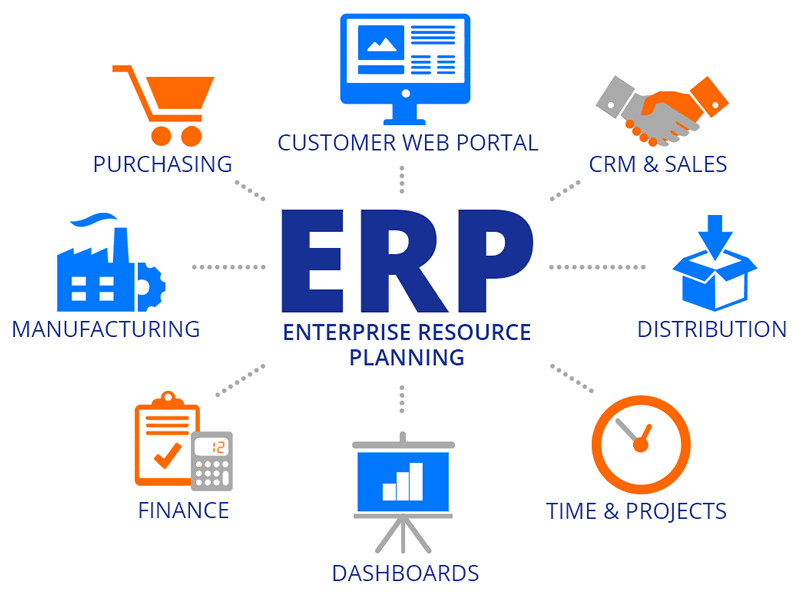
As the diagram shows, manufacturing is one function inside a larger system rather than a standalone application — which is exactly the point. The production schedule is useful because it sits next to purchasing, inventory, finance and the customer record, not despite it. For a module-by-module breakdown, see the main components of an ERP system.
Key Features of a Manufacturing ERP System
Manufacturing ERP systems offer a range of key features that help businesses efficiently manage their operations. These include:
Inventory Management
ERP software solutions provide real-time tracking of inventory levels, allowing businesses to monitor stock levels and make informed decisions regarding reorder points. Automated reordering functionality streamlines the purchasing process, ensuring that inventory levels are always optimized.
Additionally, cost control measures enable businesses to analyze and reduce inventory holding costs, improving overall inventory management.
Supply Chain Management
Streamlining the supply chain is crucial for manufacturing businesses. ERP systems offer features that enhance supplier collaboration, enabling businesses to communicate and coordinate with suppliers in real-time.
These systems also facilitate demand forecasting, enabling businesses to accurately predict customer demand and optimize inventory levels throughout the supply chain. By implementing ERP systems, businesses can achieve greater visibility and control over their supply chain, resulting in improved efficiency and cost-effectiveness.
Production Planning and Scheduling
Efficient production planning and scheduling are essential for meeting customer demand and optimizing resource utilization. ERP systems enable businesses to create production schedules based on real-time data and demand forecasts.
These systems also optimize resource allocation, ensuring that materials, machines, and labor are effectively coordinated. Real-time monitoring capabilities allow businesses to track production progress, identify bottlenecks, and make necessary adjustments to maintain efficient production processes.
Quality Control and Compliance
Ensuring product quality and compliance with industry regulations is paramount for manufacturing businesses. ERP systems provide features that enforce quality standards throughout the production process. These systems allow businesses to track product quality, implement quality control measures, and identify and resolve quality-related issues promptly.
Additionally, ERP systems assist in regulatory compliance by providing documentation and traceability, enabling businesses to meet industry-specific compliance requirements and maintain consistent product quality.
For a feature-by-feature breakdown — including MES boundaries, mixed-mode handling and module-level detail — see our dedicated guide to manufacturing ERP features.
Production Planning and Shop-Floor Control
Planning and execution are separate problems, and systems that treat them as one are the source of most shop-floor frustration. Planning answers what should we make and when. Execution answers what is actually happening right now.
What a production plan needs to account for:
What shop-floor control adds: job status by operation, labour and machine time booked against the work order, scrap and rework captured at the point it happens, and material consumed as it is consumed rather than backflushed at completion and reconciled later.
The gap between those two layers is where manufacturers most often discover their system is not doing the job. A plan built on data that is a shift old is a plan built on fiction. Systems that close that loop — where actual production feeds back into the next planning run automatically — are what our piece on closed-loop demand planning describes, and the shop-floor side is covered in ERP for a shop floor that runs itself.
ERP for Custom and Make-to-Order Manufacturing
This is where standard systems most often fail, and it is worth treating separately because the requirements genuinely differ.
Repetitive manufacturers make the same thing repeatedly. The BOM is stable, the routing is stable, cost is known, and the system's job is efficiency. Custom, make-to-order and engineer-to-order manufacturers make something slightly or entirely different every time — and almost every assumption built into a standard ERP breaks against that.
What changes when every order is different:
The usual workaround is to create a new item master for every variant, which works until there are forty thousand of them and nobody can find anything. The second workaround is to run the real logic in a spreadsheet beside the ERP, which reintroduces exactly the fragmentation the system was bought to remove.
What to ask a vendor if you build to order:
- Can a bill of materials be configured at order entry from rules, or must each variant exist as a separate item master?
- Can a routing be modified for a single work order without creating a new routing master?
- How does the system handle an engineering change on a work order that already has time booked against it?
- Can we quote from comparable historical work rather than from a fixed standard cost?
- Can we bill against production milestones rather than shipment?
- When our process does not match the system's assumption, what are our options — and what does each one cost us at the next upgrade?
That last question is the one that separates vendors. On a traditional system, bespoke development to handle your order logic is re-tested and often re-done at every version change. On a composable or headless platform, business logic sits outside the upgrade path by design — our overview of composable ERP explains the architecture, and how customization affects total cost covers what it does to a ten-year ownership number.
Benefits of ERP in the Manufacturing Industry
Why do manufacturing companies need ERP functionality? Implementing an ERP system in your manufacturing business offers numerous benefits that can significantly enhance your operations and contribute to your overall success.
Enhanced Efficiency
- Automated processes: ERP streamlines manual tasks, reducing the need for manual labor and increasing efficiency.
- Minimized errors: By automating processes and generating real-time data, these systems help minimize human errors, leading to improved productivity.
- Centralized data management: ERP technology provide a centralized platform for data management, eliminating the need for multiple systems and reducing data redundancy.
Improved Decision-Making
- Real-time business visibility: ERP provides real-time access to accurate data, allowing you to make informed decisions based on current information.
- Data-driven insights: With detailed reporting and analytics capabilities, ERP systems enable data-driven decision-making, empowering you to identify trends, forecast demand, and optimize production.
- Streamlined communication: This technology facilitates seamless communication and collaboration across departments, ensuring that information flows accurately and efficiently.
Cost Savings
- Optimized inventory management: ERP systems provide real-time inventory tracking, ensuring optimal inventory levels, reducing carrying costs, and preventing stockouts.
- Efficient resource allocation: By optimizing production planning and scheduling, ERP helps allocate resources effectively, minimizing waste and lowering costs.
- Minimized production downtime: With real-time monitoring and maintenance capabilities, it reduces equipment breakdowns and production disruptions, leading to cost savings.
Scalability
- Adaptable to growth: ERP software can grow and adapt with your business, accommodating increased production needs, expanding operations, and supporting your long-term growth strategy.
- Flexible customization: They offer customization options to meet your specific manufacturing requirements, ensuring that the software aligns with your unique business needs.
- Support for multiple locations: If you have multiple manufacturing facilities or global operations, ERP provides a single operating picture across all of them.
Notably, headless ERP systems excel in scalability, allowing businesses to easily add or modify functionalities without disrupting the core system, making them an excellent choice for businesses planning significant growth.
By leveraging the benefits of ERP in manufacturing, you can optimize your production processes, improve decision-making, achieve cost savings, and position your business for sustained growth and success in the competitive manufacturing industry.
The Different Types of ERP Solutions
When it comes to selecting the best ERP system for your manufacturing operation, there are several options to consider. Each option has its own advantages and considerations that need to be evaluated based on your unique business needs.
In this section, we will explore three types of ERP systems commonly used in the manufacturing industry: on-premise ERP, cloud-based ERP, and hybrid ERP. Additionally, we will outline key considerations to keep in mind when selecting the right ERP system for your manufacturing business.
On-Premise ERP
An on-premise ERP system is installed and maintained on-site within your organization's infrastructure. This type of ERP solution offers greater control and customization capabilities, allowing you to tailor the system to your specific manufacturing processes.
However, it requires higher upfront costs for hardware, software licenses, and IT resources to manage and maintain the system. On-premise ERP is an ideal choice for businesses that prioritize complete control over their data and have the necessary resources to support an on-site implementation.
For manufacturers specifically, there is one additional argument for on-premise that does not apply to other industries: a plant that cannot stop when connectivity does. If a dropped connection halts the line, local resilience is an operational requirement rather than an IT preference.
Cloud ERP Software
Cloud-based ERP systems are accessed through the internet, offering flexibility, scalability, and cost-effectiveness. With a cloud-based ERP, your manufacturing data is securely stored and managed on remote servers, eliminating the need for on-site hardware and infrastructure.
This type of system provides the advantage of anytime, anywhere access to your ERP system, as long as you have a stable internet connection. Cloud-based ERP is particularly beneficial for businesses seeking rapid implementation, lower upfront costs, and the ability to scale with their evolving manufacturing needs.
Hybrid ERP
A hybrid ERP system combines elements of both on-premise and cloud-based solutions. This type of ERP offers a balance between control and flexibility.
You can choose to keep some critical data and processes on-premise while leveraging the scalability and accessibility of the cloud for other operations. Hybrid ERP allows businesses to maintain sensitive data on-premise while benefiting from the agility and cost savings of the cloud.
However, it's important to note that integrating and managing data between on-premise and cloud-based environments may introduce additional complexities. Our comparison of cloud and on-premise ERP integration risks covers the security and scalability trade-offs in detail.
Key Considerations When Selecting ERP Providers
When selecting an ERP system for your manufacturing business, it's crucial to consider various factors that align with your specific requirements. These key considerations include:
- Budget: Evaluate the upfront costs, ongoing expenses, and ROI of implementing the ERP system.
- Scalability: Determine if the ERP system can accommodate your manufacturing growth and expansion plans.
- Industry-Specific Requirements: Ensure the software offers functionality that meets the specific needs of your manufacturing industry.
- Integration Capabilities: Assess the ERP system's ability to seamlessly integrate with other business systems and third-party applications.
- Security: Consider the security measures implemented by the ERP system to protect your sensitive manufacturing data.
- Vendor Reliability: Research the credibility and track record of the provider to ensure a long-term partnership.
By carefully evaluating these considerations and understanding the unique benefits and trade-offs of on-premise, cloud-based, and hybrid ERP systems, you can make an informed decision on the best ERP system for your manufacturing business.
ERP for Manufacturing by Production Type
Company size is the wrong first question. How you produce determines fit far more, and it is the variable most buyers skip past.
A few sector notes worth knowing before a demo:
- Electronics — component-level traceability, revision control and rapid BOM churn dominate. Approved-manufacturer lists matter more than most systems expect.
- Food, beverage and cosmetics — lot genealogy in both directions, allergen segregation, shelf life and recall simulation are non-negotiable.
- Regulated and validated environments — the system has to support validation, audit trails and electronic signatures, which narrows the field considerably.
- Fabrication and job shops — quoting speed, nesting and material yield, and scheduling around a genuinely constrained work centre.
- Furniture, apparel and configured consumer goods — option-based configuration where the variant count makes item-master-per-variant impractical.
If your operation spans retail as well as production, our guide to software for retail manufacturers covers that overlap, and ERP for the manufacturing use case shows how Tailor approaches it.
What ERP for Manufacturing Costs
There is no single price, because cost depends on module scope, user count, production complexity and how much of the work you do yourself. What is useful is understanding the shape of the cost so you can compare quotes that are structured differently.
Pricing models you will encounter:
- Per user, per month — simple to compare, but it penalises giving shop-floor visibility to people who only need to look at a screen. Ask how operator or kiosk access is licensed; this is where manufacturing quotes diverge most.
- Per transaction or per work order — scales with volume rather than headcount. Favourable when small, less so when you succeed.
- Platform fee plus modules — the base looks attractive and the modules are where the real number lives. Ask specifically whether quality, MES integration and advanced scheduling are included or extra.
- Tiered by revenue or volume band — predictable inside a band, with step changes when you cross one. Ask where the next threshold is before signing.
The costs that sit outside the subscription line:
Compare offers on a three-year total, not a monthly price. Our SaaS TCO guide walks through the full calculation, and the software evaluation framework covers scoring vendors against it consistently. For named platform comparisons, see our roundups of the best manufacturing software solutions and manufacturing management software and the top ERP systems for it.
Best Practices When Using ERP for Manufacturing
Successful implementation of an ERP system in a manufacturing environment requires effective project planning and management, seamless data migration and integration, as well as comprehensive user training and change management.
By following these key strategies, businesses can ensure a smooth transition and maximize the benefits of their ERP system.
Project Planning and Management
Define clear project goals, establish a realistic timeline, allocate appropriate resources, and involve key stakeholders from the beginning. This will help create a shared vision and ensure alignment throughout the implementation process.
Regular communication and collaboration with stakeholders will facilitate timely decision-making and address potential challenges proactively.
Data Migration and Integration
During data migration, it is crucial to accurately transfer existing data into the ERP system, while ensuring compatibility and consistency. A well-planned data migration strategy includes data cleansing, mapping, and validation processes to guarantee the integrity of the data. Additionally, integrating the ERP system with other existing systems and databases is essential for seamless operations and data flow across the organization.
For manufacturers this phase deserves its own warning. BOMs and routings are the hardest master data in any industry to migrate, because inconsistencies that a human has been silently correcting for years become visible the moment a system tries to plan from them. Start BOM cleansing before the project formally begins — our ERP implementation guide covers how to sequence it.
User Training and Change Management
Comprehensive user training is vital to ensure smooth adoption and effective utilization of the ERP system. Providing customized training sessions for different user roles and offering ongoing support will empower employees to use the system effectively and maximize its benefits.
Change management strategies that address employee resistance, communication gaps, and potential workflow disruptions are also essential to mitigate the challenges associated with implementing a new system.
Shop-floor adoption is its own problem. An operator who has recorded production on paper for fifteen years is not resistant to technology — they are being asked to change a routine that currently works, under production pressure, on a terminal that may be dusty and gloved-hand-operated. Train on real work orders, keep the shop-floor transaction count as low as the process allows, and measure actual system use rather than training attendance.
Who Needs Manufacturing ERP Software?
Manufacturing ERP systems are beneficial for businesses of all sizes, ranging from small enterprises to large corporations. These systems provide advanced capabilities that streamline operations and enhance efficiency, allowing manufacturers to stay competitive in their industry.
Various industries commonly utilize ERP systems to optimize their manufacturing processes. Some of these industries include automotive, electronics, pharmaceuticals, food and beverage, and discrete manufacturing.
These sectors have complex production processes, supply chain management, and inventory management requirements that can greatly benefit from the comprehensive functionality of ERP systems.
Smaller manufacturers often ask whether they are too small to justify one. The honest threshold is not revenue — it is whether coordination has outgrown the tools: when nobody trusts the stock number, when purchasing is reactive, when the same data is entered more than once, or when promise dates are guesses. Our guide to ERP for small business covers that threshold in more detail.
When Is A Business Ready for ERP Implementation?
Businesses are ready for ERP implementation when they have clearly defined goals, streamlined processes, and a strong desire to optimize operations. Implementing an ERP system is a significant undertaking that requires commitment and preparation.
Before embarking on ERP implementation, businesses should evaluate their readiness based on the following criteria:
- Clearly Defined Goals: A business should have a clear understanding of the goals they want to achieve through ERP implementation. These goals can include improving efficiency, streamlining operations, enhancing data visibility, or overcoming operational challenges.
- Streamlined Processes: Before implementing an ERP system, it is important for a business to have already streamlined their processes as much as possible. ERP systems work best when they can automate and optimize efficient processes. It is crucial to identify and eliminate bottlenecks or inefficiencies in existing workflows before integrating an ERP system.
- Adequate Resources: Implementing and maintaining an ERP system requires financial resources, IT support, and personnel dedicated to the project. Businesses should ensure they have the necessary budget to invest in an ERP system, as well as a reliable IT infrastructure to support its implementation and ongoing maintenance.
- Growth and Operational Challenges: Businesses that have experienced significant growth or face operational challenges such as inventory management issues, production bottlenecks, or data inaccuracies may be prime candidates for ERP implementation. An ERP system can provide the scalability and functionality necessary to overcome these challenges and support the future growth of the business.
A structured ERP readiness assessment is worth running before you talk to vendors rather than after.
Where ERP Falls Short for Manufacturers
An honest view matters more than a sales pitch, and there are real limits worth knowing before you buy.
- It will not fix inaccurate BOMs or routings. Wrong standards produce wrong plans faster and more confidently than a spreadsheet did. Data correction is a prerequisite, not a phase two.
- ERP scheduling is not MES, and it is not APS. Most ERP scheduling is finite-capacity at best and infinite-capacity in practice. If your constraint is genuinely complex sequencing, you will need a specialist tool alongside — and another integration to maintain.
- Real-time means as real-time as your shop floor reports. A system fed by end-of-shift paper entry gives you an end-of-shift picture, however modern the software.
- It will not resolve organisational disagreement. If sales and operations disagree about which number is the forecast, the system faithfully implements whichever one it is configured with.
- Industry-specific requirements may force a trade-off. Deep process-manufacturing capability and deep discrete capability rarely coexist at equal strength. Mixed-mode operations should test this hard rather than take the claim on trust.
- Implementation risk is underestimated more often than software capability is overstated. Most disappointing outcomes trace back to data, scope and change management.
10 Tips To Find the Best ERP Solution for Manufacturing Companies
Selecting the right ERP solution is crucial for manufacturing companies aiming to streamline their operations, enhance efficiency, and maintain competitiveness in the fast-paced manufacturing industry.
Finding the best ERP solution involves understanding your company's unique needs, industry requirements, and future growth plans. Here are steps and considerations to help manufacturing companies identify the best ERP solution:
- Assess Your Needs: Begin by conducting a thorough analysis of your manufacturing processes, identifying areas that require improvement, such as inventory management, production scheduling, or customer relationship management. Understanding your core business processes and where you need more visibility, automation, or integration is crucial.
- Define Your Requirements: List the specific functionalities and modules you need from an ERP system, such as real-time analytics, supply chain management, or shop floor control. Consider both your current requirements and those that may arise as your business grows.
- Consider Industry-Specific Solutions: Look for ERP solutions tailored to the manufacturing sector, as these will likely offer the specialized features and capabilities that address common industry challenges.
- Evaluate Deployment Options: Decide whether a cloud-based ERP, on-premise, or a hybrid solution best meets your needs. Cloud ERP systems offer scalability and remote access, making them suitable for companies with distributed operations or those looking for lower upfront costs. On-premise solutions might offer more control and customization.
- Check for Integration Capabilities: Ensure the ERP solution can integrate seamlessly with your existing systems and tools. This integration is vital for maintaining a smooth flow of data across all areas of your business, from financial management to the shop floor — our ERP integration guide covers the patterns that hold up.
- Scalability and Flexibility: Choose an ERP system that can grow with your business. The best ERP solution for a manufacturer will be scalable to accommodate new processes, additional users, and expanding operations without significant overhauls.
- Vendor Experience and Support: Select a vendor with a proven track record in the manufacturing industry and a strong support system. Look for vendors who offer comprehensive training, ongoing support, and customization services to help you maximize the benefits of your ERP system. Our list of questions worth asking every ERP vendor is a useful starting point.
- Request Demos and Conduct Pilot Tests: Before making a final decision, request demos to see the ERP system in action. Insist on seeing your hardest work order run end to end, not the vendor's clean demo product. Consider conducting a pilot test with a shortlist of ERP solutions to evaluate their performance in real-world scenarios relevant to your manufacturing operations.
- Consider Total Cost of Ownership: Look beyond the initial purchase price to consider the total cost of ownership, which includes implementation costs, training, customization, and ongoing support. A cost-effective ERP solution offers a balance between upfront costs and long-term value.
- Seek Feedback and Recommendations: Consult with peers in the manufacturing industry, read case studies, and seek recommendations from other manufacturing companies. Learning from the experiences of others can provide valuable insights into the strengths and weaknesses of different ERP solutions.
Final Thoughts
To wrap up, the implementation of ERP systems can greatly benefit businesses in the manufacturing industry. These powerful tools have the ability to optimize production processes, enhance supply chain management, and improve decision-making.
By streamlining operations, improving efficiency, and enabling data-driven decision-making, ERP systems built for manufacturers pave the way for success in a highly competitive marketplace.
These ERP systems, whether on-premise, cloud-based, or hybrid, need to be carefully chosen to meet the specific needs and challenges of a business. Effective implementation, including strategic planning, data integration, and training, is essential.
An ERP system is essential for streamlining manufacturing operations and laying the groundwork for future expansion and innovation. By keeping up with industry trends and using these systems well, businesses can secure continuous success and differentiate themselves in a highly competitive market.
Tailor provides manufacturing companies with ERP solutions that are both adaptable and scalable, catering to the dynamic needs of modern manufacturing. These solutions are designed to grow with your business, ensuring that as your manufacturing processes become more complex or your production volume increases, your ERP system can handle the changes with ease.
Whether you're dealing with intricate supply chains, diverse product lines, or specific compliance requirements, Tailor's ERP solutions are completely customizable to meet these specific demands. See it against your own work orders.
Frequently Asked Questions
What is ERP for manufacturing?
ERP for manufacturing is software that runs production, inventory, procurement, quality and fulfilment inside the same system that holds your financials. What makes it manufacturing-specific is that bills of materials, routings, work centres, capacity, scrap and yield are built into the data model rather than added as fields on an inventory record.
What is the difference between ERP and MRP for manufacturers?
MRP covers material requirements, production planning and inventory, and usually hands financial data to a separate accounting system. ERP covers all of that plus finance, procurement, sales, quality and fulfilment, with production transactions posting to the ledger natively. MRP suits smaller shops with straightforward routings; ERP suits manufacturers who need operations and financials to reconcile without integration work.
How do I choose an ERP for manufacturing?
Start with your production type rather than your company size — discrete, process, mixed-mode, make-to-order, contract or project-based each impose different requirements. Then check integration surface, deployment model, and what happens when your process does not match the system's assumption. Insist on seeing your hardest work order run end to end in the demo.
What type of ERP is best for custom or make-to-order manufacturing?
One that can configure a bill of materials at order entry from rules rather than requiring a separate item master per variant, modify a routing for a single work order, handle engineering changes against released work orders, and quote from comparable work rather than fixed standard cost. Ask what each of those costs you at the next upgrade — that answer separates vendors more than feature lists do.
Can ERP handle both discrete and process manufacturing?
Some can, but deep capability in both rarely coexists at equal strength in one product. Mixed-mode operations — a formulated product that is then assembled and packed — should test this specifically rather than accept the claim, because this is where single-mode systems fail hardest.
What does an ERP system for manufacturing cost?
It depends on module scope, user count, production complexity and how much work you do in-house, and pricing is structured in incompatible ways — per user, per transaction, platform fee plus modules, or tiered by revenue. Compare on a three-year total that includes implementation, BOM and routing data preparation, integrations, shop-floor hardware, training and your own team's hours.
How long does it take to implement ERP in a manufacturing company?
The variable that drives it most is BOM and routing data condition, followed by integration count and how standardised your processes are across sites. Single-site with clean data and limited scope can run a few months; multi-site with several integrations and significant data cleansing commonly runs considerably longer. Start the BOM work before the project formally begins.
What is the difference between ERP and MES in manufacturing?
ERP plans and records: what to make, what it costs, what was consumed, what it is worth. MES executes and controls on the floor: machine-level instruction, real-time status, detailed operation sequencing. ERP scheduling is usually finite-capacity at best — if your constraint is genuinely complex sequencing, expect to need a specialist layer alongside, and budget for that integration.
Is cloud or on-premise better for a manufacturing plant?
Cloud suits most manufacturers for the lower operational burden and faster deployment. The one argument for on-premise that is specific to manufacturing is a plant that cannot stop when connectivity does — if a dropped connection halts the line, local resilience is an operational requirement rather than an IT preference. Hybrid splits the difference and adds integration complexity.
What are the limitations of ERP for manufacturers?
It cannot fix inaccurate BOMs or routings, its scheduling is rarely a substitute for a true APS or MES, its real-time view is only as current as your shop floor reports, and it will not resolve disagreement about whose forecast is authoritative. Implementation risk — data, scope and change management — is underestimated far more often than software capability is overstated.