A System for Managing Materials and Production Timing
Material Requirements Planning (MRP) is a system for production planning and inventory management, ensuring materials and products are available when needed.
Most MRP systems are software-based, but MRP can also be done manually.
MRP stands for Material Requirements Planning — sometimes written as materials requirement planning. In operations management it is classified as a dependent-demand planning technique: rather than forecasting each component separately, it calculates what you need from the demand for the finished product. That single idea is what separates MRP from ordinary reorder-point stocking.
An MRP system aims to meet three objectives:
- Ensure materials are available for production. This means companies must procure and manage the right raw materials in time to start production.
- Maintain minimal material and product levels in store; plan for just-in-time inventory and avoid overstocking, which drives up costs and creates waste.
- Plan manufacturing, delivery, and purchasing activities.
For example, imagine your company manufactures and sells bicycles. The final product, a complete bicycle, relies on various components: handlebars, tires, seats, frames, chains, pedals, and wheels. Some of these components are, in turn, also assembled from sub-components — for example, the wheels from hubs, spokes, rims, and tires.
An MRP system would streamline your bicycle production by creating a detailed schedule according to each step needed for the finished product. An MRP would also ensure that the correct number of handlebars, frames, and other components are ready and available to assemble a complete bike. Additionally, the MRP system would ensure that the wheel assembly line has all the necessary hubs, spokes, rims, and tires to keep up with the bicycle production schedule.
Key Takeaways About MRP Systems
- MRP systems can boost profitability by minimizing inventory costs, ensuring timely production, and streamlining purchasing and delivery schedules.
- An effective MRP system relies on a master production schedule, detailed bills of material (BOMs), and inventory records to predict future needs.
- The three inputs to MRP are the MPS, the BOM, and inventory records; the outputs are gross requirements, net requirements, planned orders, and release schedules.
- While MRP software automates legacy planning processes, it struggles with real-time responsiveness, scalability, and system integration.
- Unlike MRP, which focuses on materials planning for manufacturing and production, ERP systems provide a broader, integrated view of the business. Modern systems for both empower teams to automate, scale, and make smarter decisions across departments.
- MRP is a great starting point for companies dealing with inventory chaos. However, growing businesses often outgrow it and need ERP for end-to-end visibility and flexibility.
Why MRP Is Essential for Efficient, Cost-Effective Production
Key Takeaway: MRP systems can increase profitability by minimizing inventory costs, ensuring timely production, and streamlining purchasing and delivery schedules.
The end goal of any production operation is to turn a profit by producing and delivering goods as efficiently and cost-effectively as possible. But that's far easier said than done in today's dynamic global business environment – one filled with an ever-increasing number of competitors and consumer expectations that run the gamut from highly custom to "must have it now" to low cost.
This is where material requirements planning (MRP) offers a solution.
💡Insight: Retailers worldwide are losing over $1.7 trillion annually due to inventory distortion problems that MRP and ERP systems solve, such as out-of-stocks and overstocks.
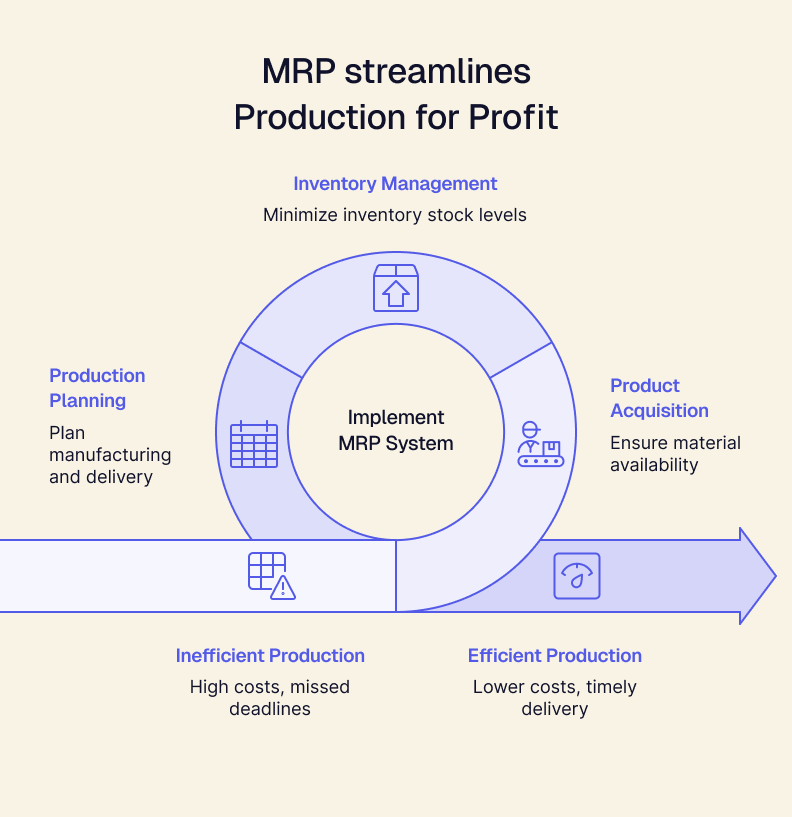
MRP's core goals: availability, inventory control, and strategic planning
The three primary objectives of MRP are:
- Product/Material Acquisition: Ensure goods and materials are available for production and shipment to customers.
- Inventory Management: Maintain the lowest possible level of inventory in stock.
- Production Planning: Plan manufacturing activities, delivery schedules, and purchasing activities.
How MRP calculates material requirements
The MRP system uses information from the production plan, inventory data, and bill of materials to calculate the quantity and timing of orders for all components and subassemblies of the final product, ensuring availability when needed.
Using information about the raw goods in stock, on order, and in production, an MRP system generates the following outputs:
- Gross demand – Total quantity needed for production and shipping.
- Net demand – Quantity needed after subtracting the existing inventory.
- Planned orders – Suggestions for resupplying inventory.
- Release schedules – Timing for purchasing or manufacturing orders.
An MRP calculation, worked through
The logic is easier to see with numbers. Staying with the bicycle example, assume the master production schedule calls for 200 bicycles in week 6, and each bicycle takes two wheels.
Step 1 — Gross requirements. Explode the BOM. 200 bicycles × 2 wheels = 400 wheels required in week 6.
Step 2 — Net requirements. Subtract what you already have and what is already coming. If you hold 60 wheels on hand and have a scheduled receipt of 40 more, net requirement = 400 − 60 − 40 = 300 wheels.
Step 3 — Lot sizing. Apply your ordering rule. If wheels are supplied in cases of 50, you round up to 300 (already a multiple). If your supplier enforces a 350-unit minimum, you order 350 and carry 50 forward.
Step 4 — Lead time offsetting. This is the step that makes MRP a planning system rather than a calculator. If wheels take three weeks to arrive, the order must be released in week 3 to land in week 6.
Step 5 — Cascade down the levels. Those 300 wheels now become independent demand for the next level of the BOM: 300 wheels × 36 spokes = 10,800 spokes, offset again by the spoke lead time. The calculation repeats at every level until you reach purchased raw materials.
Run this across a few thousand SKUs and several BOM levels and you have the reason MRP became software. It is not conceptually difficult — it is simply too much arithmetic to do by hand, and it all has to be redone the moment the schedule changes.
How MRP uses feedback loops to stay on track
MRP requires either human or system inputs for feedback on production, inventory management, and purchasing activities to identify items that drive the most order variance. While modern systems inspired by MRP can intelligently incorporate these feedback loops, traditional MRP typically does not operate in real-time and requires human operators to act on these insights.
A brief list of considerations for MRP feedback includes:
- Variance between planned and delivered times for raw goods.
- Lead time to manufacture each subassembly.
- Stock levels for each inventory item or subassembly.
- Shortages of inventory items (or overly high inventory levels).
- Potential bottlenecks in manufacturing and delivery schedules.
The Components of MRP: The Three Inputs
Key Takeaway: An effective MRP system relies on a master production schedule, detailed bills of material (BOMs), and inventory records to function correctly and accommodate future needs.
Every company's MRP system needs components to function. These components help define what's required, how much is needed, and the timing to call for the purchase or manufacturing of inventory.
The three inputs to material requirements planning are the master production schedule (what to build and when), the bill of materials (what goes into it), and inventory records (what you already have). Remove any one of the three and the calculation cannot run.
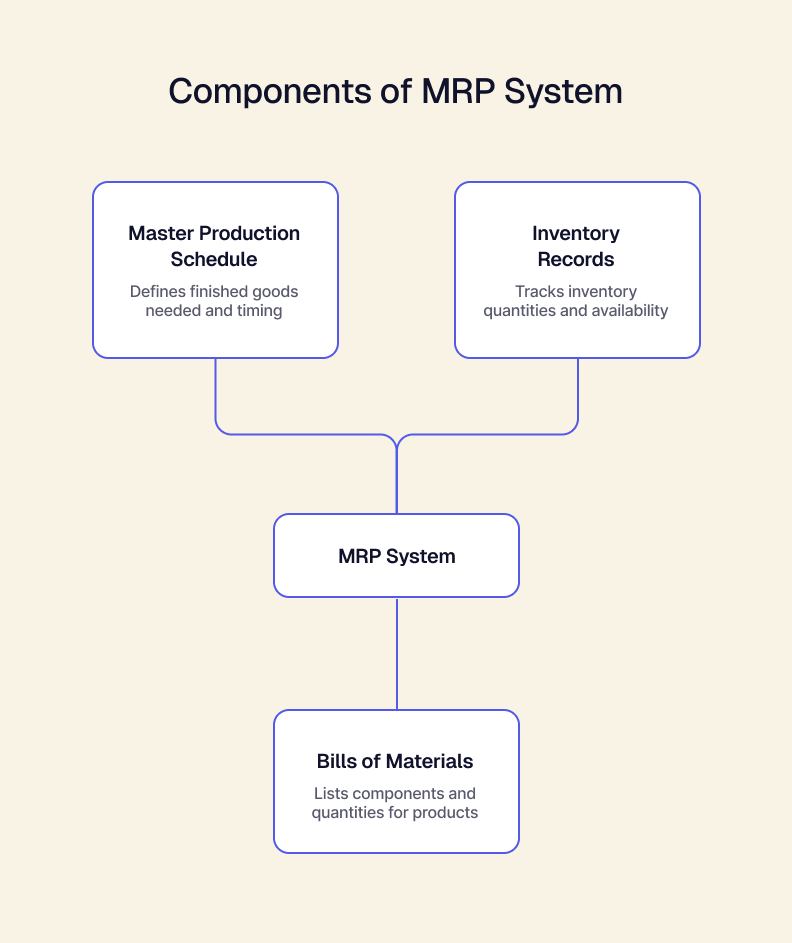
MPS: Master production schedule
The product schedule is arguably the most critical component. The MPS defines what finished goods are needed and when, acting as the central planning driver in the MRP system.
Since no company wants an infinite supply of inventory, the MRP system builds on a production plan for finished goods that typically covers at least several weeks or months.
Bills of materials (BOM)
The master production schedule identifies the product. But what exactly goes into the finished product? The bill of materials typically defines the different components that go into making the end item.
BOMs show relationships between finished goods and components. BOMs contain all the child components each parent item contains and the required quantity. For example, let's say you're building a bike and the parts needed include a seat, the handlebars, the wheels and everything else that goes into the finished product. A bill of materials is like a list of ingredients for your bike. It tells you every single part you need and how many of each:
The "bicycle" is like the finished cake, and things like the "seat" and "handlebars" are like the flour and sugar – they're the ingredients (or child components) that make up the final product (the parent).
Some parts may be used in a few different places. Think of a screw — you might need it for the handlebars AND the seat. That screw is known as a "called-out part" because it appears in multiple places on your bike-building list (it's literally called out more than once).
Inventory records
Another input to the MRP process is the inventory records. These records track quantities, availability, and location of inventory, enabling accurate planning and order scheduling. This also includes the amount allocated to production and the amount of scheduled receipts.
Inventory record accuracy is the input that quietly decides whether MRP works. The other two are documents you author deliberately; this one reflects whatever your warehouse actually did. If recorded stock and physical stock diverge, MRP calculates net requirements against a number that isn't true, and every downstream order is wrong.
How MRP software combines inputs to streamline planning
MRP software automates and expedites the calculations required to actively manage inventory, production, and labor to fill orders quickly. Basic MRP software packages help operators plan, execute, and control the most critical warehouse elements to optimize material flow, drive accurate execution, and enable complete system control. Features include:
Automated purchase orders
MRP software can automatically generate purchase orders for suppliers based on the recommended purchasing schedule. Operators can also preset inventory thresholds according to the MPS, which reduces the risk of sales order backlog due to out-of-stock items.
Automated work orders
Just as inventory monitoring signals the need for purchase orders, MRP systems can alert manufacturing staff to low supply levels of finished goods that need replenishment with automated work orders. Automating work orders helps maintain a consistent supply that meets customer demand.
Real-time data syncing
Linking warehouse or product data with MRP reporting lets managers know how accurate their production plans and schedules are. This improves proactive and timely decision-making, reducing planning and scheduling errors due to lagging data.
How to choose material requirements planning software
Most MRP tools will run the calculation above competently. What separates them is everything around it:
- Multi-level BOM support, including phantom assemblies, alternates and revision history. Thin BOM handling is the most common reason teams outgrow an entry-level tool.
- Inventory accuracy tooling — cycle counting, lot and serial tracking, and locations. The calculation is only as good as this input.
- Realistic lead time handling, ideally measured from actual supplier performance rather than a static field someone typed in years ago.
- Capacity awareness. Classic MRP assumes infinite capacity and will happily schedule more work than your plant can perform. Check whether the system tells you when the plan is impossible.
- Integration with purchasing, finance and sales. An MRP that cannot see real demand or push a real purchase order becomes another system to reconcile. This is an ERP integration question more than a feature question.
- Change tolerance. How quickly can it re-run when a customer moves an order? Overnight batch regeneration was acceptable in 1985 and is not now.
Our software evaluation framework and ERP vendor question list cover how to structure this comparison without being led by a demo script.
MRP in Purchasing and the Supply Chain
Although MRP is usually introduced as a manufacturing tool, its most immediate effect lands in purchasing.
MRP converts a production plan into a dated list of what to buy and when to release each order. That replaces the two habits it usually finds in place — ordering when someone notices a bin is empty, and ordering in bulk because a discount was available. Both produce the same result: too much of the wrong material and not enough of the right one.
Across the wider supply chain, the same output becomes a forecast you can share. Giving a supplier visibility into planned order releases several weeks out lets them plan their own capacity, which is usually what shortens a lead time more than negotiation does. This is where materials planning stops being an internal exercise and starts being supply chain management.
MRP vs. MRP II vs. ERP
The three terms are frequently used interchangeably and describe three genuinely different scopes.
MRP II arrived in the 1980s to fix classic MRP's most limiting assumption — infinite capacity — by adding machines, labor and shop-floor scheduling to the calculation. ERP then extended that scope across the entire organization. Most modern systems marketed as MRP include MRP II capability; most systems marketed as ERP include both. The useful question in a vendor conversation is not which acronym they use but which of the three rows above their product actually covers.
Limitations and Challenges of MRP (and Why Modern Inventory Management Must Evolve)
Key Takeaway: While MRP automates legacy planning processes, it often struggles with real-time responsiveness, scalability, and system integration.
If you ask most frontline operators about material requirements planning (MRP), you may not hear a lot of good reviews. Because today,_ MRP automates traditional processes but materially changes very little about them_.
MRP has some limitations for companies that aim for level capacity planning and just-in-time (JIT) delivery, as seen in various continuous process improvement methodologies. Thus, although many retailers and manufacturers have adopted MRP, it has been relatively ineffective in helping drive down inventories and deliver products as scheduled.
MRP is fragile in an era of increasing uncertainty in demand, equipment utilization rates, and material shortages. Keep in mind the following limitations when working with MRP in the lean age of modern manufacturing.
Challenge 1: MRP systems were built for a different era
MRP originated in an era of predictable manufacturing, not today's fast-changing environments and complex supply chains. Traditional MRP and even early ERP systems are often monolithic, rigid, and slow to adapt.
Challenge 2: Data dependency creates fragility
MRP systems rely heavily on accurate data inputs but lack the tools to correct or enrich them. In a world where supply chains shift daily, this creates operational risk. A modern, AI-native ERP like Tailor can flag data issues, automate corrections, and support decision intelligence.
Challenge 3: MRP can't grow with you (modern ERPs can)
MRP often requires a complete system overhaul as a company grows or pivots. Tailor's modular, API-first ERP solves this by complementing your MRP and scaling with your business — no "rip and replace" of your current systems is needed. Add capabilities (e.g., inventory, finance, CRM) on demand without disruption.
Challenge 4: Why composability matters — and what MRP gets wrong
MRP (and many traditional ERPs) force businesses into a corner: choose an all-in-one suite or cobble together disconnected tools. Tailor rejects that tradeoff. Our composable ERP integrates best-in-breed tools like Shopify, QuickBooks, and Salesforce while maintaining a secure, unified core.
Challenge 5: MRP's manual processes drain time and flexibility
MRP lacks intelligent, configurable automation — everything must be manually controlled or hardcoded. The result: rigidity, not agility.
Challenge 6: Integration is still a significant pain point
Traditional MRP struggles to integrate with external systems — especially cloud-native tools. Tailor solves this with real-time data sync via open APIs, enabling you to connect your entire tech stack effortlessly.
Challenge 7: MRP often lacks advanced security and compliance
Most MRP systems are legacy tools which require bolt-on solutions for compliance — and leave potential security gaps. Tailor bakes in SOC 2, GDPR, and access control from day one — because trust and resilience aren't optional.
MRP vs. ERP: Why You Need More Than Just Material Planning
Key Takeaway: Unlike MRP, which focuses on materials planning, ERP systems offer a broader, more integrated view of the business — empowering teams to automate, scale, and make smarter decisions across departments.
People often lump MRP and ERP together, but the difference goes beyond technical details — it's strategic. While MRP helps manage materials, modern ERP systems empower businesses to scale, adapt, and automate without compromise. Our full MRP vs. ERP comparison goes deeper on where the line sits.
MRP focuses on materials. ERP powers the entire business
MRP systems focus specifically on planning and scheduling finished goods based on demand forecasts and inventory levels. In contrast, ERP systems unify a company's manufacturing, finance, HR, operations, and supply chain management.
MRP = material control.
ERP = end-to-end visibility.
Traditional ERP systems introduce new constraints
Legacy ERP systems expanded on MRP, but they introduced their own issues — they were monolithic, expensive, and difficult to change. Businesses often get locked into rigid workflows or forced to compromise with all-in-one suites.
Why modern ERP wins: smarter, faster, more automated
Most MRP systems lack built-in intelligence or automation. Outputs are reactive and require manual action.
Modern platforms like Tailor offer intelligent automation across order-to-cash, inventory, and more.
💡Insight: 83% of companies that conducted an ROI analysis before launching their ERP implementation project and remained live for at least a year reported that their ERP system met their ROI goals (according to The 2023 ERP Report by Panorama Consulting Group).
ERP that scales: modular, API-first, and built for change
Tailor's approach to ERP embraces composability: integrate best-in-class tools (e.g., Shopify, QuickBooks, Salesforce) without sacrificing unity. No need to choose between flexibility and centralization. A modular, API-first ERP lets you build what you need now and scale it later.
When MRP Makes Sense — and When It's Time to Level Up
Key Takeaway: MRP is a great starting point for companies dealing with inventory chaos, but growing businesses often outgrow it and need ERP for end-to-end visibility and flexibility.
Implementing an MRP system can be a smart first step for businesses struggling with inventory chaos and production inefficiencies. But in a world that demands flexibility and scale, many companies find that what they really need is a modern, modular ERP system built to grow with them.
Telltale signs you're ready for MRP
MRP is great for getting organized, especially before moving to a more integrated system. If you're constantly reacting to supply chain surprises, MRP can help you take control.
For instance, you may:
- Be struggling to keep up with inventory manually
- Experience frequent stockouts or overstock situations
- Have disconnected planning and scheduling between sales, purchasing, and production
- Face difficulty forecasting materials for finished goods or managing lead times
Situations where MRP delivers value
Most small to mid-size businesses underutilize MRP and discover they can tweak their existing processes and produce a better product at minimal cost. That being said, there are instances where adopting an MRP system will help a business be more successful by giving management and executives increased and more accurate insight into production, leading to better decisions and improved customer satisfaction.
If any of the following sounds like your current situation, you might want to start adopting some MRP tools:
- You sell more than one product with unique configurations for each sale.
- You create custom products to exact specifications for each order.
- You stock over 50 inventory items, selling both in subsets and as end products.
- You have frequent, unique orders, insufficient time for proper production scheduling, or too many late shipments.
What MRP needs from you to work
MRP fails more often from missing prerequisites than from bad software. Before implementing, confirm you have:
- Accurate bills of materials for every product, kept current as engineering changes them.
- Inventory record accuracy high enough to trust — most practitioners target 95%+, verified by cycle counting rather than an annual physical count.
- Realistic, measured lead times for both purchased and manufactured items.
- A master production schedule someone owns and updates, rather than a spreadsheet that drifts out of date.
- Discipline about transactions. Receipts, issues and scrap have to be recorded as they happen. Where they aren't, the system's numbers decay within weeks.
None of these are software purchases. They are the reason two companies buy the same MRP system and get opposite results.
The breaking point: when MRP limits your growth
As a company grows, it often hits a ceiling with MRP and starts looking at ERP systems. For example:
- Companies that need real-time coordination between inventory, finance, and fulfillment
- Businesses that are outgrowing spreadsheets and juggling multiple disconnected tools
- Businesses that want automation, scalability, or better integration with sales and customer data
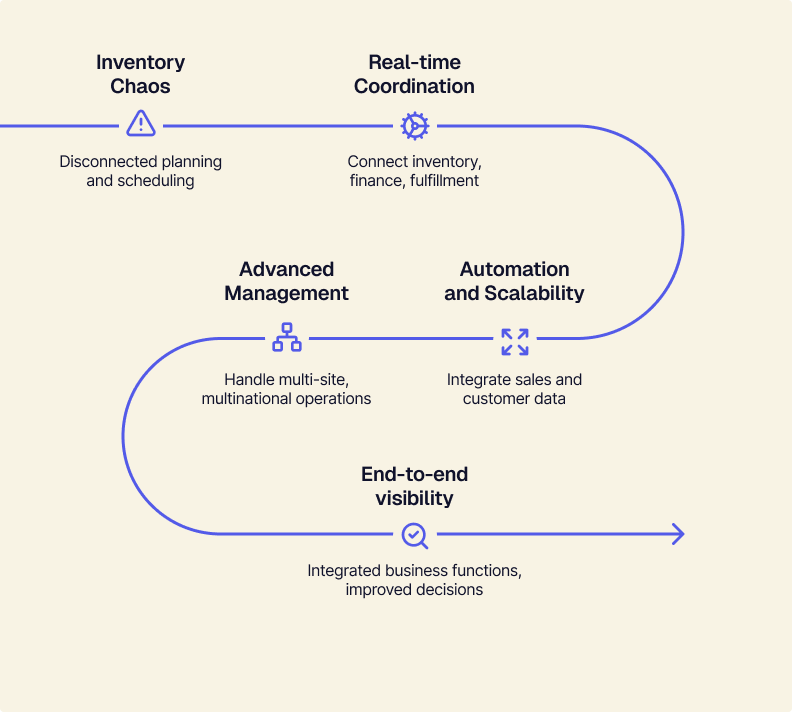
ERP connects functional areas of business (marketing, sales, design, inventory management, production, communication, and finance) to best fulfill customer orders. Software that includes all these functions can also handle advanced materials management and manufacturing execution for multi-site, multinational corporations.
The Tailor Perspective: ERP Should Be the Starting Point, Not the Upgrade
We believe that businesses shouldn't wait to implement ERP. Its modular, scalable design lets you grow efficiently from day one, avoiding costly upgrades later.
Most companies treat ERP as something you "grow into," but that mindset delays the inevitable (and makes it more painful). At Tailor, we believe you shouldn't have to wait to run your business right. Our flexible, modular retail ops system serves as the perfect complement to MRP — and delivers on everything MRP lacks in terms of scalability and customization.
Today's businesses demand flexibility, scalability, and composability from day one.
That means...
- no waiting for operations efficiency (or suffering through disruption and multiple generations of tech)
- no "rip and replace" (because you outgrow your tools as soon as you think you're comfortable)
- no vendor complacency (because we believe in composability and integration, NOT lock-in)
When you're ready to run your business more efficiently and do away with data silos, disconnected processes, and constant switching between MRP, sales, finance, HR, and analytics software, try out a demo of Tailor.
Request a demo or learn more about our composable ERP platform.
It's never too soon to get started with real solutions; our team is ready to show you how.
Frequently Asked Questions About MRP
What does MRP stand for?
MRP stands for Material Requirements Planning. It is a method for calculating what materials a manufacturer needs, in what quantity, and by when — derived from the production schedule for finished goods rather than forecast separately for each part.
What is an MRP system?
An MRP system is the software that performs that calculation continuously across every product and component. It takes the master production schedule, explodes the bill of materials, subtracts current inventory and scheduled receipts, applies lot-sizing rules, and offsets each resulting order by its lead time to produce a dated schedule of what to buy and build.
What is MRP in manufacturing?
In manufacturing, MRP is the planning layer between the sales forecast and the shop floor. It converts "we will build 200 bicycles in week 6" into the specific purchase orders and work orders required to make that possible, timed so materials arrive when production needs them rather than months early.
What are the three inputs to MRP?
The master production schedule (what to build and when), the bill of materials (what each product is made of), and inventory records (what you currently hold, what is allocated, and what is already on order). All three must be accurate — the calculation inherits every error in its inputs.
How does MRP work, step by step?
Explode the BOM against the production schedule to get gross requirements. Subtract on-hand inventory and scheduled receipts to get net requirements. Apply lot-sizing rules such as minimum order quantities. Offset each order backward by its lead time to set a release date. Then repeat the whole sequence at the next BOM level down, until you reach purchased raw materials.
What is MRP in operations management?
In operations management, MRP is taught as the foundational technique for dependent demand — demand that derives from the demand for something else. It sits alongside independent-demand methods such as economic order quantity and reorder-point systems, which are appropriate for finished goods and consumables where demand is not derived from a build schedule.
What is the difference between MRP and ERP?
MRP plans materials for production. ERP manages the whole business — finance, sales, inventory, HR, customers — with materials planning as one component. MRP answers "what do I need to buy and when." ERP answers that plus how it affects cash, margin, customer commitments and everything else.
What is MRP II?
MRP II (Manufacturing Resource Planning) extends MRP beyond materials to include capacity, labor, machines and financial planning. Classic MRP assumes you have unlimited capacity to execute whatever plan it produces; MRP II checks whether the plan is actually achievable with the resources available.
What is MRP in supply chain management?
Within the supply chain, MRP output is the demand signal you send upstream. Planned order releases tell suppliers what you will need and when, far enough ahead that they can plan their own capacity — which usually does more to shorten lead times than negotiating over them.