Kits are a simple way for a growing brand to raise order value. Consider a birthstone gift set consisting of a pendant, chain, and gift box. For customers, this consolidates three separate purchases into one easy decision — a great gift in Q4. But for you, things can get messy fast:
Behind the scenes, each kit is a new SKU that has to pull from the stock of several other SKUs at once, across every channel where you sell.
Most kitting content is created for warehouses and manufacturers. This guide is custom-written for consumer brands that run on Shopify and want their kits to scale smoothly, with inventory counts you can trust at every step.
What you’ll learn:
-
What is kitting?
-
Kitting vs. bundling vs. virtual bundles: choosing the right model for each product
-
Component-level inventory deduction: how to keep kitting inventory accurate across every channel
-
Pre-kitting: how building kits ahead of demand speeds up fulfillment
What Is Kitting?
Kitting takes separate products and combines them into a single sellable unit. For consumer brands, this is more than just packaging: Think of it as a growth lever. A well-oiled kitting process makes it much easier to offer gifting, personalization, subscription boxes, and similar deals — all things that can give revenue a boost.
Product kitting can pay off for your brand in a few different ways:
-
Higher order value. One kit sells three items in a single checkout.
-
Easier gift buying. Since shoppers don’t have to build the set themselves, the purchase decision is simpler.
-
Smarter inventory movement. Pairing a slower-moving item with a bestseller, like a chain style that isn’t selling by itself, helps both products move.
-
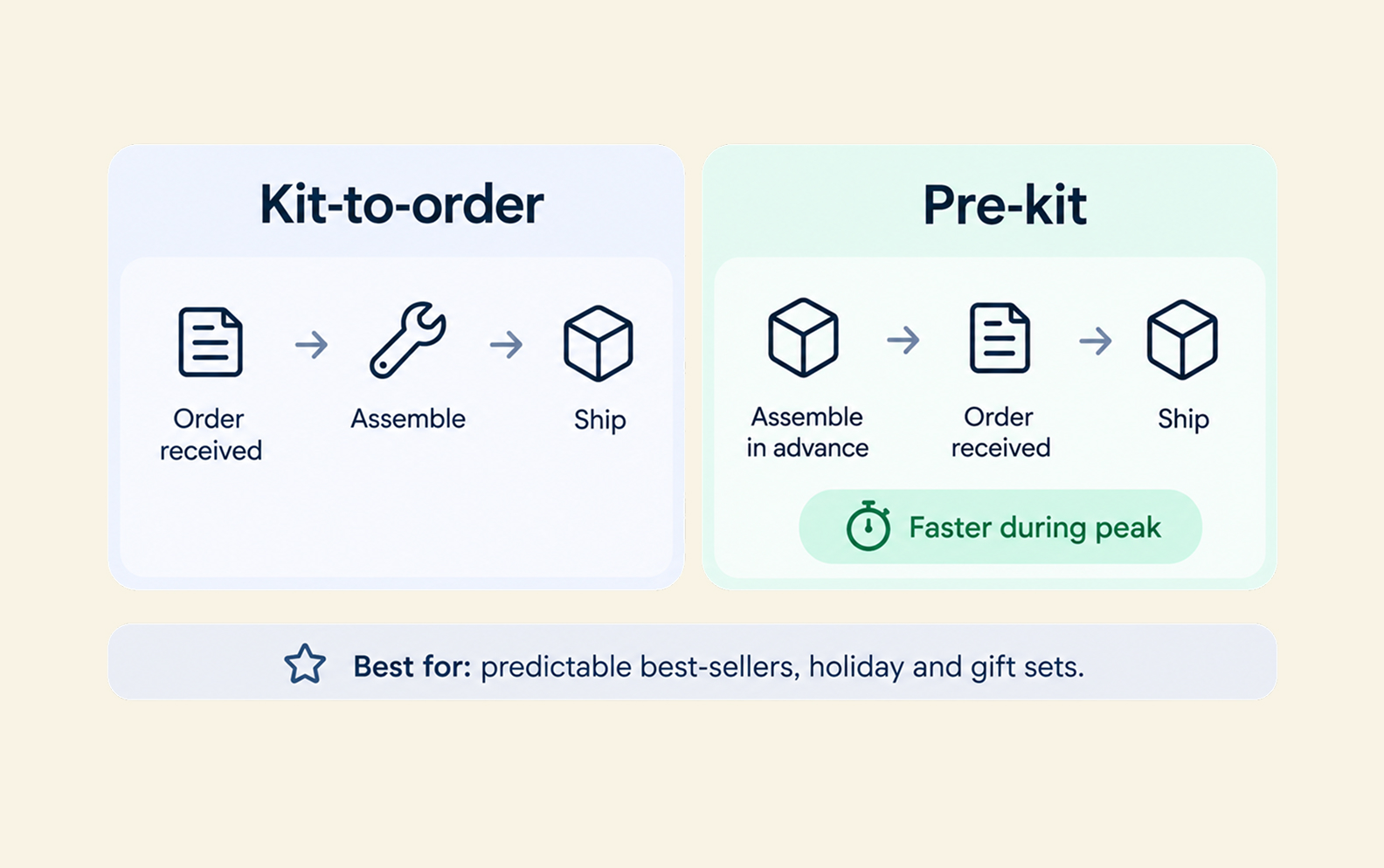
Faster fulfillment during peak season. Ultimately, you only have one SKU to pick and pack instead of three.
Most articles view kitting as a warehouse workflow. But for a Shopify brand, the real job is making sure the kit and its components agree across every channel.
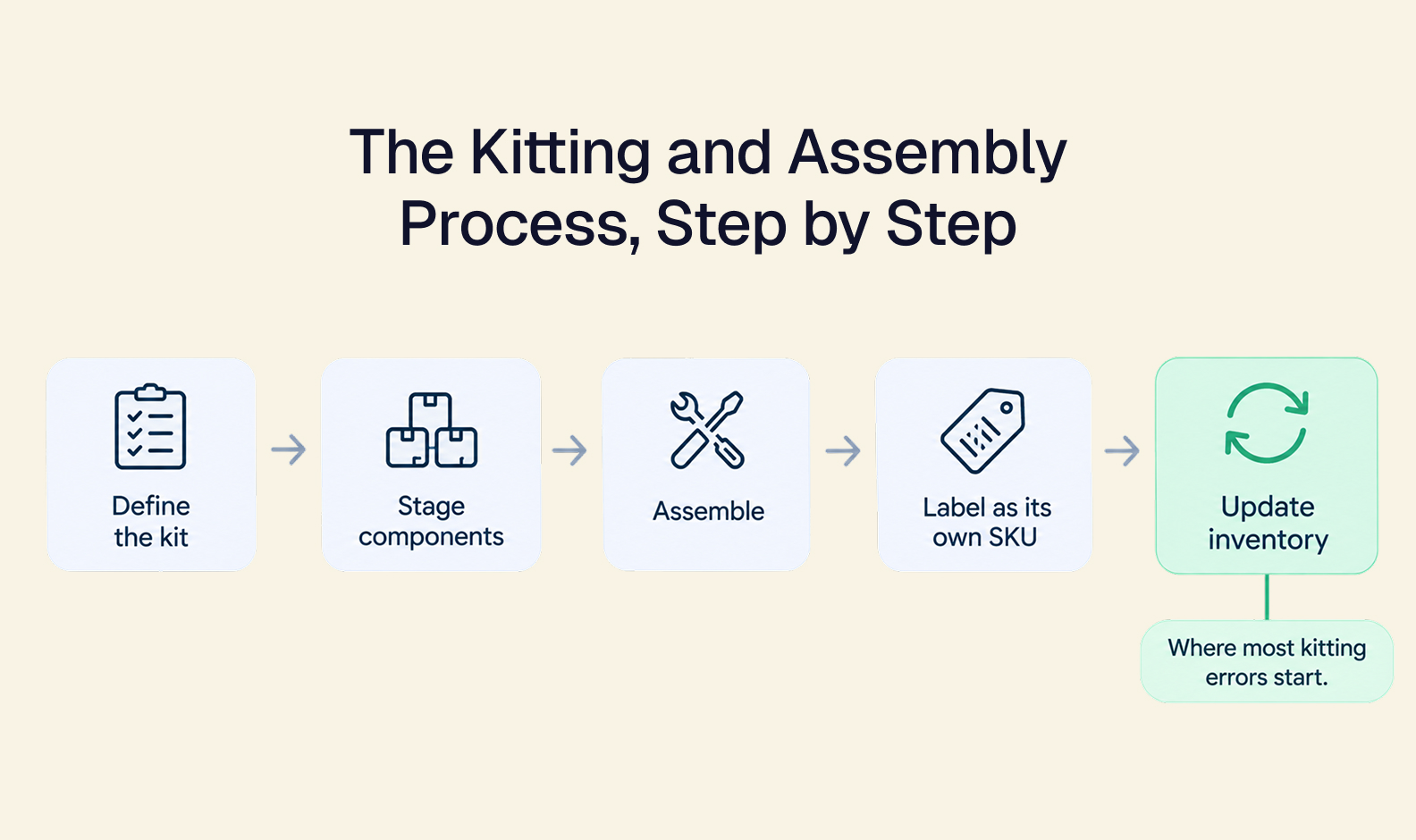
The Kitting and Assembly Process, Step by Step
Here’s a breakdown of what the kitting and assembly process looks like step by step, using the gift set example mentioned above.
-
Define the kit and its components. What will go into each kit? This is your component list. For the birthstone gift set, that list was one pendant, one chain, and one gift box.
-
Stage the components. Pull the components from stock and set them aside for assembly. At this point, they’re still counted as individual components — just reserved for the kit.
-
Assemble the kit. Pack the pieces, add engraving or personalization if relevant, and seal the box.
-
Label as its own SKU. Give the finished set a unique SKU and label. Now it’s ready to be listed, sold, and shipped as a single product on every channel.
-
Update inventory. The pendant, chain, and gift box counts each go down by one. The gift set count goes up by one. Accurate kitting inventory depends on this step, so every channel needs to see both changes at the same time.
Step #5 is the one most likely to break, especially as you add channels and kit variations. That’s why inventory that corrects itself makes such a big difference for brands that kit.
Some brands hand assembly off to a 3PL. But either way, the inventory record still has to reflect what happened.
Kitting vs. Bundling vs. Virtual Bundles: Choosing the Right Model for Each Product
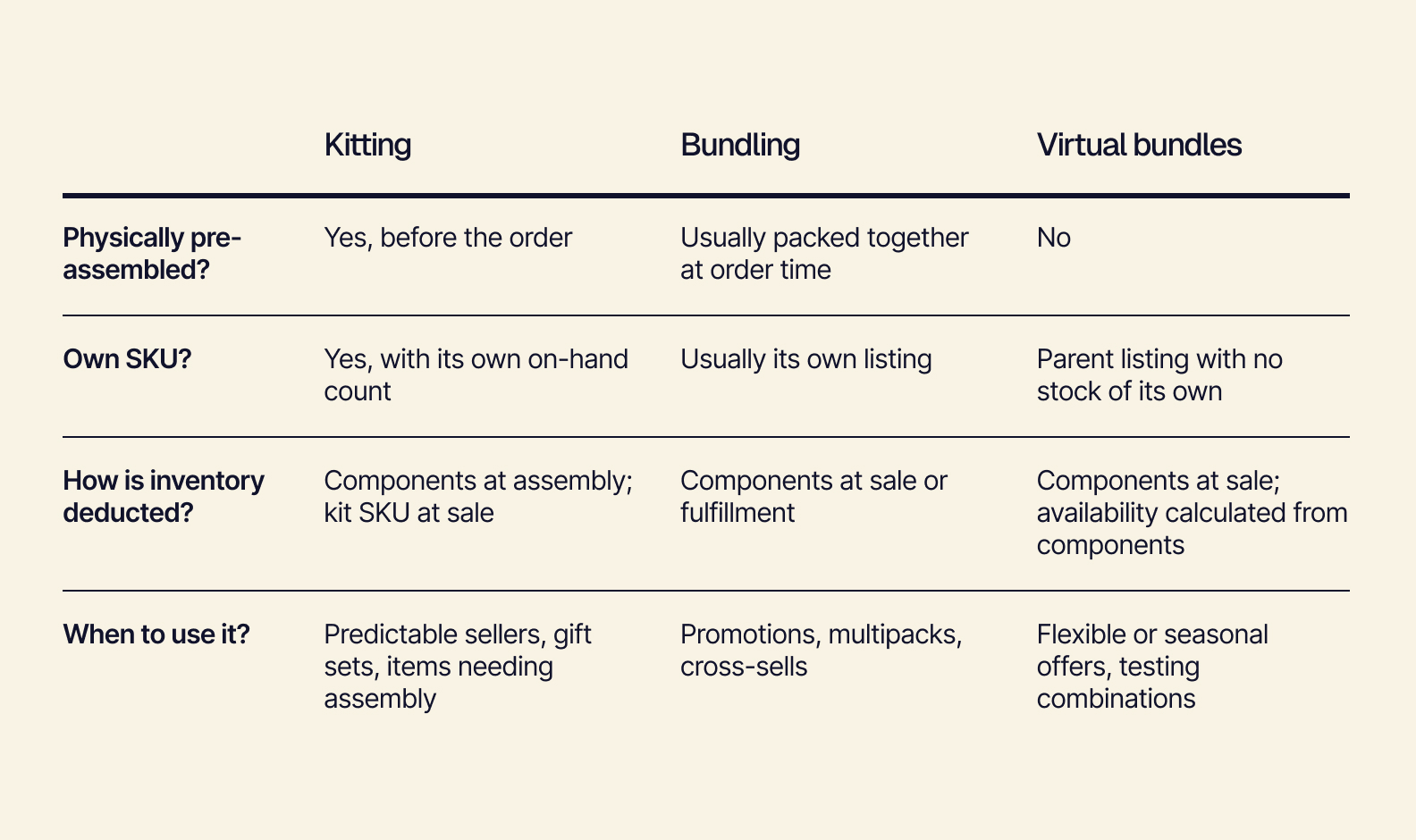
Kitting, bundling, and virtual bundles are three terms that get used interchangeably. But each one handles inventory differently. Once you know which model fits which product, you can use all three with confidence. See how they compare:
Why Bundling in Shopify Keeps Causing Inventory Problems
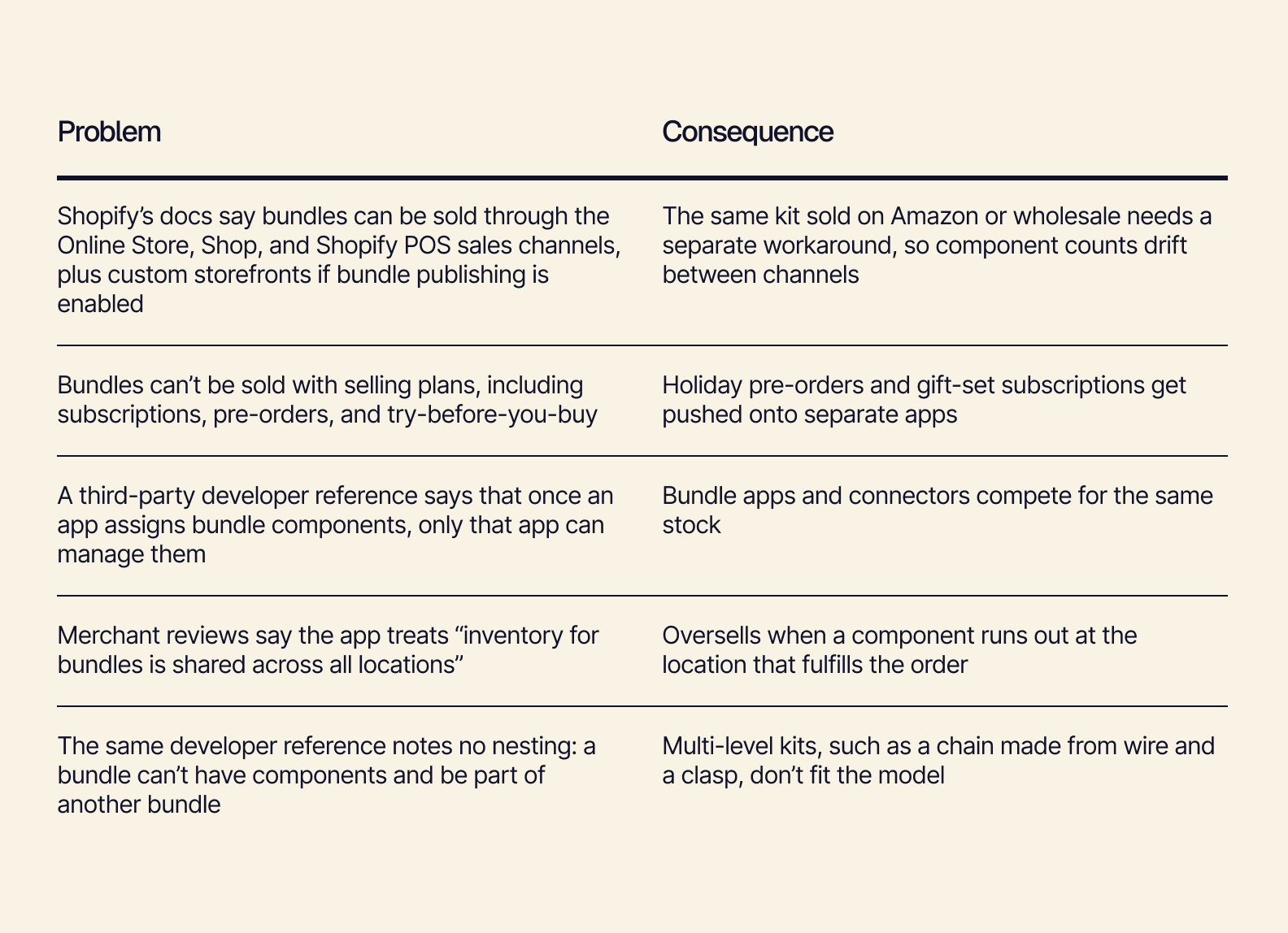
Shopify is a great choice for a storefront. But when you also want it to be the system of record for component inventory across every channel, you’re going to run into issues.
Learn more about Shopify's bundle features.
Shopify’s own Bundles app deducts stock from each individual component product in real time for fixed bundles. For a single storefront, that’s a solid foundation. Most of the problems emerge when you start adding other channels, multiple locations, and extra app layers.
The good news: You don’t have to give up Shopify to fix it. When component inventory lives upstream of Shopify, every channel reads from the same counts, letting Shopify focus on doing what it does best: selling.
The way to make that work is by tracking inventory at the component level.
Component-Level Inventory Deduction: How to Keep Kitting Inventory Accurate Across Every Channel
The simplest way to keep kits accurate is to track the components, not just the kit. A kit’s availability always comes from its scarcest component. So when every sale deducts from component counts, every channel shows a number you can trust.
How Kitting Inventory Works
If you have 120 pendants, 40 chains, and 300 gift boxes, the chain is the limiting component, giving you a maximum of 40 sellable kits.
With component-level deduction, the wholesale order, the Shopify sales, and the kit count all update the same record. You’re able to sell chains on their own and in kits without worrying about one cutting into the other.
Product Kitting and Personalization Without SKU Bloat
Component-level tracking lets you offer more combinations without creating SKUs for each one.
-
If every birthstone and chain length combination were its own kit SKU, 12 birthstones x 3 chain lengths would = 36 SKUs to track.
-
At the component level, that’s 12 pendants + 3 chains + 1 gift box, which = 16 total components.
-
The upside: You can add a 13th birthstone or a new chain length without completely rebuilding your catalog.
Headless, Composable Inventory as the Source of Truth for Every Kit
Component-level deduction works best when inventory sits upstream of every sales channel — not inside any single one.
-
One source of truth for every channel. With a headless, composable architecture like Tailor’s, Shopify, Amazon, wholesale, and POS all read from the same inventory using APIs. Composable ERP lets you choose the capabilities you need and then connect them so you can keep the tools you already use.
-
Bills of materials for multi-level kits. A BOM records what goes into each kit, including raw materials like the wire and clasp that make up a chain.
-
Build for your own kit logic. Tailor’s production module connects BOMs and work orders to the inventory module, so every kit deducts component stock accurately — no connector workarounds.
See how Tailor’s production management keeps every component and kit in sync.
Pre-Kitting: How Building Kits Ahead of Demand Speeds Up Fulfillment
A pre-kit is a kit that’s assembled before any orders come in. It’s stocked as finished goods. When demand is predictable, pre-kitting turns peak season from a frantic scramble into a simple pick-and-ship.
Pre-kitting works best for:
Make sure you have a plan for the kits that don’t sell. Until those kits are broken back down, their components aren’t available for other kits or individual sales. Mitigate risk by building in batches against forecasts.
Tailor’s work orders also help. They move components into finished, pre-kit stock, ensuring component counts and kit counts both stay accurate.
Kitting That Grows With Your Catalog
Kits are a growth tool, and component-level accuracy is what lets them scale. When every pendant, chain, and gift box is counted at the source, you can add new kits, channels, and personalization options with confidence.
See how Tailor keeps every kit counted by booking a free demo today.