You started your brand online — perhaps selling skincare, supplements, or a specialty grocery item — with a simple ecommerce store. In the beginning, production ran in manageable batches, and all you needed to keep track of which lot went where was a simple spreadsheet. Then, you finally got the coveted yes from a retailer.
That buy, however, has changed everything.
Suddenly, you’re juggling wholesale POs, several production runs a month, a 3PL, and buyers who want (and often require) lot codes and expiration dates on every shipment. The spreadsheet and Shopify app that could handle lot numbers for 200 orders a week aren’t up to taking on the added quantity, nor complexity.
You already know how important lot tracking is. The challenge is that workflow complications stack up faster than your current tools can handle.
What you'll learn:
-
What lot traceability is and why it gets harder as you scale
-
How lot, batch, and serial tracking differ — and which ones your products need
-
How forward and backward traceability work, using a real-world example
-
What to look for in lot traceability software
-
How ERP-driven recall workflows and FEFO strategies protect your brand
Why Lot Tracking Gets Harder When You Move into Retail Settings
Selling direct-to-consumer is relatively simple. With only one channel, a manageable SKU count, and a well-understood path from your warehouse to the customer’s door, it’s easy to manage.
Once you move to retail distribution, though, everything changes — with more SKUS and pack sizes, more frequent production runs, more channels with stricter rules to ship to, and more hands on your inventory.
The stakes are also higher. Not only do retailers and distributors typically ask their suppliers to keep track of lot codes and expiration dates, but they also require it — along with proof that, if needed, a recall can be traced and resolved quickly. To move into retail, you likely signed a vendor agreement to that effect.
In addition, regulators add rules and regulations. Depending on the products you sell:
This isn’t a compliance guide. Rather, it’s a reminder that every one of these pressures can be eased with clean and connected lot data.
Lot vs. Batch vs. Serial Tracking
Three terms often get used interchangeably when talking about tracking. However, each one actually tracks different things:
-
Lot tracking follows raw materials or finished goods that share inputs and production dates. Every unit within a lot carries the same lot number, which can be used if a product or ingredient is recalled, as well as to manage expiration.
-
Batch tracking is similar to lot tracking, which is why it’s often misused. However, it is used to keep track of a single production run, recording how a product was made and which ingredient lots went into it. One batch can produce one lot — or several.
-
Serial number tracking is rarely used for consumables. As the most granular option, it’s used to chart each individual unit with its own unique number. Few consumer goods brands need it.
Let’s look at a 200-liter batch of vitamin C serum, which gets filled into 30 ml bottles and 10 ml travel sizes. That’s one batch and two finished goods lots — each with its own lot code and expiration date. The batch record shows how the serum was made, while the lot codes show where each bottle went.
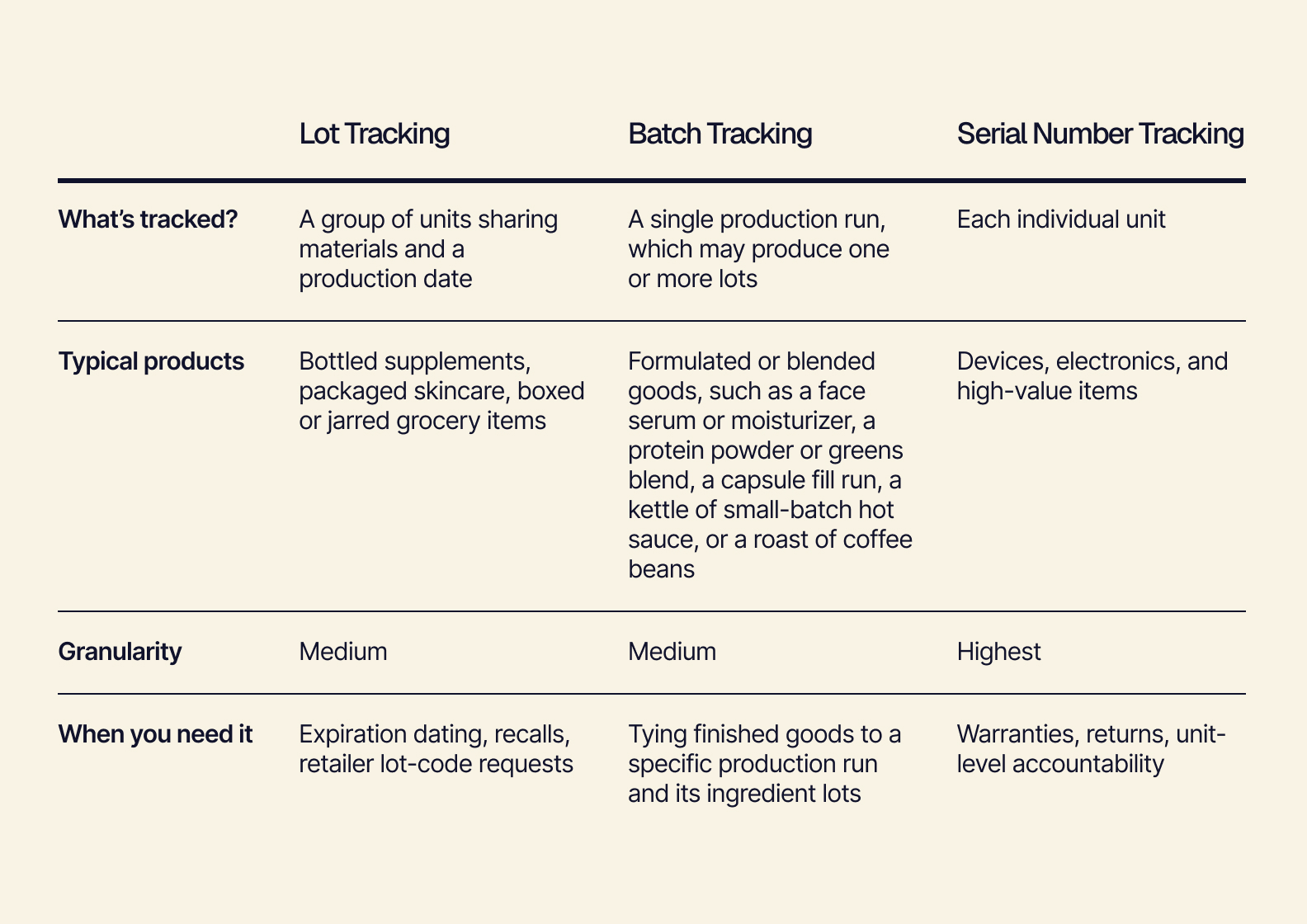
For most skincare, supplement, and specialty food brands, lot tracking supported by batch-level production records is the right combination for consumers, retailers, and regulators.
Forward and Backward Traceability
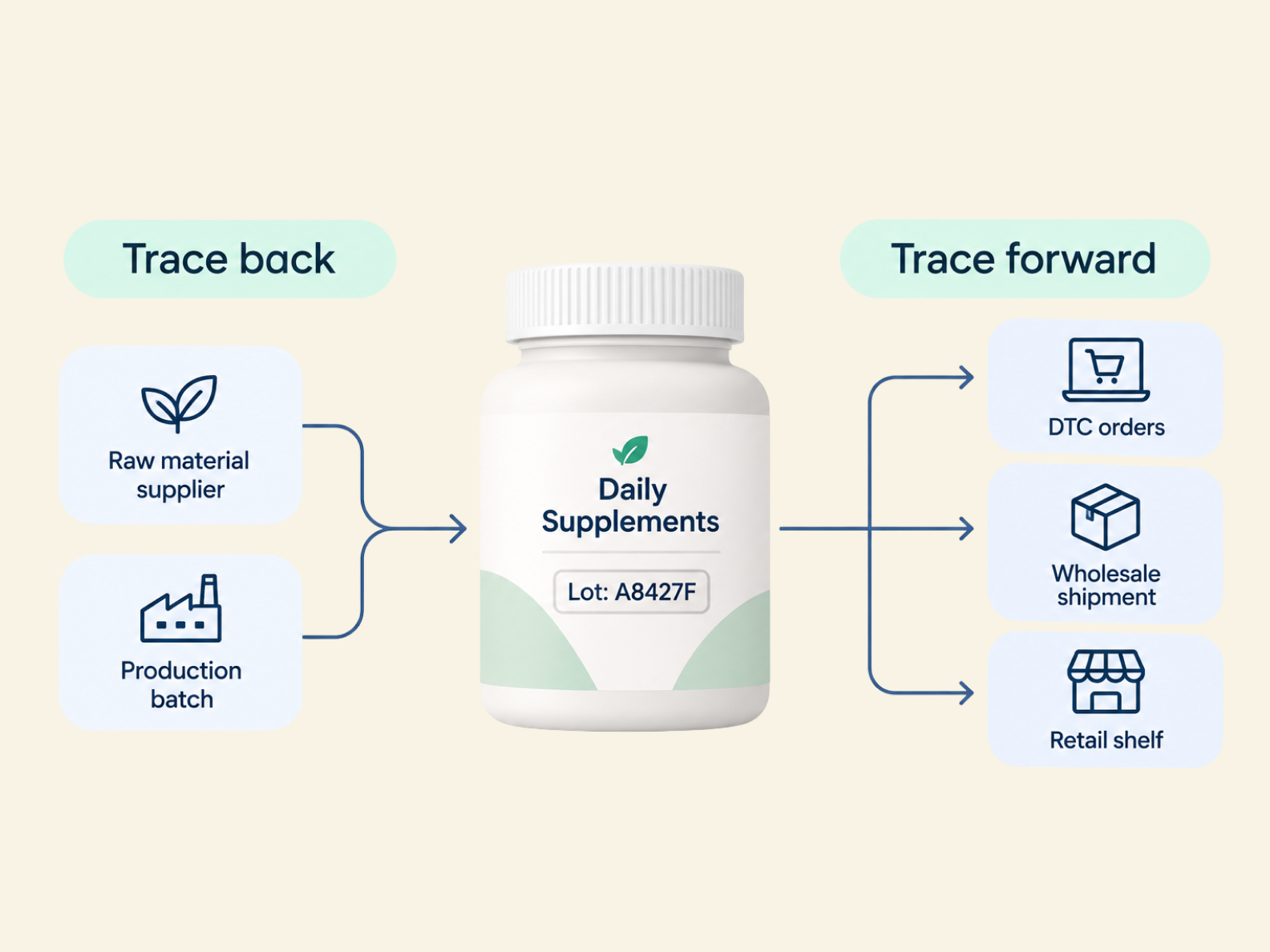
Traceability runs in two directions — forward and backward. Let’s use a bottle of magnesium glycinate, a supplement, after the brand receives a customer complaint, for an example.
Because you run a reputable brand, you want to get to the bottom of the customer’s complaint immediately. But with your disjointed tools, though, tracing the supplement to the issue is slow.
The lot data, for instance, sits in a production spreadsheet, a 3PL portal, and an ecommerce platform. None of the tools really talk to each other. So now, you have to piece the story together manually to trace the issue, which can take days.
However, by simply connecting the right tools so they can easily share lot data, that same job can be done in minutes.
Backward Traceability
Backward traceability starts with the product in question and follows the bottle’s lot number to the finished goods lot, then to the production batch, the raw-material lots in that batch, and finally to the supplier.
With a multi-level bill of materials (or BOM), your system can track each batch, so you can see which ingredient lots went into it — down to the capsule shells and packaging. You don’t have to try to reconstruct its path from disjointed tools or, worse, paper records.
Forward Traceability
Say the backward trace indicated a single lot of magnesium glycinate from a single supplier was the issue. Now, you can follow that raw-material lot to every batch that used it, including the finished goods lot those batches produced. You can then trace it to every DTC order, wholesale shipment, and retailer that received that ingredient lot.
Instead of pulling every SKU from every shelf, you can precisely scope the problem to only the specific lots involved. This saves your company time and money while protecting your reputation with retailers and consumers alike.
What to Look for in Lot Traceability Software
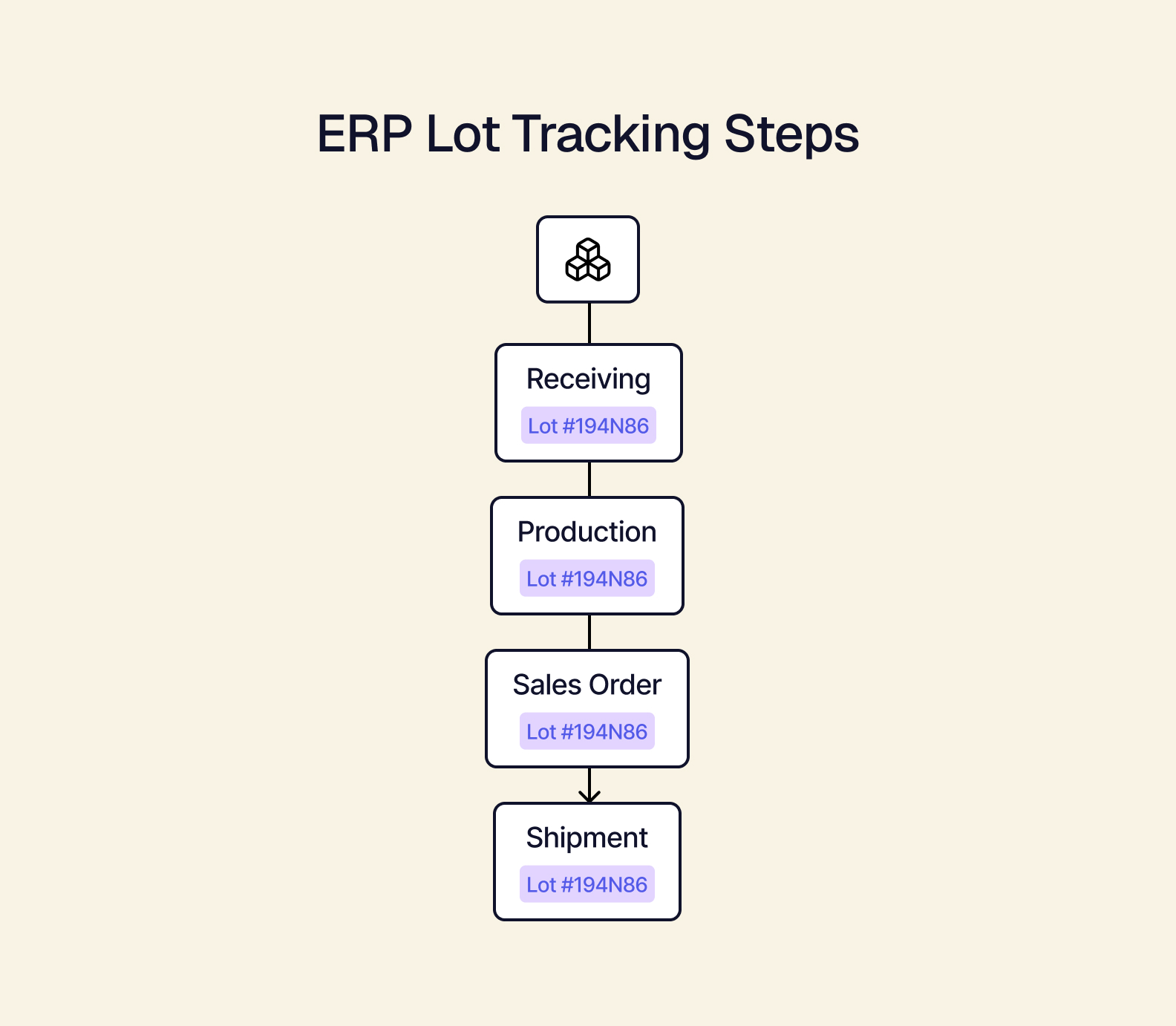
In an ERP, lot tracking can be built into the system, so lot numbers are assigned when materials are received. The numbers are then carried through production and tied to sales orders and shipments. Anytime inventory moves, the lot number goes with it, keeping your records complete — automatically.
Good lot traceability software can:
-
Capture lot at receiving: Record the supplier’s lot number and expiration date as soon as the materials land.
-
Provide multi-level BOM genealogy: In production management, raw material lots are linked to the batches and finished goods lots they become, so you can trace materials without manually digging through different tools.
-
Improve lot visibility: Inventory management allows you to easily see which lots sit in your warehouses, at your 3PL, or in each sales channel.
-
Support expiration-aware allocation: The system picks lots by expiration date rather than just by whatever is on hand.
-
Create forward and backward trace reports: Answering “where did this come from?” and “where did this go?” in minutes.
-
Increase flexibility to fit your workflows: A headless ERP adapts to how your business runs instead of forcing you into someone else’s process.
How an ERP Helps Handle Recall Workflows
All brands hope they never need to deal with a recall — U.S. recalls have already topped one billion units in 2026, only the fourth time in 15 years that’s happened, according to Sedgwick’s Product Safety and Recall Index. So, it pays to be prepared with a mapped-out process to handle them and handle them well.
Here’s how lot data connected in an ERP can help:
-
Identify the affected lot: Triggered by a customer complaint, a supplier notice, or a quality assurance finding.
-
Run a backward trace: To discover the root cause and any other material or batches that could be affected.
-
Run a forward trace: With a list of all affected orders, customers, and retailers.
-
Quarantine on-hand inventory: Place a hold on affected lots, so they can’t be allocated or shipped.
-
Notify everyone: Contact retailers, distributors, and customers, using lists generated from the trace.
-
Document everything: Record the actions you took and their outcomes for regulators and retail partners to protect your relationships and reputation.
How an ERP supports FEFO (First Expired, First Out)
The best recalls are the ones that never happen. First Expired, First Out (or FEFO) is one important inventory strategy to help prevent one. As the name suggests, you’ll ship the stock with the earliest expiration date first — regardless of when it was received.
Using expiration-aware allocation, an ERP can automatically apply FEFO when it picks lots for an order. This is especially important for products that lose quality over time, such as a specialty grocer’s perishables, skincare with active ingredients that degrade, or supplements that lose potency or flavor.
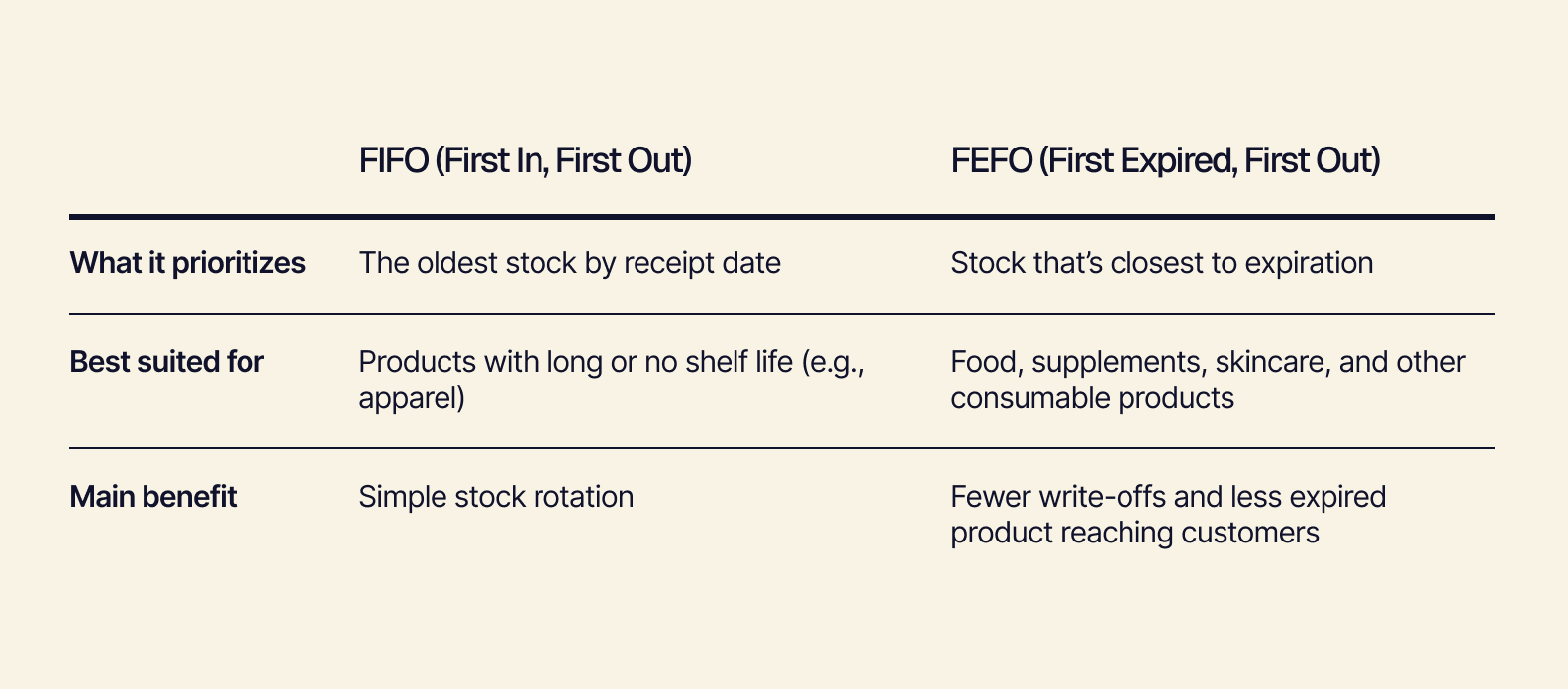
FIFO is a good option when units age at the same pace.
FEFO uses expiration dates to keep short-dated stock moving, which reduces waste and makes it less likely for expired (or soon-to-expire) products to end up on a retailer’s shelf or in a customer’s cabinet.
Ready to put lot traceability to work for your business? See how Tailor’s inventory management features track every lot end to end.
Lot Traceability Takeaways
Getting onto retail shelves is a huge milestone many brands work months or years for. Staying on those shelves not only takes hard work but the right tools — including those that let you know exactly what’s in every product, where it came from, and where it went.
Lot traceability not only provides visibility but proof. If you receive a customer complaint, you can create a targeted response before it grows into a bigger issue. If your new retailer has a lot-code request, it’s easy to pull a routine report. And if you ever have to face a daunting recall, you can contain the event before it becomes a crisis.
To scale more smoothly, build traceability into your workflow before you need it, rather than having to piece it all together manually if (and more likely when) something goes wrong.
See lot traceability in action: Request a demo to see how Tailor connects your production and inventory data from supplier to shelf.