ERP
Retail Operations
ERP
Retail Operations
When you buy a legacy ERP, the quote you receive isn’t always the bill you end up paying.
The gap between your quote and what you pay depends mostly on how your business is structured, and does not necessarily depend on the software's sticker price. That’s why costs can increase over time as licensing, usage, and industry standards shift, and customization needs grow with your business.
What you’ll learn:
What drives ERP software cost
How implementation comes with hidden fees
Different ERP pricing models and how they scale
How the total cost of ownership differs for enterprise ERP and composable ERP
Your company’s size is a key factor in determining ERP costs. Rigid ERP systems were built for enterprise operations. They often rely on per-seat pricing, user minimums, and bundled suites. That means scaling retailers often pay up front for seats and software they won’t be able to use for years to come, if at all. That’s the beauty of adopting a composable ERP. You get to choose the modules that align with your business today and can make adjustments as your company grows.
When it comes to purchasing an ERP, the quote is just the tip of the iceberg. Yet, it can impact your business down the line. Choosing between a perpetual license and a subscription service depends on what best fits your company’s accounting practices. A perpetual license requires a large one-time investment for on-site software, usually paired with ongoing support fees, whereas a subscription is a recurring monthly expense.
That said, the highest cost usually comes after you’ve signed your agreement. It’s the cost of implementation. In fact, according to ERP Research, implementation costs alone can be between one to three times the cost of an annual license for mid-market ERPs and two to five times the cost for enterprise systems.
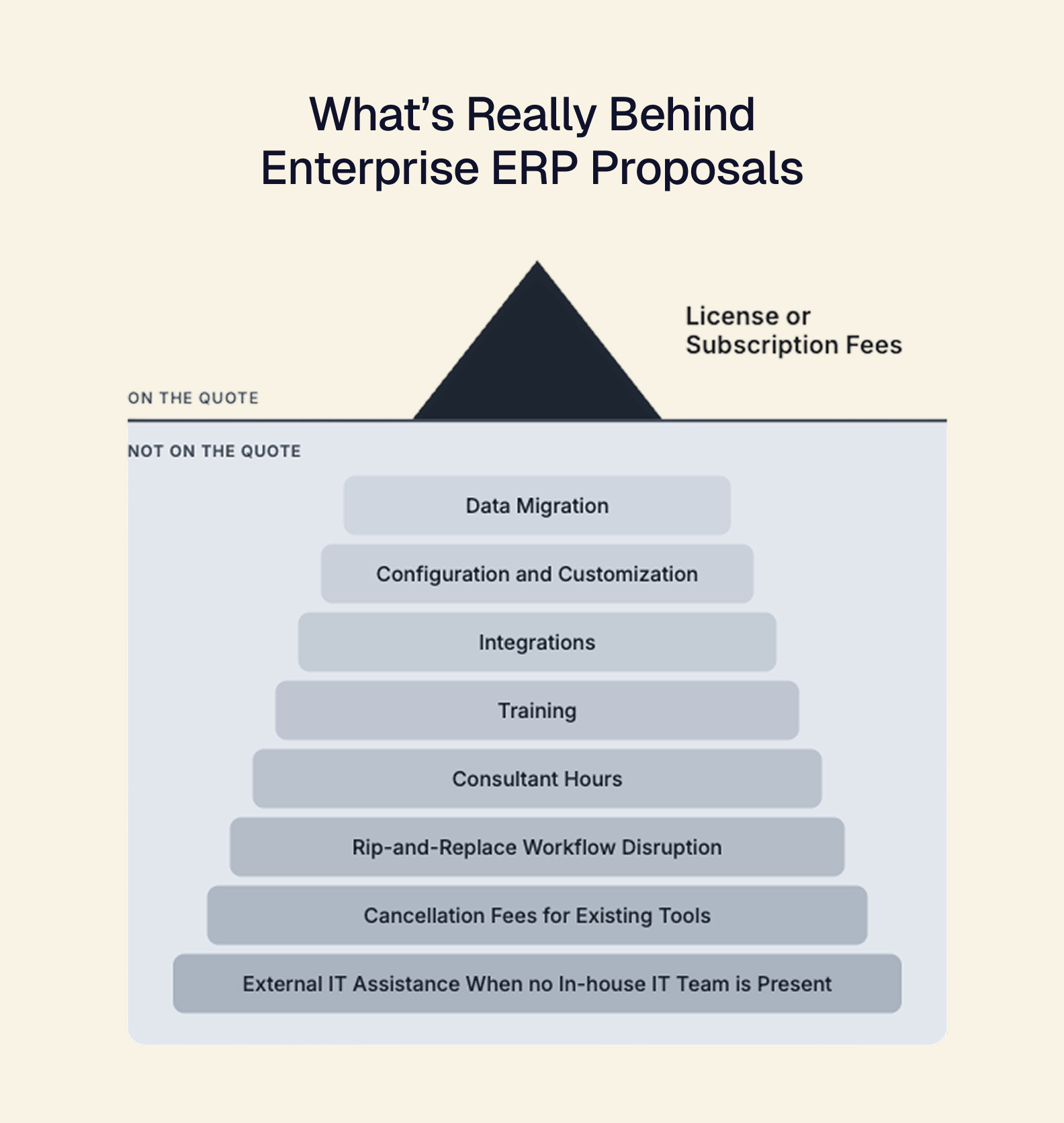
While there are many touchpoints in implementing an ERP, we’d like to focus on the areas that put the most strain on the budget for growing retail brands.
Unlike modular ERPs, legacy systems rely on suite-based solutions, which can be challenging for high-SKU categories like wholesale and DTC jewelry. That means every workflow that deviates from the software’s standard process requires additional configuration and custom code. This can be hard for smaller companies without dedicated developers and often adds costs to make the system fit operations. Additionally, these systems require you to replace your existing tools, leaving you to find stopgap solutions until go-live or rely on manual labor to keep operations running smoothly.
Often, because teams lack in-house support, they rely on consultants or third-party vendors to help implement legacy ERPs. However, these areas are typically underbudgeted because long lead times often require additional support and technology to bridge the gap.
Because rigid ERP systems typically require a single cutover, there is little time to address training gaps across verticals, from end users to IT. So, brands rely on vendor training or a partner to get their team up to speed. This doesn't always account for staff growth, which requires additional training resources and causes productivity dips and lower morale as teams scramble to keep up with operational demands.
However, API-first, composable ERPs help mitigate this risk. By using a phased rollout and offering on-demand support, Tailor lets you upgrade your backend one module at a time, so your business can keep running while you migrate data and operations.
ERP models charge differently depending on their structure, with most charging based on the number of users, application activity, or individual functions or modules. While you can examine the merits of the type of license you secure for your ERP, we’d like to focus on the general models that most ERPs fall within. Let’s take a look at how each structure works and how they scale:
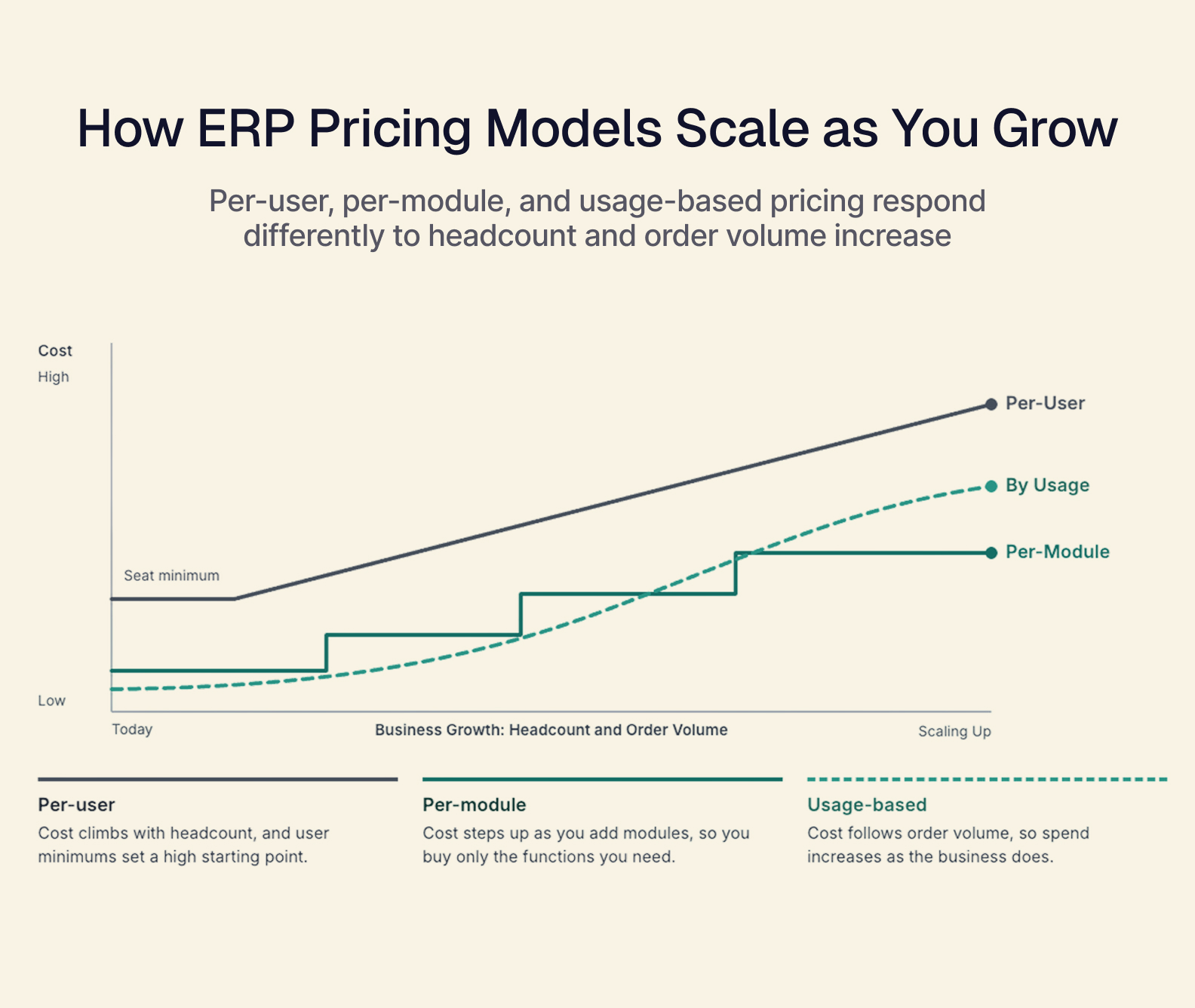
Per-user pricing refers to paying for each person who accesses the ERP. While this pricing structure is predictable, costs can increase as quickly as headcount. Additionally, legacy ERPs with minimums can create high up-front costs for small businesses.
This model relies on usage rather than headcount. You pay in proportion to how often you use the system, creating a variable month-to-month expense and posing challenges for companies that need to rapidly increase access to the software, resulting in large unanticipated spend and impacting margins.
Whereas enterprise ERPs focus on bundles, per-module pricing lets you pay only for the functions you choose. You also have the flexibility to add more as your business evolves and can pay accordingly. This type of pricing enables you to scale costs adequately alongside business scope, not just the size of your team.
In fact, each model also scales differently. As headcount and order volume grow, per-user pricing increases. Tailor lets you choose the modules your business needs while providing services like support from the start.
The total cost of ERP ownership is what you will pay throughout the system's lifetime. You can calculate these costs by looking at licensing, implementation, and maintenance fees. We’ve already covered how implementation eats a large chunk of the allocated project budget, but let’s take a look at how each cost area differs between enterprise ERP and composable systems.
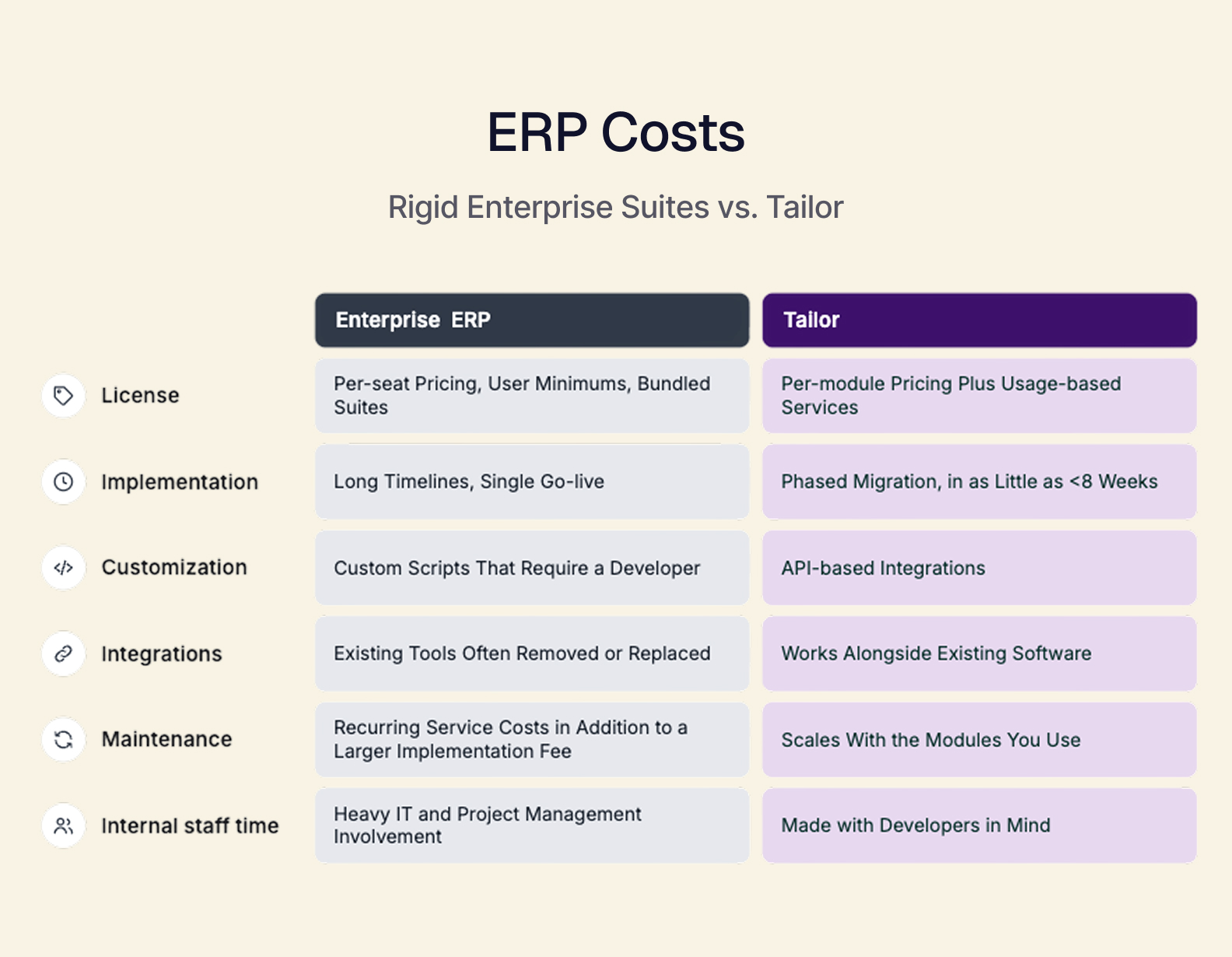
At the base level, enterprise ERPs require seat minimums and bundles, a long, single cutover, and significant long-term maintenance costs, which inflates the time and resources a scaling business must commit before deploying. However, a composable ERP keeps costs proportionate throughout its lifetime, lets you pay only for the modules you choose and integrate in phases, and adds new capabilities without replacing what already works for your business.
Unlike rigid enterprise systems that automatically bundle accounting and operations into one system — which means you cannot update one without also impacting the other — composable ERPs decouple the two. This allows you to keep accounting systems you already trust while running operations through a composable layer connected by APIs.
Unlike custom scripts used by enterprise ERPs that need a developer to build and maintain them, API-first ERPs like Tailor are built to scale with demand and focus on cloud connectivity. This makes them more cost-effective and agile to right-size for your business.
How much does an ERP system cost?
The total cost of ERP ownership depends largely on your business size and structure. It can range from thousands to millions of dollars.
How long does ERP implementation take?
ERP implementation largely depends on the type of ERP system you purchase: Enterprise or Composable. Rigid enterprise systems can take months or years to deploy, whereas a modular, headless, composable ERP works through phased implementation. In Tailor’s case, you can have a solution operating within your existing workflow in three to six months, with phased go-lives as features are ready.
How much does it cost to implement ERP?
When you're implementing an ERP, expect implementation to cost 1-3x the annual license for mid-market systems and 2-5x for enterprise platforms.
Why are ERP implementations so expensive?
Implementing any new software involves costs for additional training, project management, and support, but data migration, system customizations, and workflow integrations often cost more. Additionally, enterprise ERP systems often require you to replace existing tools in your workflow, so cancellation or decoupling fees may also apply.
What are cheaper alternatives to enterprise ERP?
To lower ERP costs, consider a composable ERP. Modular ERPs like Tailor use a per-module model, with usage-based pricing for additional services. That means you pay only for the functions you choose, avoiding seat minimums and unnecessary bundles.
Now that you understand what owning an ERP truly costs, you can accurately assess the right ERP for your business. To help with the purchasing process, we’ve put together a quick list of simple questions to ask in order to help you choose the right ERP vendor for your business and avoid hidden fees:
Is there a seat minimum?
Do costs shift if my headcount changes?
Does this system require phased rollout or single cutover?
How long does system implementation take?
Does this system need a developer to handle integrations and customization?
Can I keep my existing tools, or would I have to rip and replace?
Are there any cancellation fees for replacing existing tools?
What are the recurring costs that will apply after deployment, including maintenance, support, and upgrades?
Ready to get started weighing your options? Book a demo today. See how Tailor’s headless, composable ERP can reduce total cost of ownership.

AUTHOR
Joyniece Kirkland


Connectors
Compare Tailor