Navigating the current retail inventory management landscape can be a headache. Every solution offers a mountain of different features and price points, but it’s rarely clear what you actually need for your business.
Rather than wade through a sea of products with no discernible direction, this guide is designed to help you isolate what you need out of a modern inventory management solution. By cutting away fluff and unnecessary feature bloat, we’ve isolated the core tools you should look for.
What You’ll Learn
-
Which tools you need from your new inventory management system
-
How these tools impact your daily operations
-
Why you need to get “bad data” out of your inventory process
-
How to restore inventory systems harmed by bad data
-
What composability does to improve your business
What You Need from a Modern Retail Inventory Management System in 2026
Real-Time Inventory Tracking
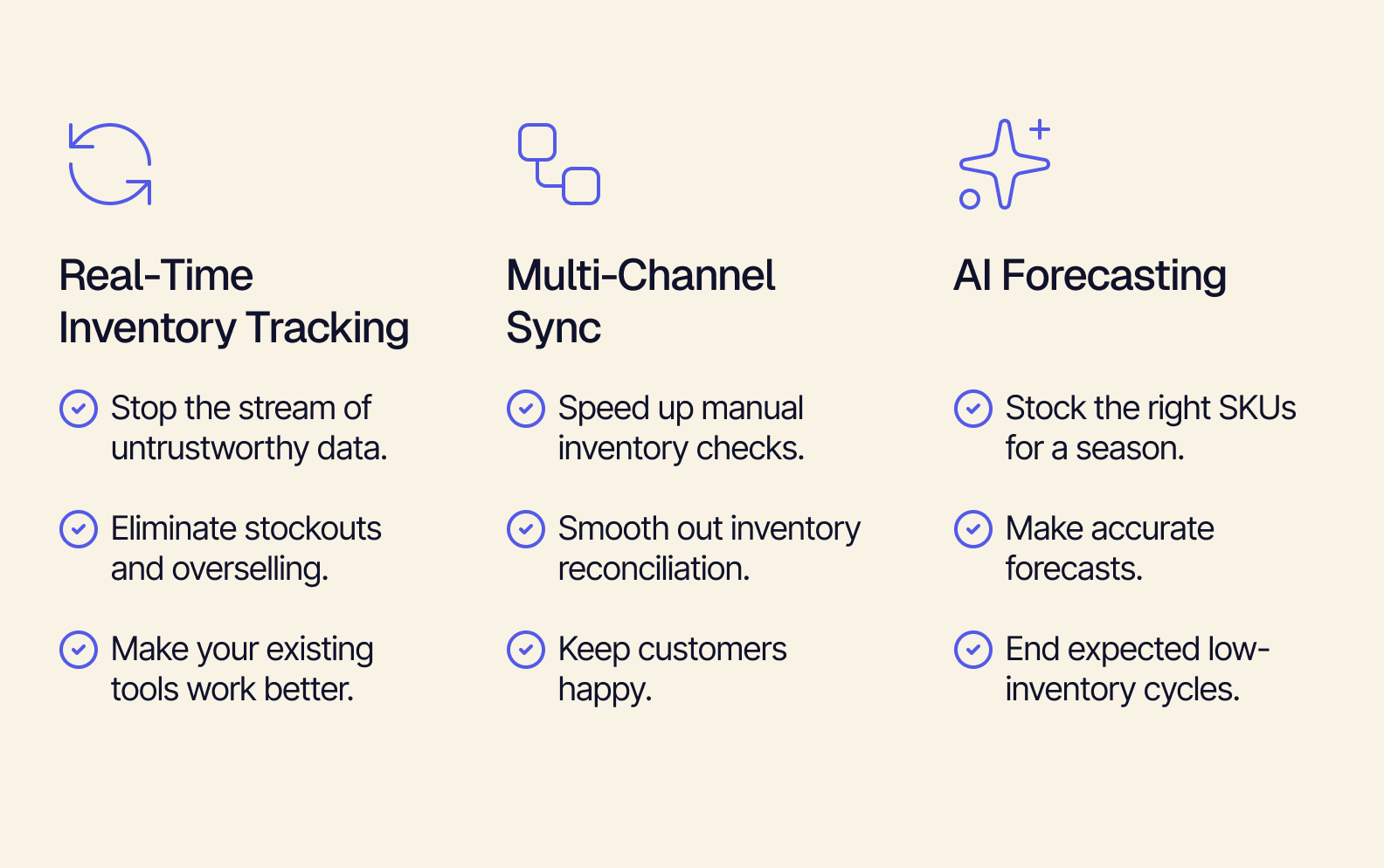
The first key feature you need to see in a 2026 inventory management system is real-time inventory tracking. Data latency is one of the biggest contributors to inventory management mistakes — and it’s driven by a lack of real-time tracking. Oftentimes, small businesses have disconnected tools that don’t talk to each other, and lack the capital to acquire better solutions. Plus, many popular legacy inventory management tools report at the end of the day, hourly, or through event-driven API calls.
This means your data is being held in limbo until the system releases it to you, leading to a scramble to reconcile it at the start of every day. And in this global economy, your sales can happen any time. The outcome is:
-
A stream of untrustworthy data. When the data you receive from Shopify, Amazon, or another point-of-sale (POS) is different from your manual (or warehouse side) tracking, you’re forced to recount your inventory — and that’s only if you catch it immediately. Untrustworthy data compounds almost instantly and can wreak havoc on your inventory management.
-
Overselling inventory you don’t have. It’s all too easy for your on-hand inventory counts and your POS inventory estimates to become mismatched. When you have a multi-channel retail operation, it’s very easy for one online storefront to sell through available stock. Because of data latency, you can end up selling SKUs at quantities you don’t have available — leading to upset customers and refund process headaches.
-
Constantly fighting your own tools. One of the worst consequences of all this is having to build combative workflows with the tools you rely on to run your business. When you can’t use your tools to their full potential because you’re trying to mitigate errors and mismatched data, it can cause immense frustration and drive reactive solution-seeking that can create more overhead in your business. You should be able to use core tools like QuickBooks and ShipStation without worrying about your inventory woes getting in the way.
However, with real-time inventory tracking, you can see your inventory adjust as sales happen, so you don’t have to worry about babysitting your inventory spreadsheets and getting back to trusting your data.
Multi-Channel Sync
Another feature you should look for is multi-channel sync. If you’re a retailer who operates different storefronts (physical or digital), you understand just how chaotic inventory management can be when you’re attempting to reconcile data from different platforms. Without multi-channel sync, your operations team likely spends most of their time collecting data from different websites and tools, then manually crunching them and checking them against each other — then updating inventory levels on a per-storefront basis. This creates a vector for untrustworthy data to seep into your daily operations. This can lead to:
-
Lengthy inventory checks. When inventory needs to be manually crunched between platforms, it naturally leads to having your inventory team perform inventory checks and SKU recounts. It’s good practice to perform inventory checks, but frequent checks take more time than they should take to make sure your inventory is correct for your storefronts.
-
Creating inefficient workflows. Because disconnected tools and storefronts aren’t capable of integrating with each other (most of the time), your operations team spends a lot of their time moving data around between POS portals. The workflows that come from managing this data on the fly can be slow, cumbersome, and prone to error.
-
Blindsided and frustrated customers. One of the most discouraging shopping experiences a customer can have is being delivered the dreaded “About Your Order…” email. It makes customers not want to shop with you in the future, and can damage your company’s reputation if enough customers are affected.
By choosing a retail inventory management system that comes with multi-channel sync, you can easily parse and reconcile data from your storefronts with ease and eliminate many of the operational difficulties that multi-channel retailers suffer from.
AI Forecasting Tools
With AI tools growing in power every day, agile, future-forward businesses can deploy AI forecasting to empower their retail inventory management system. Some inventory management systems include non-AI forecasting tools, but these rely on parsing past data trends, rather than accounting for current trends. Historically, sales and inventory forecasting is performed by scouring documented seasonal and yearly trends in an attempt to triangulate which SKUs will be the most popular by season. Unfortunately, this old approach can lead to:
-
Overstocking SKUs that aren’t popular. Past trends can sometimes tell stories that just aren’t true. Over the last three years, your business sold a certain outerwear SKU to near-stock out several times. Unfortunately, this year, the colors associated with this SKU are no longer in style. Your historic data forecast would be correct if it had the ability to contextualize trends from the last month, but it cannot. Now your warehouse is stocked with a SKU that simply will not sell to expectations.
-
Suffering stockouts on unexpected SKUs. If you’ve stocked up on an unpopular SKU, then it’s highly likely that a lower stock SKU is going to get bought out. Stockouts are frustrating, both for your daily operations and your customers. With a bad forecast, it’ll probably take too long to get more items ordered and ready for shipping before the demand ends. This means you lose out on valuable revenue, and your customers may be less likely to shop with you next time.
-
Making forecasts with tunnel vision. Overreliance on past data can lead to making forecasts that ignore the current moment, leading to completely misreading the market. It can make your operations team deliver future forecasts with less certainty, potentially creating worse inventory misses in the future. The old way of making forecasts worked for slower, more predictable markets — a time when things were less global, and sales weren’t happening 24/7.
AI forecasting tools consult past trends but also compare them to real-time tracking data to give you a more accurate picture of what you can expect. AI forecasting helps close the gaps left by old forecasting processes and allows you to capture trend-driven revenue opportunities.
How Retail Inventory Management Takes the Blinders Off Your Data
Data visibility is a huge issue for modern inventory management. With so many different tools (which are often disconnected from each other), the data you need to optimally run your business is hidden behind convoluted user interfaces, incompatible file types, and uncontrollable data delivery cycles. But this can all be changed with a modern retail inventory management system.
Many tools put blinders on you — not unlike a race horse — to keep you focused on driving forward and using their products without asking questions. What if you could take those off blinders and not only get rid of bad data, but also eliminate data silos and latency?
How You Keep Getting Bad Data
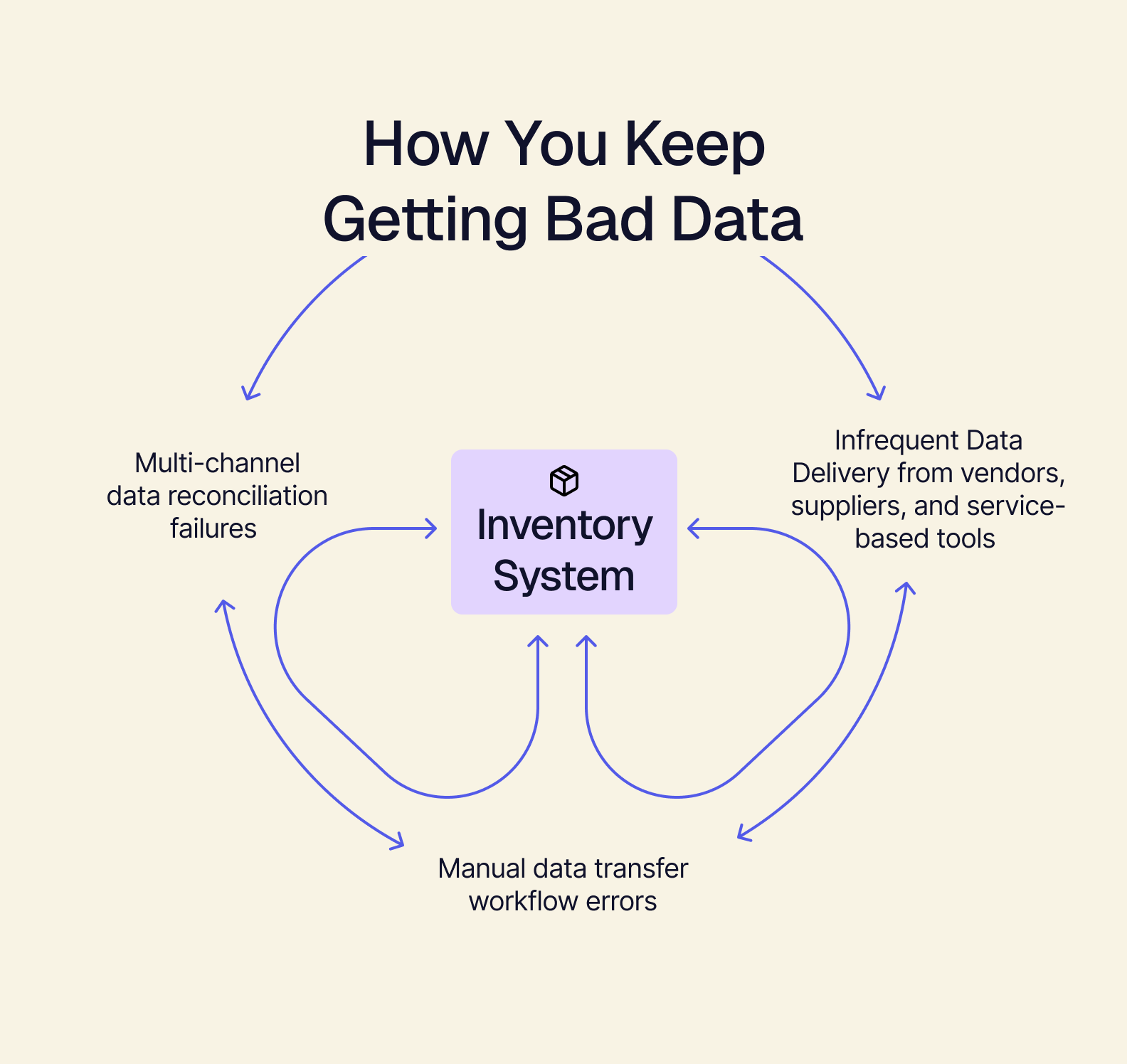
We covered earlier what bad data is (incorrect or untrustworthy data), but many businesses struggle to isolate the cause. Unfortunately, there can be many vectors for it — some obvious, others less so. The top three culprits of bad data generation are:
-
Infrequent data delivery from vendors/suppliers and service-based tools: caused by limited functionality or bandwidth (service-based tools) and proprietary workflows (an old-school supplier uses hand-written documents that are difficult to parse).
-
Manual data transfer workflows: spreadsheets are the most notorious stumbling block with manual workflows. Because they’re clunky, it’s easy to jumble up numbers or copy/paste the wrong columns/rows/cells, which can have dangerous knock-on effects for your inventory management.
-
Multi-channel data reconciliation failures: this gets back to disconnected tools being unable to talk to each other. They each deliver their own reports, which need to be crunched in context with data from another platform or tool. This ultimately loops back into the spreadsheet issue looked at above: too much data, too little room for error.
What ERPs Do to Solve Data Silos and Latency
Finally, we can dig into what ERPs do to solve data-related inventory management headaches. ERPs act as a way to eliminate data silos and provide businesses with a connected set of tools. There are two different ways that ERPs achieve this:
-
The Monolithic ERP Method: eliminate data silos and inventory latency by providing a business with a suite of tools designed to work together. This results in all inventory information being managed by a core system and is consistently tracked across the entire business.
-
The Headless ERP Method: eliminate data silos and inventory latency by providing a means to connect ordinarily disconnected tools. This results in a way to keep the tools you use most, without having to replace them and shake up daily operations.
In both cases, data silos are eliminated by bringing inventory reporting tools together, and latency is solved by plugging directly into your POS and online storefronts to call data directly from the source.
Restore Your Cashflow with Real-Time Inventory Sync: A New Inventory Management Framework
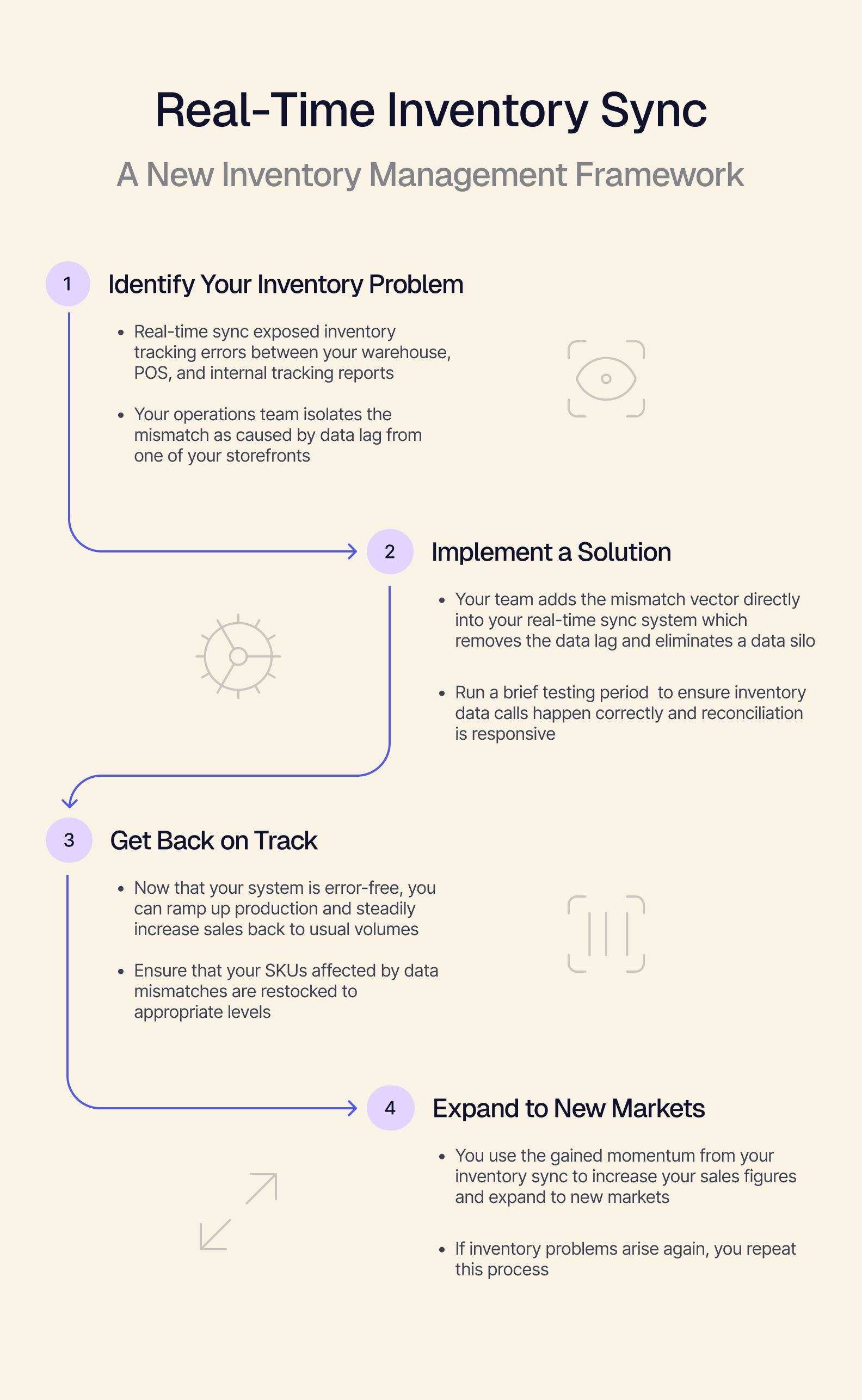
It’s one thing to discuss how real-time sync works, but it’s another to visualize its impact on your business. By starting with a hypothetical “average” framework, you can get a better read on how it’ll impact your daily operations:
Step 1: Identify Your Inventory Problem
-
Real-time sync exposed inventory tracking errors between your warehouse, POS, and internal tracking reports.
-
Your operations team isolates the mismatch as caused by data lag from one of your storefronts
Step 2: Implement a Solution
-
Your team adds the mismatch vector directly into your real-time sync system, which removes the data lag and eliminates a data silo
-
Run a brief testing period to ensure inventory data calls happen correctly and reconciliation is responsive
Step 3: Get Back on Track
-
Now that your system is error-free, you can ramp up production and steadily increase sales back to usual volumes
-
Ensure that your SKUs affected by data mismatches are restocked to appropriate levels
Step 4: Expand to New Markets
-
You use the gained momentum from your inventory sync to increase your sales figures and expand to new markets
-
If inventory problems arise again, you repeat this process
How a Composable Architecture Brings Your Retail Inventory Management System Together
You understand which retail inventory management system features you need and how they’re supposed to support your business, but now you need the final piece — your system needs a flexible backbone.
This is where composable architecture comes into play. Composable architecture is the code that governs how your business runs, and is often the result of an ERP integration. Composability is a result of modularity, meaning you can swap the tools your teams use with ease, and incrementally upgrade your system as you grow. By leveraging the tools you love with synced inventory tracking, you can trust your inventory management system to become a single source of truth for your daily operations.
Unlike a monolithic ERP system — an all-in-one inventory management solution that replaces your existing tools with a suite of interconnected programs and workflows — a composable ERP can be specifically designed to support your inventory management needs, without getting rid of what makes your business thrive.
Bring your inventory management under a composable umbrella to experience the productivity increases that come with being able to trust your data, forecasting, and your daily-driver tools.
Get Beyond Overstock and Inventory Errors
By now, it should be crystal clear what you need out of a retail inventory management system built for 2026 and beyond:
If the system you’re looking at is lacking these features, there’s a strong chance that it’s not going to properly integrate into your business. Thankfully, Tailor is able to help you simplify your choice:
We offer composable retail inventory management solutions through Omakase, our flagship headless ERP. Book a demo with us to see how composability can radically transform your business and help you scale your business rapidly — without having to sacrifice the tools you love.