If you sell across more than one store or channel, you’ve probably faced this moment before: Two locations sell the last unit of the same SKU at the same time, and now you’re dealing with an oversold order instead of two happy customers.
While this doesn’t feel good, it’s not a sign your team is doing something wrong. It simply means the sync tools most multi-store inventory management software rely on weren’t built to close this gap.
This guide covers the sync model’s structural ceiling and what it looks like to switch to a shared, real-time inventory model instead.
What You’ll Learn
-
Why multi-store inventory management keeps breaking, even with sync software
-
Three exceptions that can stress sync tools
-
What a single source of truth for inventory actually looks like
-
Where automation fits (human in the loop)
-
What to look for in multi-store inventory management software
Why Multi-Store Inventory Management Keeps Breaking, Even With Sync Software
Most multi-store inventory management software is designed to synchronize separate stock records across locations. This means there’s always a lag between true inventory and displayed inventory. That lag leads to stockouts and overselling.
-
Each store or channel typically keeps its own ledger. Often, your Shopify storefront, POS system at each location, and marketplace listings each serve as their own source of truth to define what’s in stock. Sync tools update these ledgers on an interval-based system, or a trigger-based system, like a sales event firing a webhook.
-
Even fast syncs have a window. Growth widens it. Lag causes real problems, which can make 15-minute syncs feel lacking. Two stores could both sell the last unit of a popular product in the same 15-minute window, and now you’re oversold. And the more locations or channels you have, the more sync relationships you’ve added that all have to stay current with each other.
This doesn’t mean multi-location selling is too hard. The problem is most likely that your tool’s underlying architecture was built for single-location retail and stretched (via bolted-on integrations) to cover more locations than it was designed for.
The lag isn’t something you can configure away. It’s structural and a byproduct of keeping inventory in more than one place at the same time.
This changes your shopping criteria in an important way: you’re no longer looking for the fastest sync tool. Instead, the important question to ask is whether a software’s data model requires syncing at all.
3 Exceptions That Can Stress Sync Tools
The sync model breaks down in other ways, too, beyond just timing. It also struggles with exceptions — transactions that don’t fit a clean, one-store, one-SKU pattern. Since those are typically the transactions your best customers generate, this can turn into a major issue.
Examples of these non-traditional transactions include:
-
Bundles/kits. A bundle SKU and its component SKUs are often tracked as separate inventory records. When a bundle sells, the parent record decrements — but the sync layer also needs to correctly subtract each component across every location. Sync tools frequently miss that step or only get it partially right.
-
Cross-store returns. When a customer buys online and returns in-store, or buys in-store and returns online, the sale and return happen in two different places. Which location’s ledger absorbs the returned unit, and how fast does that location’s available-to-sell count reflect it? Sync tools can struggle with transactions that span two locations.
-
Promo-driven demand spikes. If you’re running a promo, stock is going to come off the shelves at every location more quickly than usual. If five locations all sell the last few units of a promoted item during the same 15-minute sync cycle, the lag adds up fast. Overselling becomes far more likely.
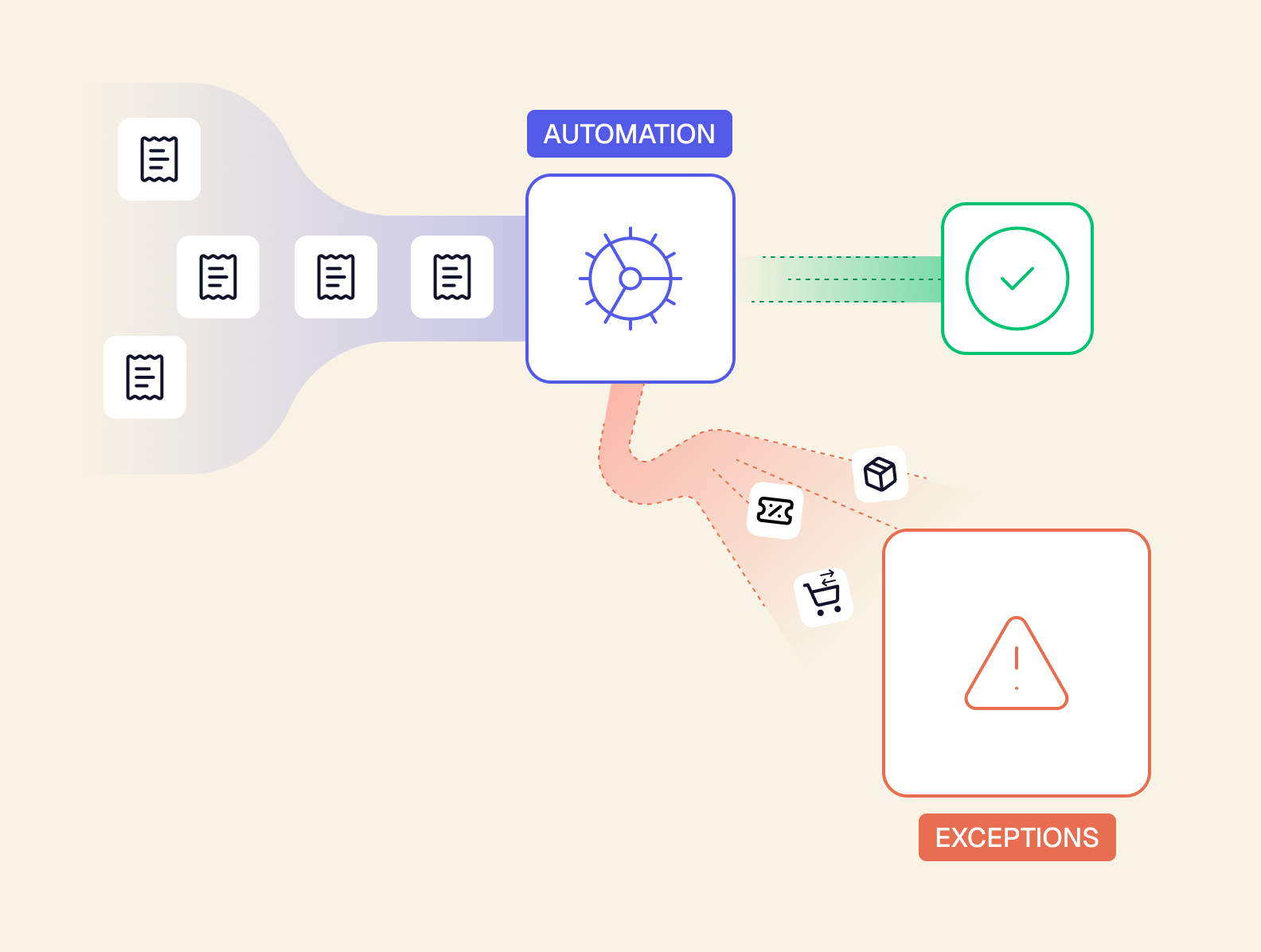
When you’re evaluating a platform for multi-store inventory management software, it’s helpful to ask whether it was built to handle these exceptions or if they were an afterthought bolted on after the core system was built.
What a Single Source of Truth for Inventory Actually Looks Like
The fix for what’s breaking is less about making sync faster and more about removing the need for it altogether. Instead of syncing multiple stock records, some retail operations systems maintain one shared inventory record that every store, channel, and sales point reads from and writes to directly.
-
Stock isn’t duplicated per store. It’s one record, with location-level attributes. Instead of having three separate ledgers that each need to agree with each other, you have a single record — one source broken down by location, not three sources trying to stay in sync.
-
The inventory data model sits underneath every storefront, POS, and channel. This is what a headless system allows. The data model doesn’t live inside any single storefront or POS. Each one is simply a screen that reads from and writes to the same underlying layer. The screen is one manifestation of the API. And since that layer isn’t locked inside any one channel, it’s also composable: You can add or swap a storefront, POS, or sales channel without duplicating your inventory logic into it.
-
This is the architectural version of “a source of truth upstream of everything.” Inventory truth doesn’t live inside any single store or channel. It lives above all of them. No individual location owns the number, and none can be more accurate than another.
Take a deeper look at the comparison between the synced model and the shared model:
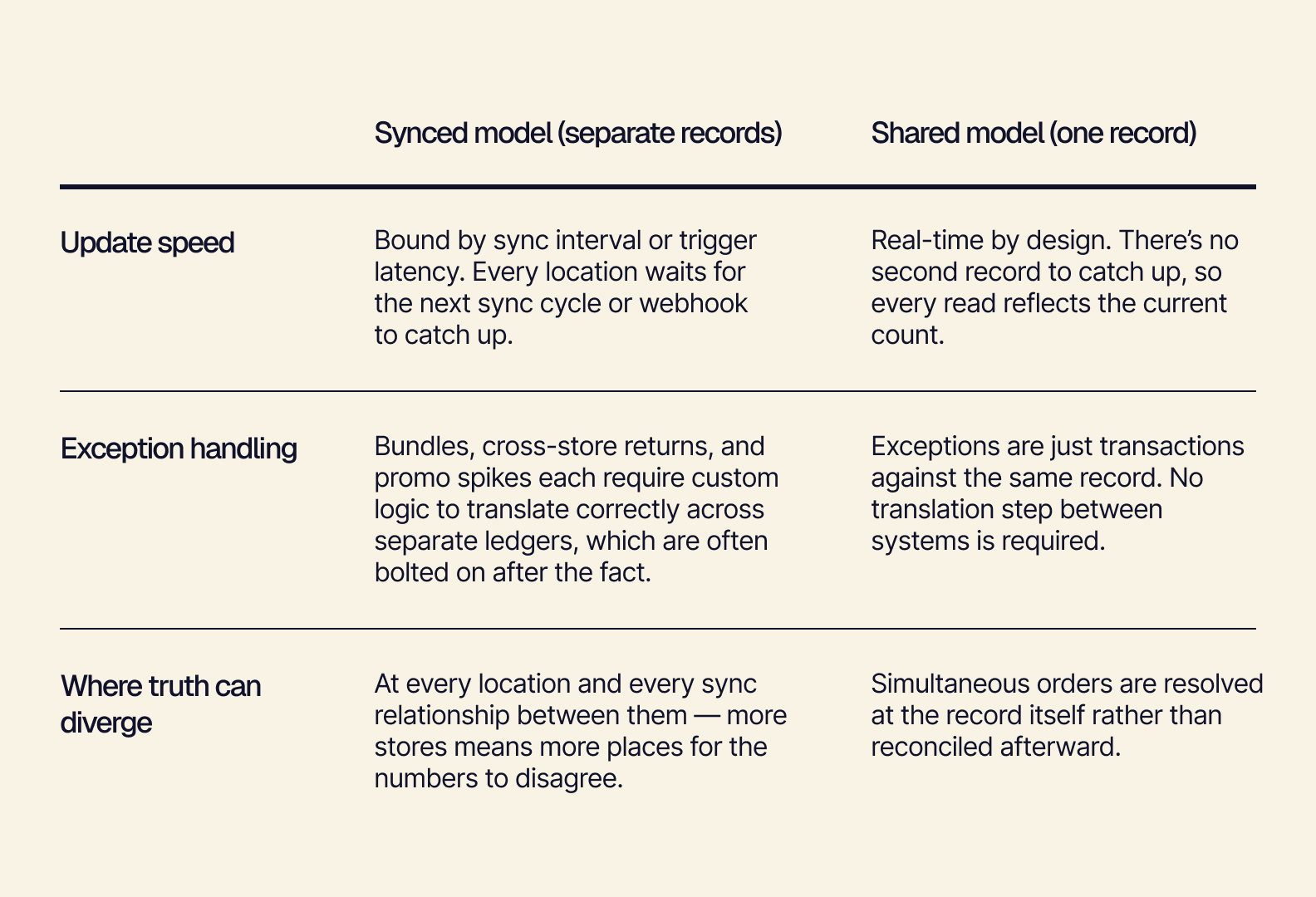
A shared model is the kind of architecture Tailor is built on. Tailor is a headless, composable, AI-native ERP that serves as a customizable retail operations system for fast-growing ecommerce and omnichannel brands.
Because inventory lives in one shared layer — not inside any single channel — you can also decouple your accounting from your operations. Keep financial records separate from the real-time operational data every store and channel reads from.
Removing the sync step resolves lag. It also changes what’s possible when it comes to automating on top of it. With one trustworthy number instead of several competing ones, the next question is what should run on that number automatically, and where a person still needs to make the call.
Where Automation Fits (Human-in-the-Loop)
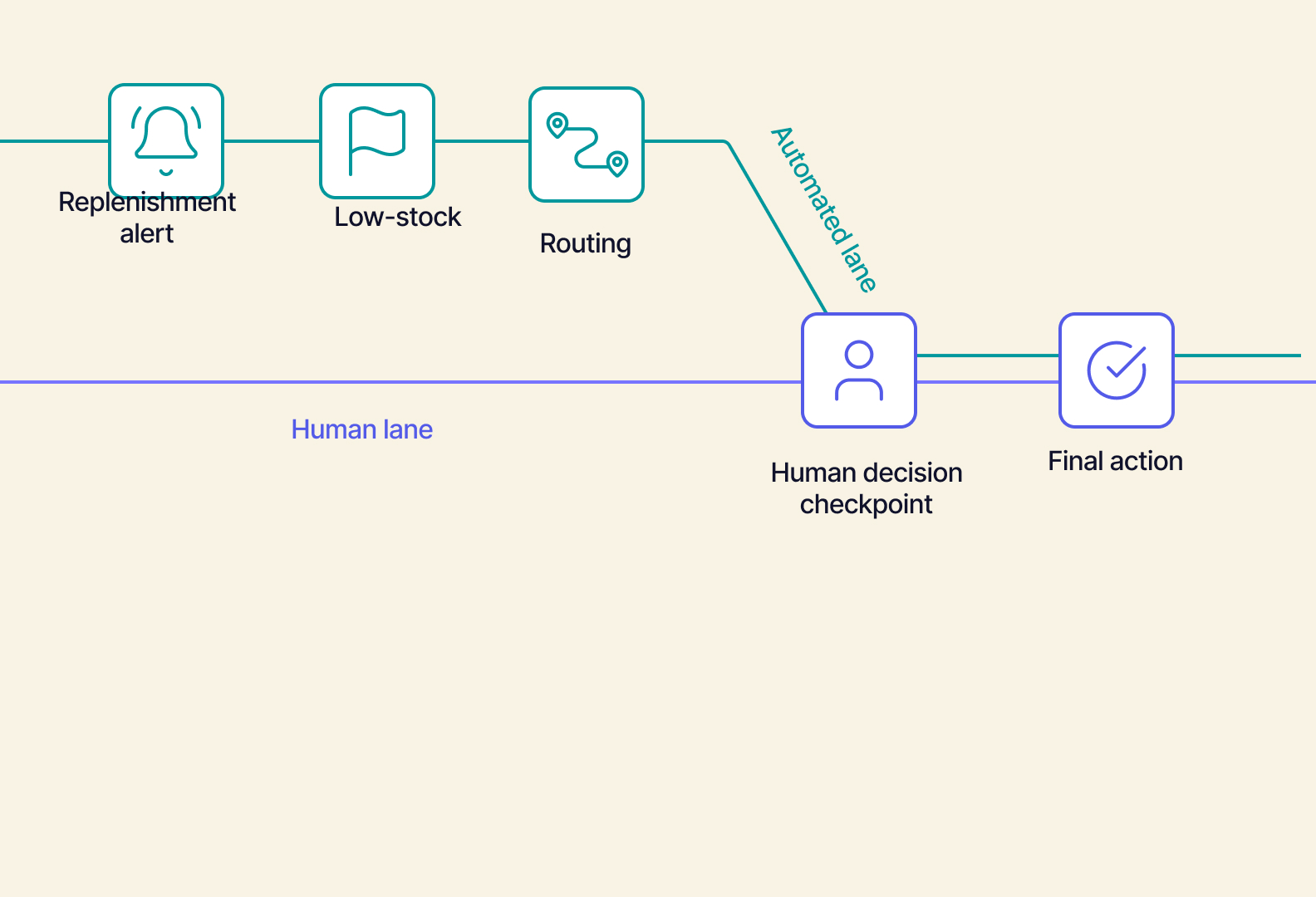
A shared source of truth results in trustworthy automation. Automated actions are only as good as the number they’re reading. If you have a laggy, synced count, layering automation on top just automates mistakes faster. A single, accurate number is what makes automation into something that’s actually safe to rely on.
What can run automatically:
-
Replenishment suggestions, based on real-time stock levels and sales velocity across every location
-
Low-stock and overstock alerts
-
Routing exceptions to the right person or team (surfacing the issue, not resolving it)
-
Reorder point calculations and demand forecasting inputs
-
Flagging anomalies for review (like a sudden spike or a count that doesn’t reconcile)
What should stay human-owned:
-
Which store gets the last unit when more than one location wants it — which might depend on a loyal customer, a VIP order, or something happening locally that the system has no way to know
-
How to handle a flagged or ambiguous return (like damaged goods or a timing dispute)
-
Whether to override a system-suggested reorder quantity based on context that the system doesn’t have (like an upcoming promo or a shifting trend)
-
Final approval on larger or unusual stock transfers between locations
Generally, decisions that are repetitive, pattern-based, and don’t require judgment about a specific customer or edge case can be automated. Decisions that involve judgment, trade-offs, or context the system doesn’t have should be handled by a human.
The system isn’t making decisions for you. Instead, it’s providing the right information at the right time to the person who does. Human-in-the-loop automation doesn’t remove people from inventory decisions; it simply removes the busywork so the people who make those calls have accurate numbers and more time. Humans stay in the loop, not out of it.
What to Look for in Multi-Store Inventory Management Software
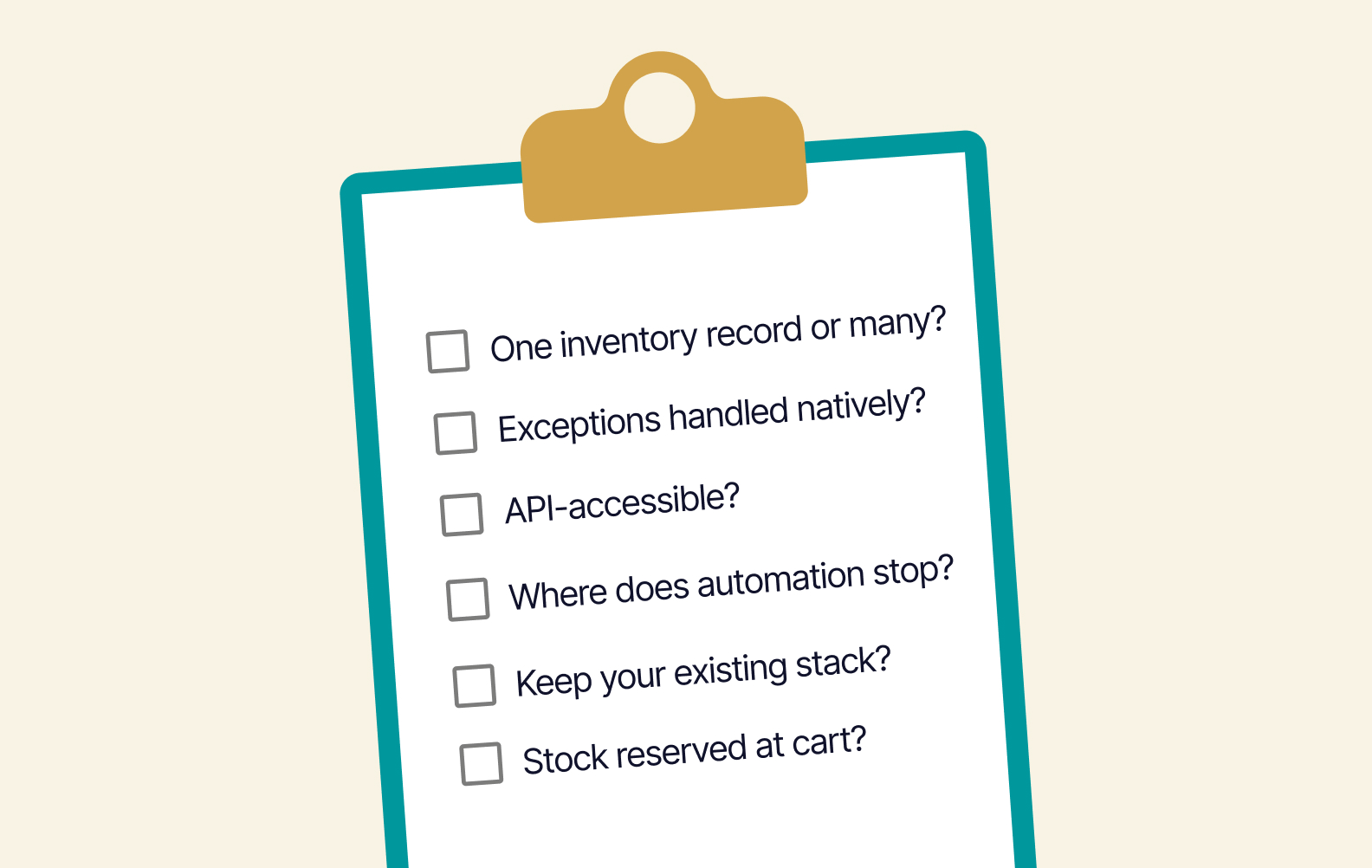
Go through this practical evaluation checklist with a vendor before buying.
-
Does inventory live in one shared record, or is it synced between systems? If it’s synced, how often?
Are bundles, cross-store returns, and promo spikes handled natively, or with a workaround?
-
Is the platform’s data layer accessible via documented APIs?
-
Where does automation stop and a human decision start?
-
Can you keep the parts of your current stack that already work, or will you have to replace everything at once?
-
Can stock be reserved at the cart or checkout rather than at fulfillment?
These questions go a long way in predicting whether you’ll see an actual change in the rate of stockouts and overselling.
Stock You Can Count On
Multi-store inventory management benefits from a single source of truth. Book a demo to see how Tailor gives every store, channel, and system the same real-time inventory number, cut down on bad data, and make your inventory management frictionless.