Orders are up, channels are multiplying, and month-end close takes longer every quarter because the numbers in QuickBooks never quite match what’s happening in your business.
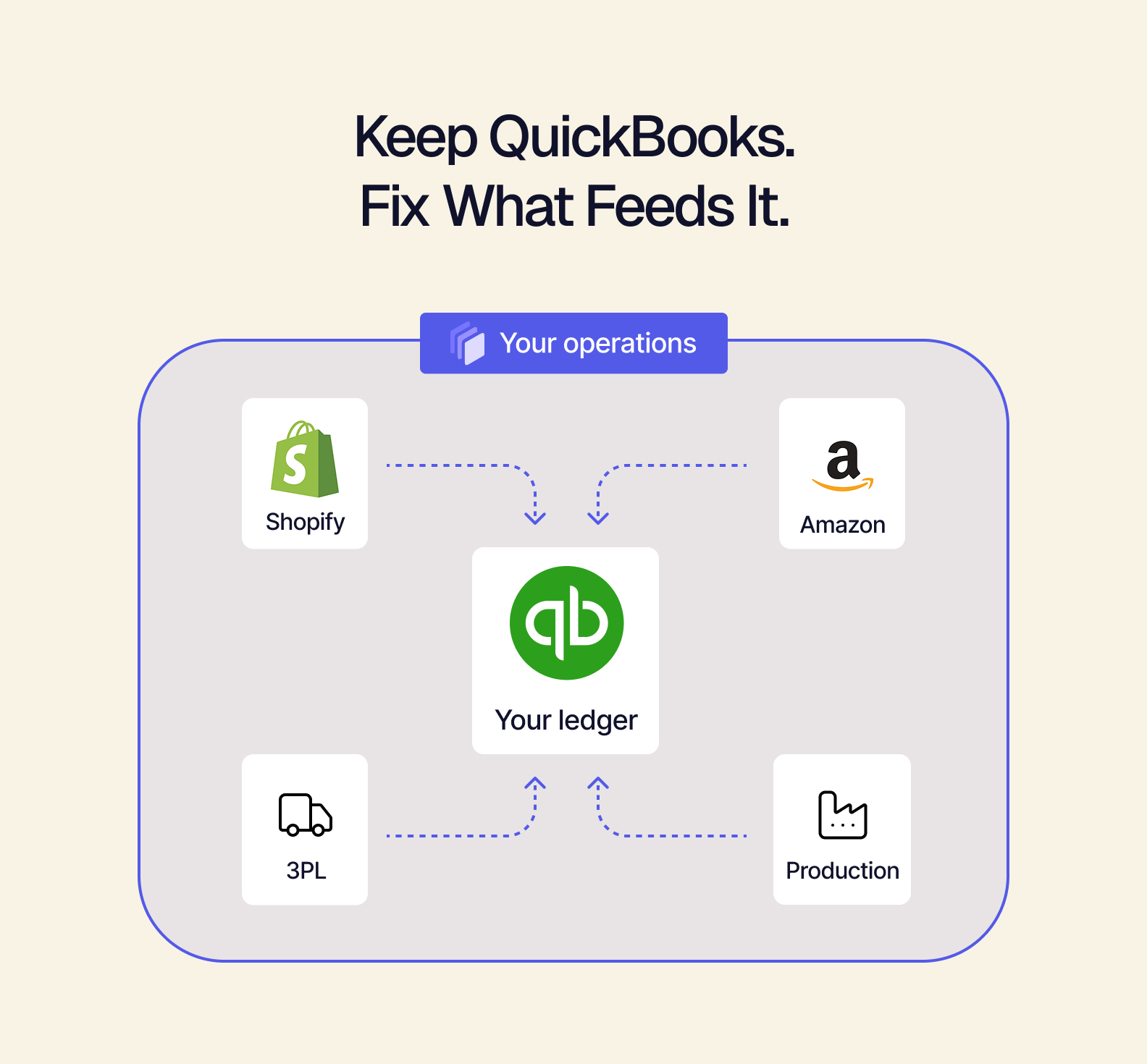
It’s only natural to conclude: “We’ve outgrown QuickBooks.” But in most cases, QuickBooks is doing exactly what it was built to do. It excels at accounting. It just wasn’t designed to run modern commerce operations on its own. Plus, like any ledger, it’s only as reliable as the data that reaches it.
Here are 5 common myths about outgrowing QuickBooks, and more importantly, what actually fixes the problem.
What you’ll learn:
-
Why QuickBooks often isn’t the problem
-
Where inventory, reconciliation, and data accuracy actually break down
-
How QuickBooks compares to an ERP, and why you may not have to choose
-
How a composable ERP helps QuickBooks scale with your business
Myth 1: QuickBooks Can’t Handle Our Volume Anymore
The Myth: Order growth means QuickBooks has hit its limit, and it’s time to move on.
The Reality: Volume usually isn’t the issue. Rather, it’s the path your data has to take to get into QuickBooks. For many brands, orders arrive through CSV imports, batch uploads, and manual entries. And that works fine — as long as you’re only processing 50 orders a week. But once those numbers grow to 500+, with every new order, you have to spend more time copying, pasting, and double-checking. That increases the risk of a simple typo throwing off your books entirely.
As a result, QuickBooks can feel slow and inaccurate. Yet the real bottleneck is everything that happens before the data arrives.
How Tailor Helps: Tailor manages your orders from every channel in one place. It then automatically sends the accounting data to QuickBooks. When an order ships, a QuickBooks invoice is created. Customers, payments, credit memos, and bills sync into QuickBooks in real time — no exports or rekeying required.
Your team no longer spends hours moving data from one system to another, and QuickBooks gets complete, accurate information. Plus, with Tailor’s cost accounting module, you can see the costs and margins in real time.
Myth 2: Our Inventory Numbers Are Off Because QuickBooks Is Wrong
The Myth: If your inventory value and cost of goods sold (COGS) don’t add up, QuickBooks must not be able to accurately track inventory.
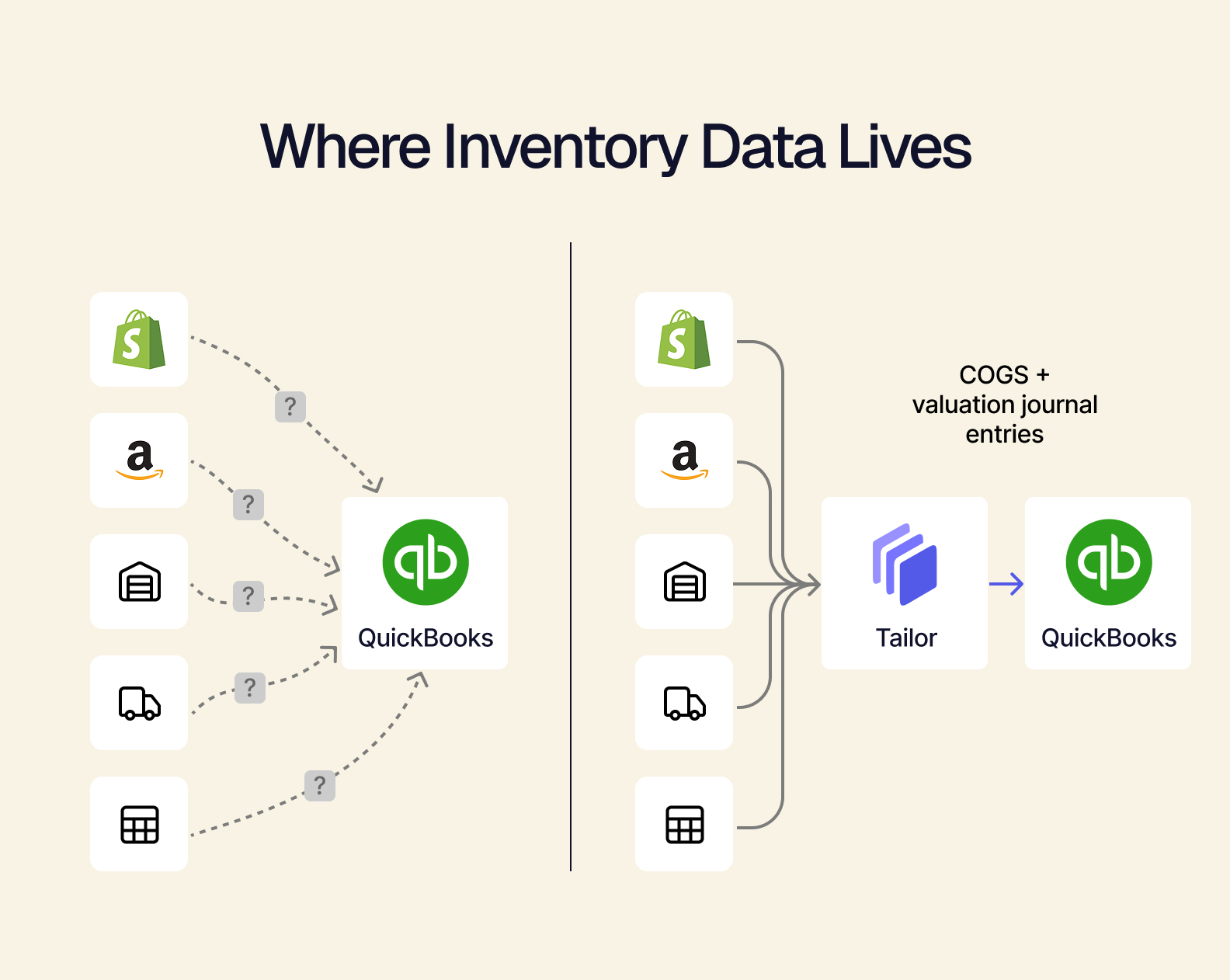
The Reality: QuickBooks can only process and report the numbers it has. For many growing retail brands, inventory lives across Shopify, Amazon, warehouses, 3PLs, and a spreadsheet or two (or 10). QuickBooks only sees what someone remembers to enter or connect. That, unfortunately, often happens in a rush at the end of the month. And when the sources don’t sync automatically, the confusion becomes increasingly apparent in the books.
How Tailor Helps: Tailor becomes the single source of truth for inventory across every channel and location, with custom rules to ensure margins are accurate. As products are received, sold, adjusted, or returned, Tailor posts the inventory adjustments, COGS, and valuation to QuickBooks as journal entries. So, they’re triggered by real events in real time instead of as estimates (or from memory) to clean up at the end of the month.
That includes landed costs: freight, duty, and other costs are allocated to your products and rolled into COGS, so your margins reflect what each item really costs.
So, for example, a custom-print brand can track blanks as well as finished, printed shirts separately in Tailor. When an order ships, COGS reflect not only the finished product but the blank and shipping costs.
Myth 3: Month-End Close Will Always Be a Pain
The Myth: Manual reconciliation is just part of business, especially as you grow.
The Reality: When sales come from Shopify, but marketplace payouts are in Amazon, and returns or inventory are found in separate apps and spreadsheets, nothing can sync. So, someone on your team has to match the orders, refunds, and payments before the books can close. The more channels you add, the longer that process takes, and the easier it is for errors to occur.
How Tailor Helps: Tailor connects those tools and uses event-driven workflows to automatically trigger accounting entries for you:
-
Orders become invoices as soon as they ship
-
Returns become credit memos automatically
-
Payments sync without manual matching
-
Inventory changes post as they happen
Because entries are created as the business runs — instead of after the fact — your numbers stay in agreement from day one to month-end. The close becomes a review rather than a rebuild. So, your finance team can spend their time on what the numbers mean instead of just chasing them down.
Myth 4: Upgrading QuickBooks Will Fix It
The Myth: Moving up a tier will solve these growing pains.
The Reality: QuickBooks offers significant upgrades, and that’s all some businesses need. For instance, according to Intuit, QuickBooks Online Advanced supports up to 25 users and adds deeper reporting; QuickBooks Desktop Enterprise adds even more advanced inventory features.
Yet even at the higher tier, at the end of the day, QuickBooks is accounting software. And you need to connect your Shopify store, Amazon listings, 3PL, production schedule, and accounting into one operational picture. If your data is scattered across systems, someone has to bring it all together. Even if you pay for the bigger ledger, the problem doesn’t go away on its own.
How Tailor Helps: Tailor adds the operational modules QuickBooks was never designed to handle, including:
These modules provide QuickBooks with accurate, complete data. That means you can keep the accounting software you already know and get the operational backbone your growing retail brand needs.
Myth 5: We Need an ERP, so QuickBooks Has to Go
The Myth: The next step after QuickBooks is a full ERP replacement, along with a long implementation and challenging learning curve.
The Reality: For many brands, the move from QuickBooks to NetSuite or another traditional enterprise system seems like the obvious next step. Make no mistake, these systems are powerful. But they’re built for larger companies with standardized processes and dedicated IT teams. They typically replace your accounting along with everything else. That means longer implementations and more rigid processes than many growing retail brands need.
How Tailor Helps: Composable architecture works differently. Instead of replacing your whole stack, Tailor keeps QuickBooks as your ledger and adds only the modules you need — whether that’s inventory, order management, production, or cost accounting.
Because Tailor is a headless ERP, your team works with an interface built around how your business actually runs — not a one-size-fits-all dashboard. Implementation happens in three- to six-week phases, so your team can adopt new features gradually.
You get ERP-level operations without a rip-and-replace and intense training sessions. And if you decide your business would do better with a different accounting system, you can make that move on your own timeline.
QuickBooks vs. ERP: You Don’t Have to Choose
QuickBooks tracks your revenue, expenses, and financial reporting. An ERP (Enterprise Resource Planning) system, on the other hand, manages the operations behind those numbers, such as inventory, orders, purchasing, and production.
For years, getting an ERP meant replacing QuickBooks. A composable ERP gives growing brands a third option: keep QuickBooks for accounting, and add the operational modules around it.
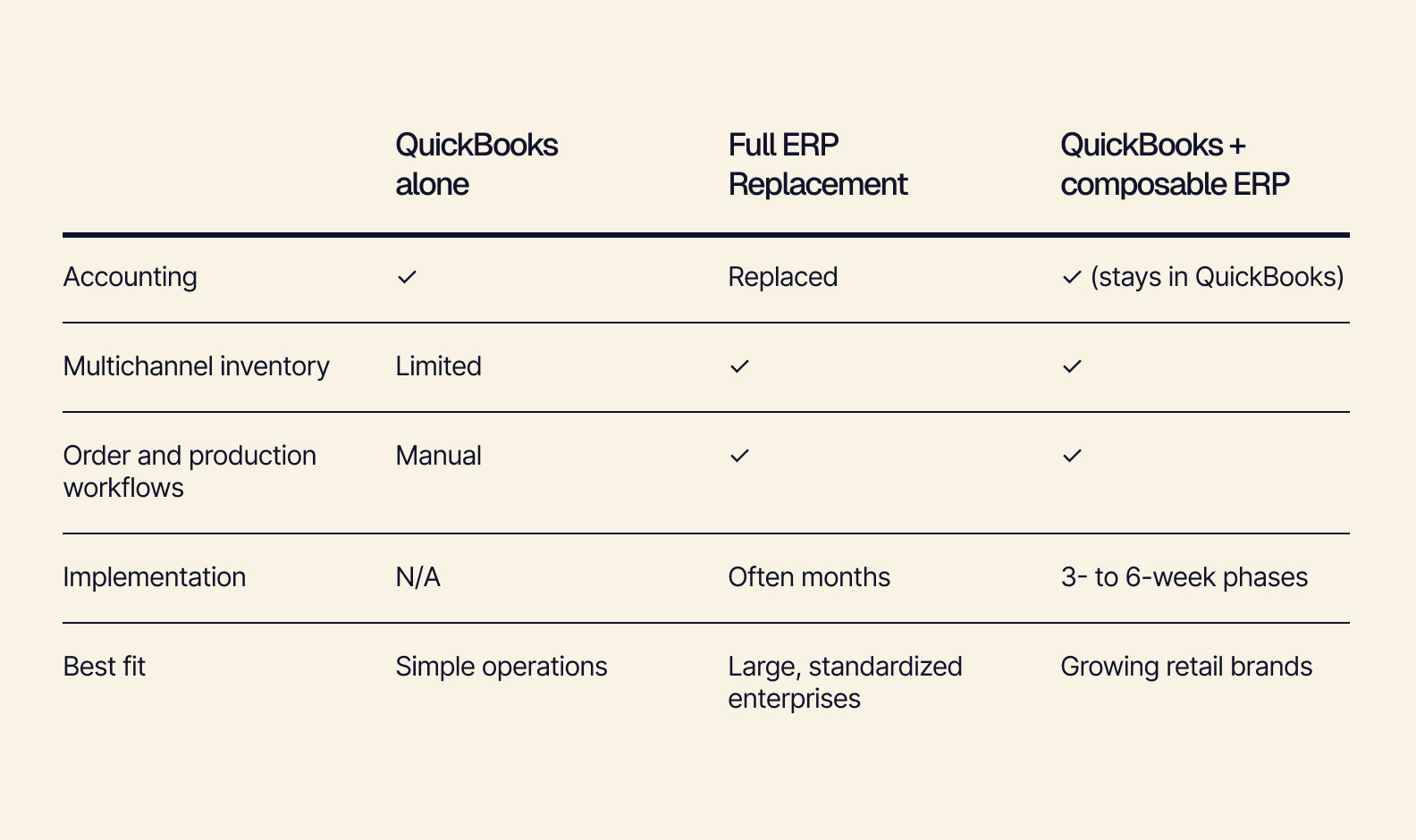
Because Tailor is built on a headless architecture, each piece of your stack does what it does best. QuickBooks handles the books, and Tailor handles everything that feeds them.
How Tailor and QuickBooks Work Together
With Tailor, you no longer have to jump between dashboards on Shopify, Amazon, your 3PL, and QuickBooks to understand what’s happening in your business. Tailor becomes the hub for every connected tool, so you can see orders, inventory, and accounting data in one place.
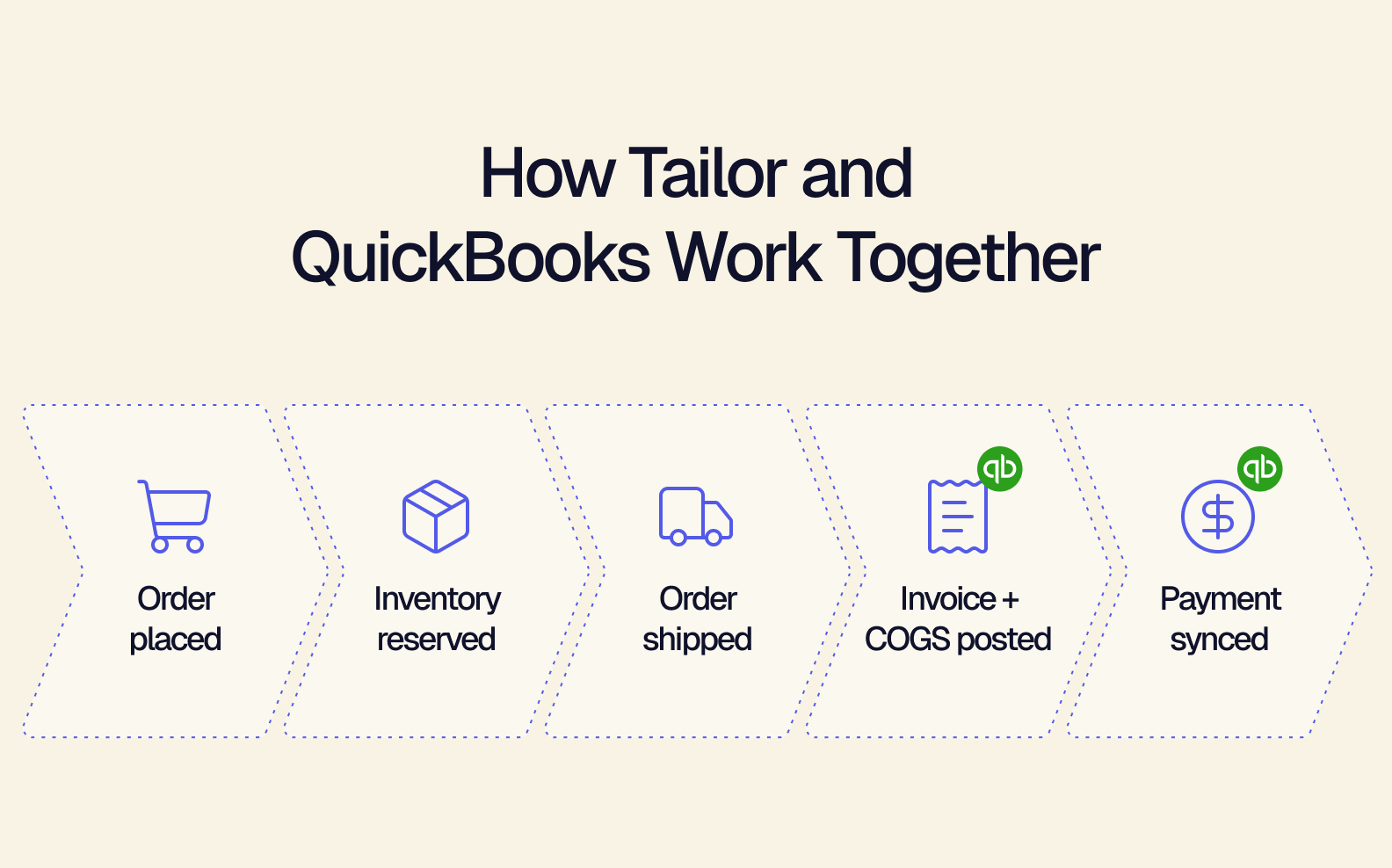
Here’s what that looks like for a single order:
-
A customer places an order on Shopify.
-
Tailor reserves inventory and routes the order to fulfillment.
-
The order ships, and an invoice is created in QuickBooks.
-
COGS and inventory valuation are recorded automatically as journal entries.
-
The payment syncs, and the books stay current.
The setup is simple: connect QuickBooks through a secure sign-in. Then add modules as you need them. Your team sees only the tools it actually uses — without features you don’t need cluttering the screen or a steep learning curve before the system pays off. Your accounting team keeps working in QuickBooks — now, with better data.
Keep QuickBooks. Scale Everything Around It
Outgrowing QuickBooks rarely means your accounting software has failed you. More often, the tools and processes around it haven’t kept up with your growth. QuickBooks is only as reliable as the data that reaches it. Tailor makes the data reliable.
Keep the accounting software your team knows. Connect the channels, inventory, and workflows that feed it — and scale on your own terms. Request a demo with Tailor today.