Imagine a customer visits your website and orders three items: a jacket, a pair of boots, and a scarf. The jacket ships from your Atlanta store, the boots from the 3PL in Reno, and the scarf from your main warehouse. By breaking the order into three individual shipments, the three items arrive faster than a single box would. That’s how distributed order management works.
Getting the order shipped is only a single step in the fulfillment process. The customer needs to be able to track the order, have the ability to change the order, and potentially return parts of the order to a store local to them (or ship them back). For all of this to work, distributed orders need to behave like a single order, without being limited by single-order logic.
What you’ll learn:
-
Why split shipments are a distributed order management advantage
-
How to manage order tracking, edits, and cancellations across multiple fulfillment locations
-
The impact of returns, refunds, and inventory on distributed orders
-
Why distributed order management software should be built on one source of truth
Why Split Shipments Are a Distributed Order Management Advantage
Splitting an order across fulfillment locations is a sign that distributed order management is working. You’ll benefit from quicker delivery, less dead stock, and more sell-through. These benefits continue as long as every part of the business still sees one order, not three disconnected shipments.
Specific benefits that splitting unlocks include:
-
Promise customers faster delivery. Ship each item from its closest location.
-
Turn store inventory into ecommerce inventory. Use ship-from-store and turn slow-moving store stock into online sales.
-
Send fewer “out of stock” messages. One location’s surplus fills another location’s gap.
-
Add new fulfillment partners as the brand grows. Have room for a second 3PL, wholesale partner, or pop-up.
The routing engine decides where items ship. Everything downstream (the tracking page, support agent, returns desk, and ledger) has to reassemble the order. How easy that process is depends on what’s underneath.
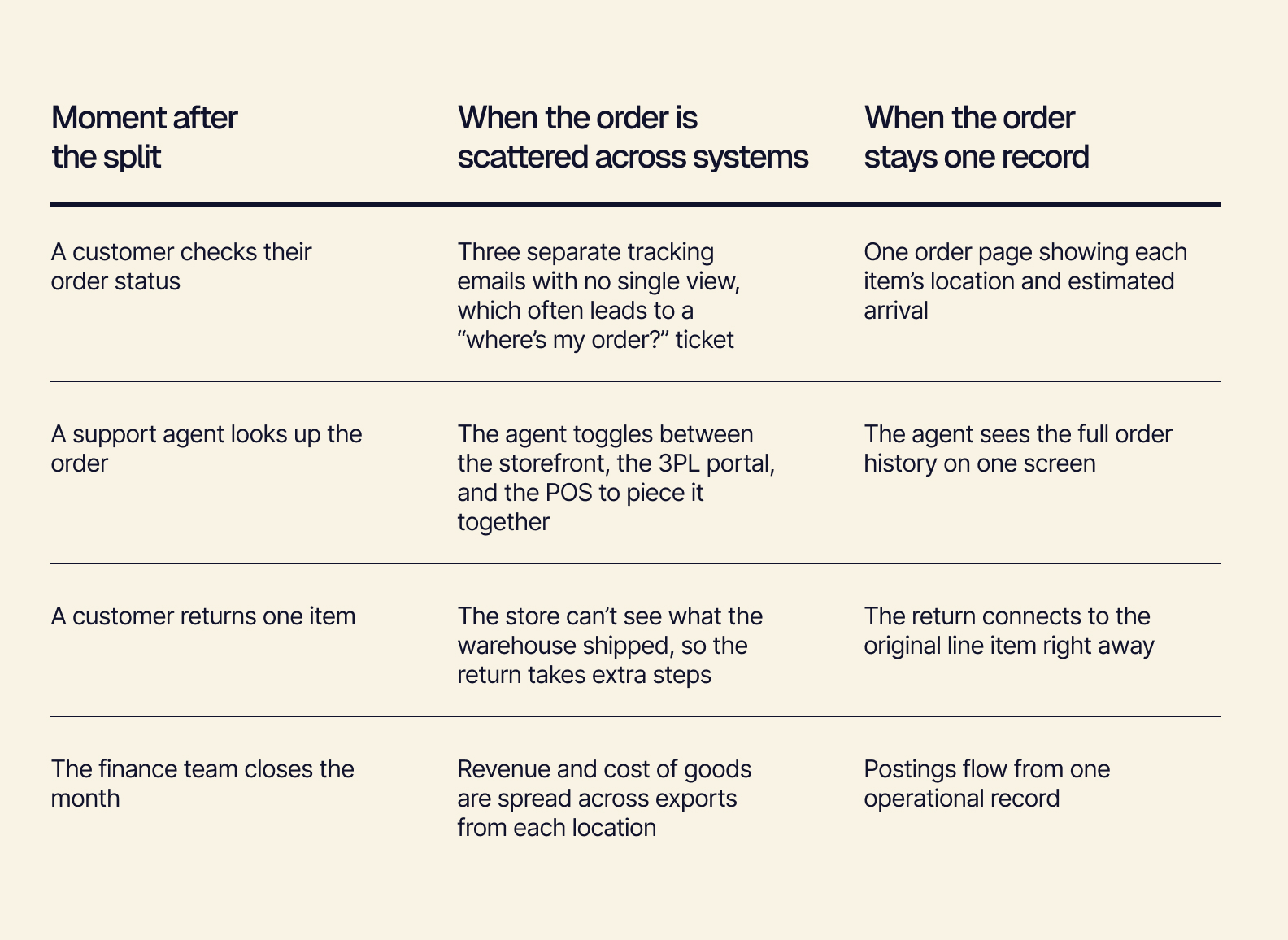
Here’s how this plays out during four day-to-day moments after an order splits:
Choosing where each item ships, however, is only the first step. Distributed order management demonstrates its full value during the rest of an order’s journey — starting with everything that happens while the order is still on the way.
Order Tracking, Edits, and Cancellations Across Multiple Fulfillment Locations
Customers interact most with a distributed order while it’s in motion, between checkout and delivery. They might check its status, change an address, or cancel one of the items. The way to make these activities effortless both for the customer and for your team is to ensure every location reads and writes to the same order record.
Order Tracking: One Status on Every Screen
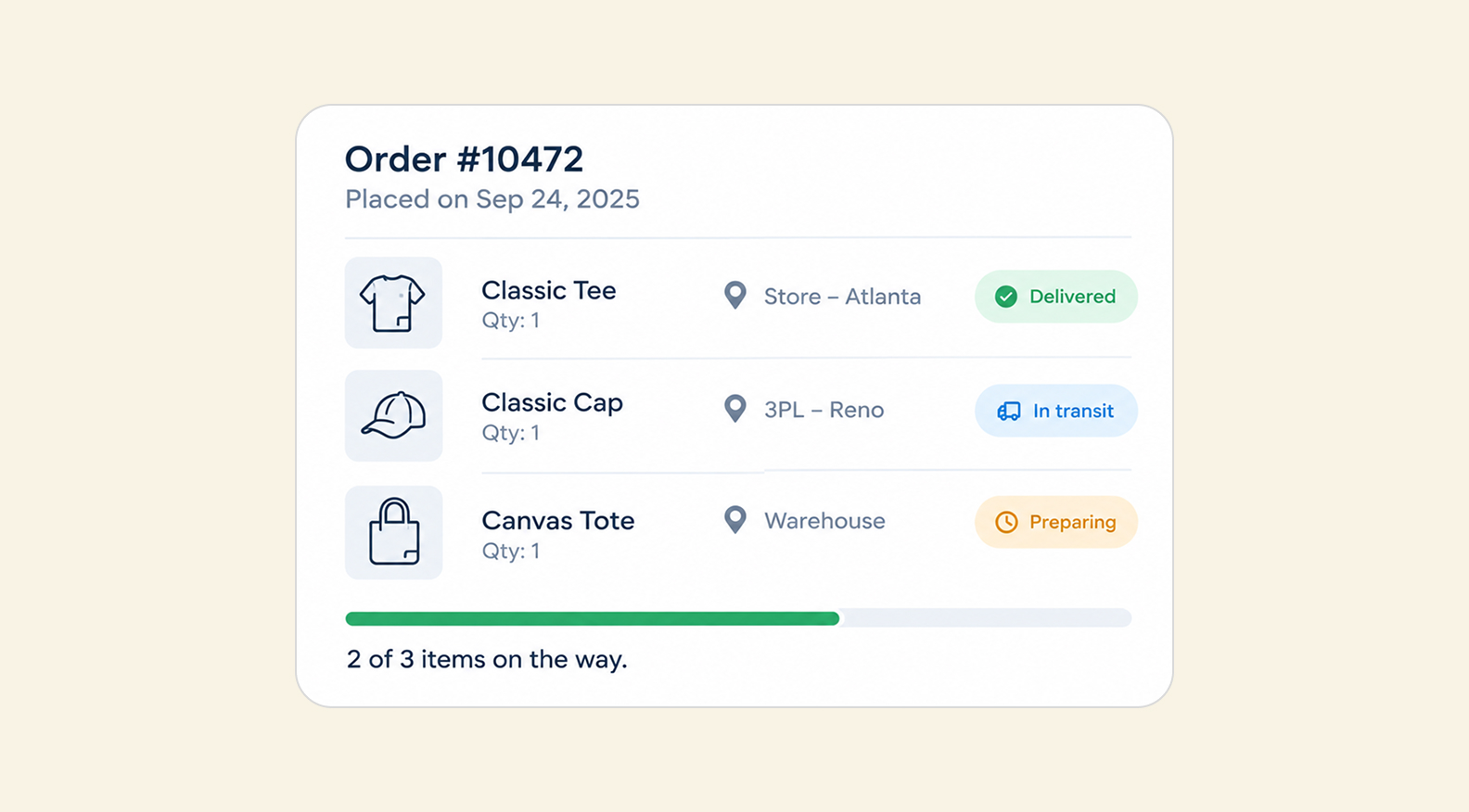
Regardless of what happens behind the scenes, customers expect one order. The tracking page should show “2 of 3 items delivered”, not three unrelated shipments.
But when each location keeps its own copy of status, the customer is going to see a “processing” status in one place and “shipped” in another. And when they contact support, support then has to check three separate systems to provide an answer.
Headless architecture makes this natural. With a headless ERP, the screen is one manifestation of the API. The storefront tracking page, the support agent’s view, and the store associate’s tablet all draw from the same order data.
Order Edits and Cancellations Mid-Fulfillment
Say a customer changes their delivery address after the boots have shipped, but before the store packed the jacket. When edits travel between systems by sync job or email, the store ships the jacket to the old address — which leaves you paying for a reship and handling a frustrated customer.
With a shared order record, the change is a single update. The jacket goes straight to the new address, and the boots are flagged for a carrier redirect.
Order Exceptions, With People Steering
You’re going to run into real-world surprises — a store that miscounts stock, a 3PL hitting capacity, or a carrier delay threatening the promised delivery date.
AI-native systems can spot these early and suggest a fix. The ops team knows things the system might not (like whether a certain store is short-staffed or if a faster route is worth the extra shipping cost), so a person on the team reviews and approves the AI’s suggestion, keeping human judgment in the loop.
Returns, Refunds, and Inventory For Distributed Orders
The return trip is where distributed order management can earn you lasting customer loyalty. Letting people return anything anywhere is a big selling point. It works smoothly when the returning item, refund, and restocked inventory all trace back to the same original order.
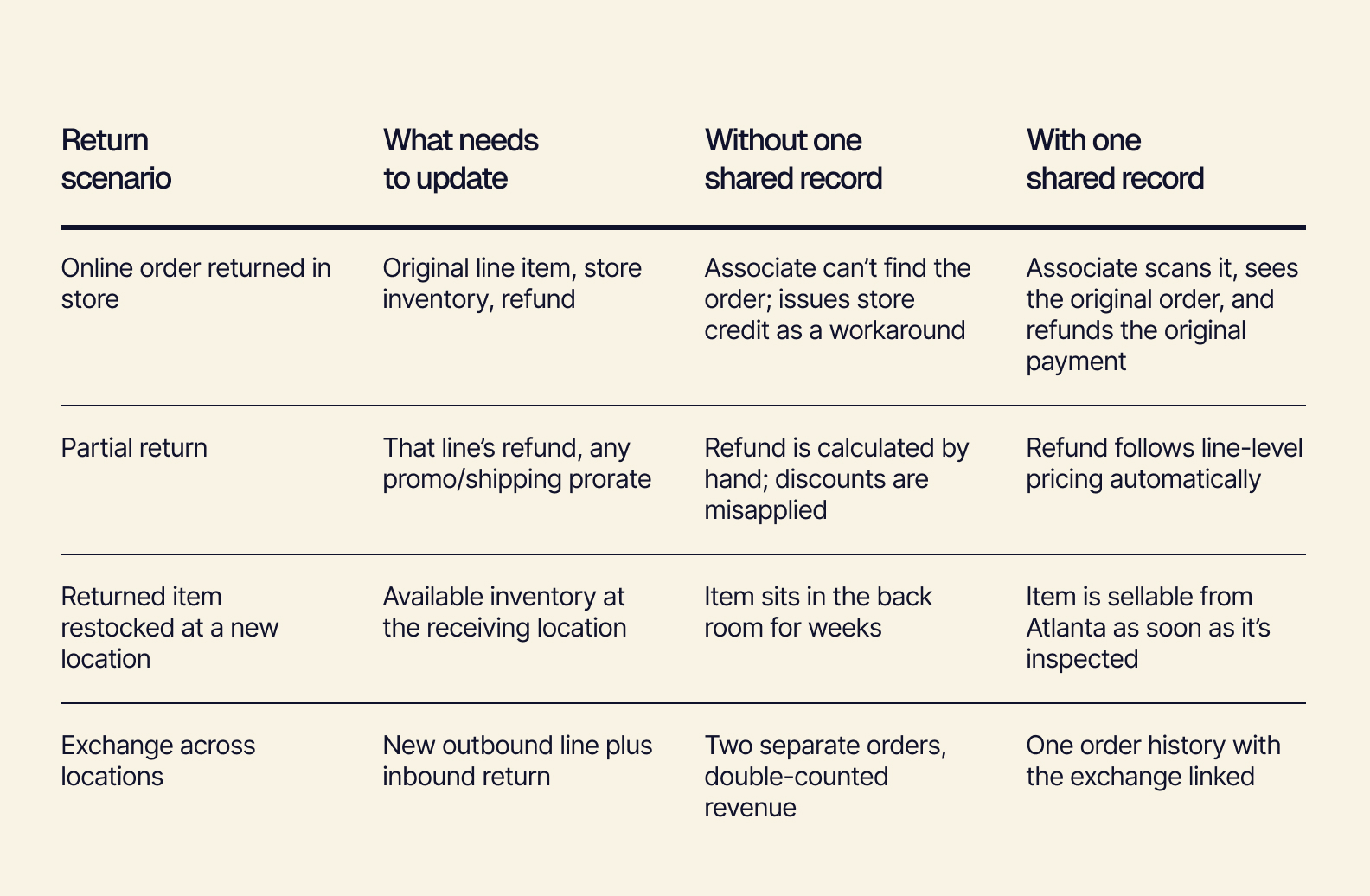
Creating a connected returns process pays off all across your business:
-
Returns become a growth lever. When shoppers know they can return an online order at the store location closest to them, they buy with more confidence. And a smooth return experience makes it more likely they’ll come back for a repeat purchase.
-
Returns become ready-to-sell inventory. A returned item that lands at a store doesn’t have to go back to the warehouse. It can be used as ship-from-store fulfillment for the next distributed order.
-
Decouple your accounting from your operations. Operations owns the detailed order record showing which location shipped what, which items came back, and where they went. Accounting receives clean, summarized postings.
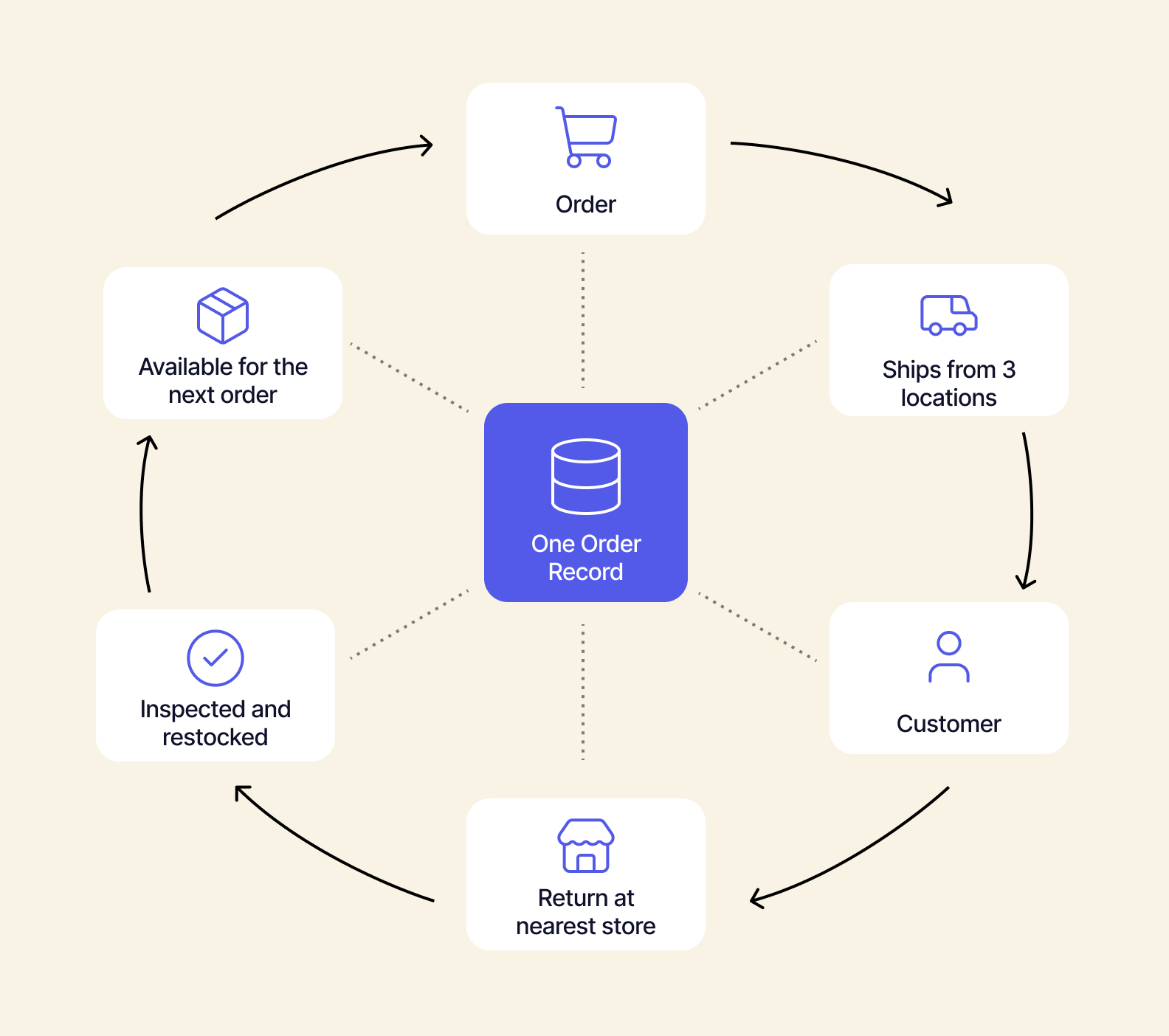
Every scenario explained above can be traced back to having one order record that every location, channel, and team relies on. This architecture decision is what the most effective distributed order management software is built around.
Distributed Order Management Software Built on One Source of Truth
The result of situations where a customer changes the delivery address and their order needs to be redirected is based on a single architectural choice. The order record lives upstream of every location, channel, and tool. Those tools plug into that record as composable capabilities. That’s what lets a distributed order stay whole from checkout to refund.
Four principles make that possible:
-
Source of truth upstream of everything. The order, inventory, and customer record sit in one place. Storefronts, 3PLs, POS, carriers, and accounting all read from and write to this real-time version. Nothing has to be reconciled after the fact.
-
Composability. Fulfillment locations, returns handling, and routing rules work as independent capabilities. Adding a second 3PL or opening a new store means connecting one more location, not reworking the entire system.
-
Headless. The same order data powers any screen, whether that’s customer tracking, the support console, or store associate tools. This enables everybody to see the same status at the same time.
-
Best-in-breed, not all-in-one. Keep the 3PL, WMS, and storefront that work well for you and simply connect them to a shared record.
How Tailor Approaches Distributed Orders
Tailor is a headless, composable, AI-native ERP. It’s a flexible, customizable, intelligent retail operations system for fast-growing ecommerce and omnichannel brands. Tailor is built around the shared order record you need for distributed order management.
With Tailor, you get:
Implementation happens via phased go-lives in roughly six-week increments. Connect existing fulfillment locations first, then layer in returns and store fulfillment.
Ship From Everywhere, Keep One Order
Shipping from everywhere is a valuable advantage, but the rest of the order’s journey needs to keep up. Build distributed order management on one source of truth to make every split shipment, address change, and cross-location return simple to handle for both your customers and your team.
See how Tailor keeps every order connected — book a demo.