Growth milestones are a fun, exciting part of building a retail brand. You might be looking forward to celebrating your first wholesale account, a pop-up that turns into a store, a Walmart Marketplace listing, or a best-selling bundle.
But each milestone you hit also requires your operations system to do something new. The ERP features you needed a year ago may not be the same ERP features you need today.
This guide maps ERP features to the milestones where you need them. It also shows how the right architecture lets new capabilities arrive on your schedule.
What you’ll learn:
- Key ERP features every retail brand starts with
- Retail ERP features for each growth milestone
- How to add ERP functionality without starting over
- AI features your ERP should have
Key ERP Features Every Retail Brand Starts With
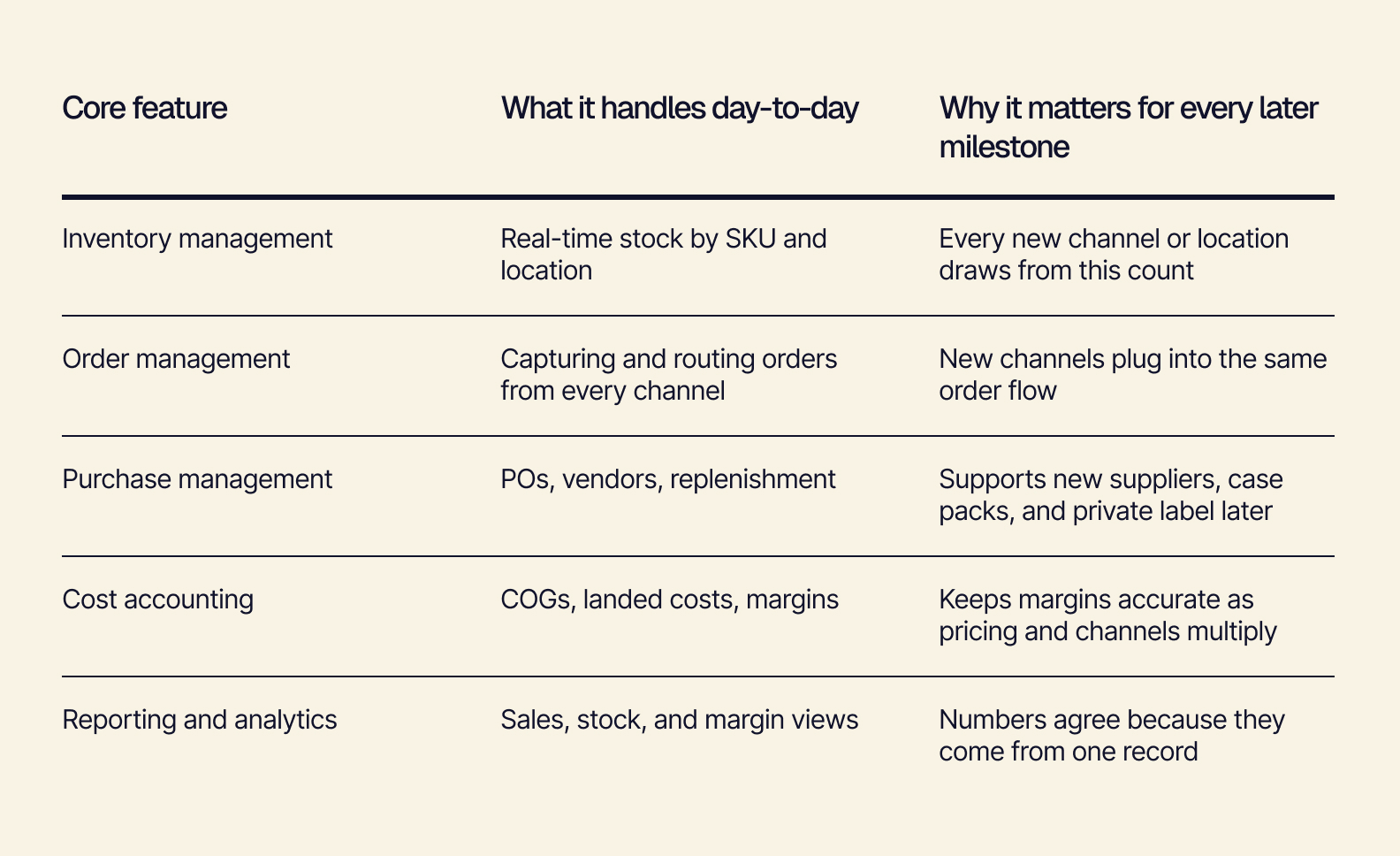
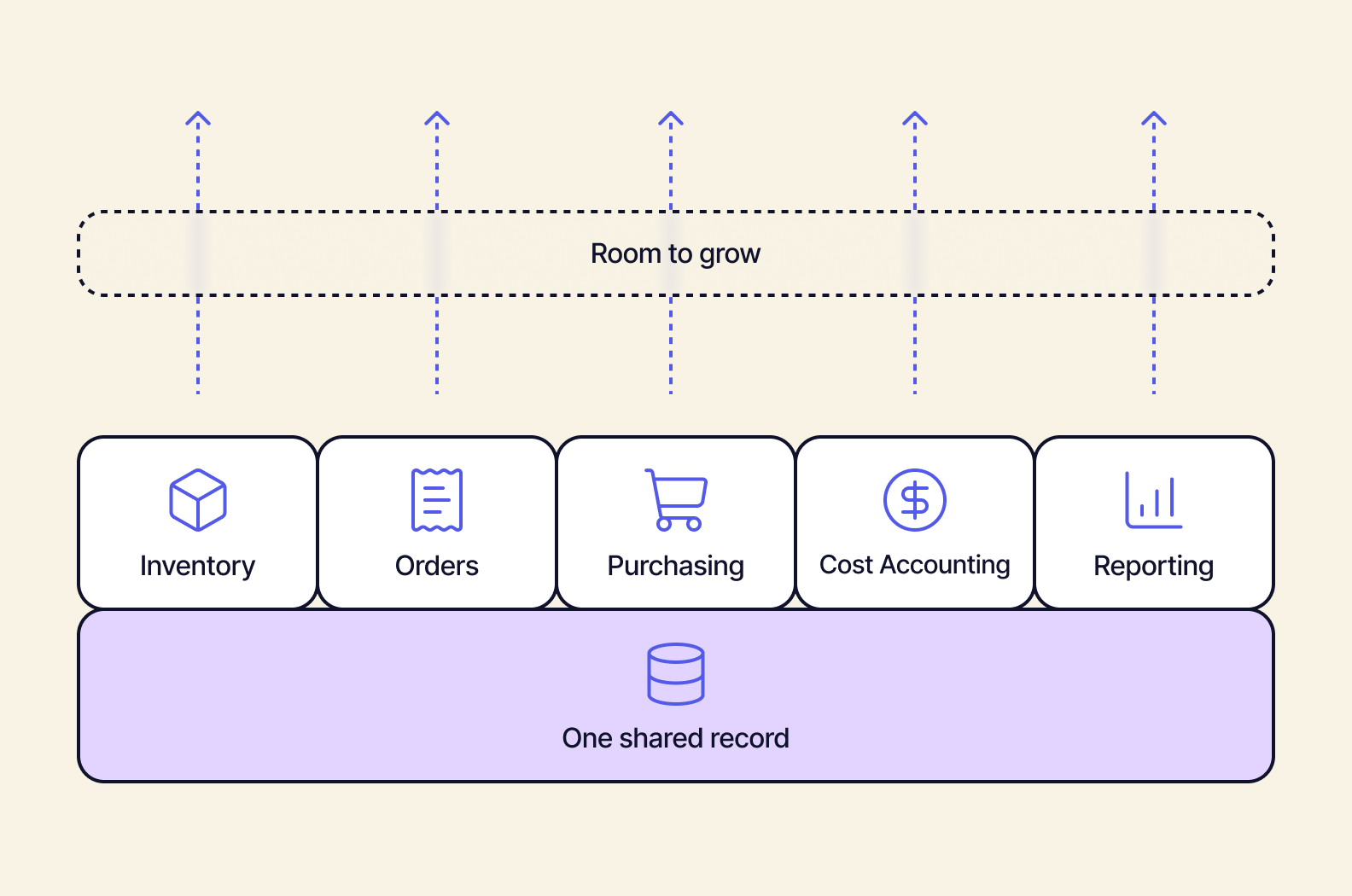
Every retail brand’s ERP feature set starts from the same basic core: inventory, orders, purchasing, cost tracking, and reporting. That core becomes a launchpad when every feature reads from and writes to one shared record — a source of truth upstream of everything.
For example, say a customer buys a sweater on Shopify. That one sale should go through all five features simultaneously. Inventory drops by one, the reorder point gets checked, the cost of the sale is logged against the margin, and the dashboard updates. It was one event and one record, but five features working from the same number.
Here’s what each of these core features handles, and why it continues to matter well after launch.
When foundational features live in separate tools — inventory in one app, orders in Shopify, costs in a spreadsheet — each one has its own version of the truth. If the inventory app shows 240 units available, Shopify says 180, and the cost spreadsheet is from last quarter, which one do you quote to a buyer?
Every milestone you hit adds another sync job. Your team ends up spending launch week reconciling counts instead of celebrating.
But when the core shares just one record, each new feature has something solid to build on. Adding wholesale or a second warehouse means building up, not starting over.
Two choices you can implement now will make an important difference down the road:
-
Decouple your accounting from your operations. Individual transactions happen in your operations. QuickBooks or Xero receives clean, summarized entries from upstream instead of tracking operational details itself. Finance can keep the tool they know, and operational features can evolve without touching the books.
-
Start with a data model designed for retail. Look for a data model that encompasses sizes and colors; bundles and gift sets; and monogramming or custom engraving. This matters from day one: Trying to add variant or bundle support later can mean re-mapping SKUs and migrating history. But if you implement it now, those milestones are ready when they arrive.
With this foundation in place, you’re ready to think about which ERP features are your current priority.
Retail ERP Features For Each Growth Milestone
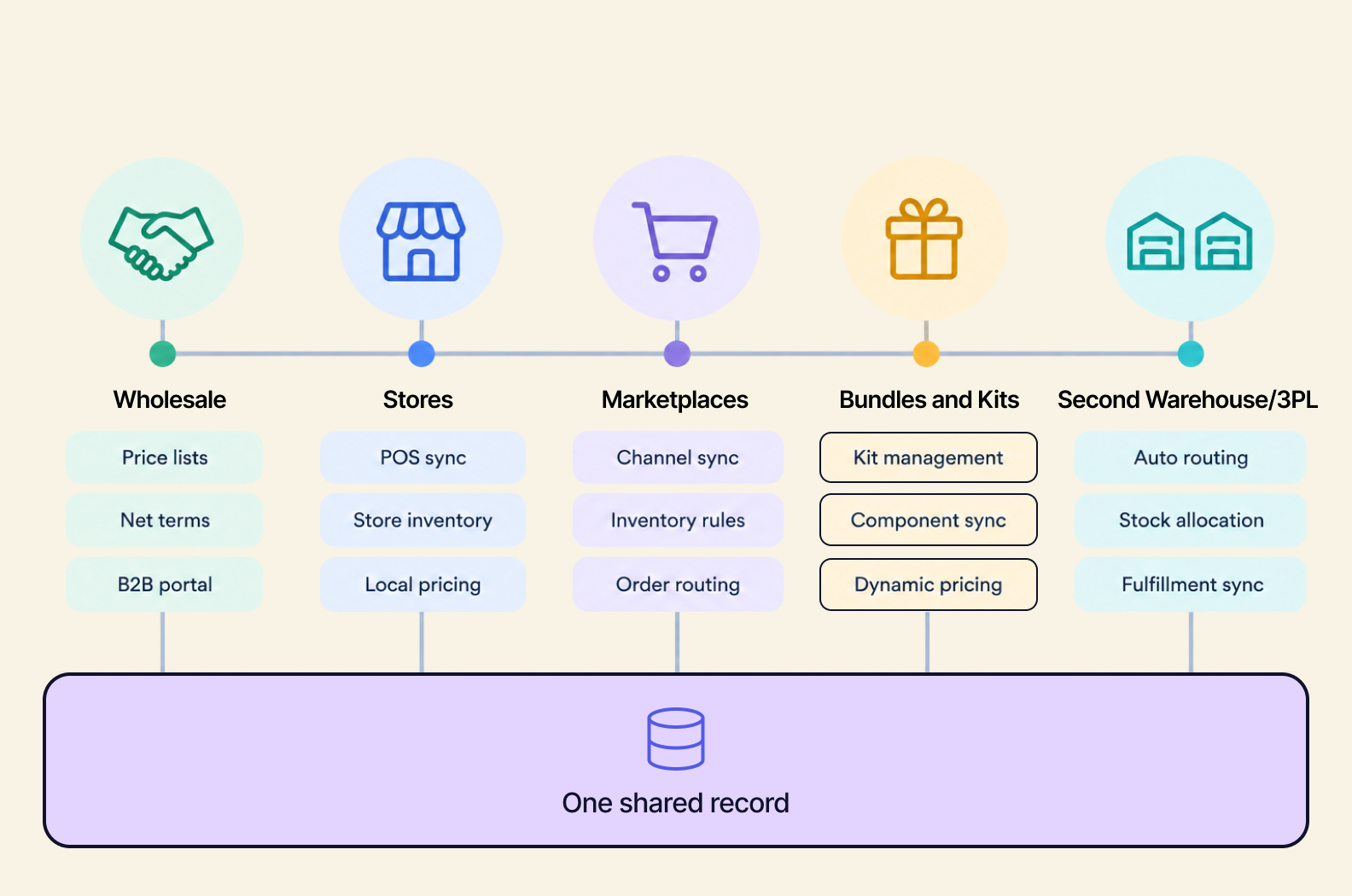
The features you need follow your growth milestones. It’s helpful to plan ahead by mapping out those projected milestones along with the expected capabilities you’re going to need for each one. That way, your operations will be ready when the time comes.
For each milestone below, you’ll find the features that matter most and what to plan for.
Adding Wholesale and B2B Accounts
A boutique or regional chain asks for your line sheet, or a trade show turns into a stack of wholesale orders. Often, this is the first time a brand sells to businesses as well as shoppers.
-
Features that matter: Customer-specific and tiered price lists, net payment terms, minimum order quantities and case packs (to track wholesale orders and single-unit DTC orders against the same stock count), and a B2B ordering portal where buyers can reorder on their own instead of emailing you.
-
What to plan for: Wholesale orders often ship weeks out. The system needs to hold inventory for future ship dates. If wholesale orders come in through email and spreadsheets, they don’t reserve inventory. DTC can sell the same units twice. But when wholesale orders reserve stock as soon as they’re entered, both channels can sell with confidence.
Opening Stores, Pop-Ups, or Showrooms
A holiday pop-up does well enough that you start seriously thinking about a lease. Or maybe you open a showroom where customers can try before they buy.
-
Features that matter: Real-time POS sync, store-level inventory, stock transfers between locations, buy online/pick up in store, and cross-channel returns.
-
What to plan for: Store counts that update overnight lead to online orders for items the store already sold. With live store-level counts, each store can do more than sell. It can also serve as a fulfillment point, giving you a better ROI from your store investment.
Expanding to Marketplaces (Amazon, Walmart, TikTok Shop)
You receive a marketplace invite or decide to meet customers where they already shop.
-
Features that matter: Channel inventory allocation and buffers (holding back a set share of stock so one channel can’t drain the rest), channel-level pricing, and marketplace and fulfillment fees flowing into cost of goods sold (COGS).
-
What to plan for: If you don’t have per-channel allocation, a single viral day on a marketplace can drain stock you had earmarked for wholesale commitments. With fees tracked by channel, you can see true margin per channel, informing your decision on where to lean in.
Launching Bundles, Kits, and Personalized Products
These products — a holiday gift set, subscription box, or monogrammed item — are often a brand’s most creative and highest-margin launches.
-
Features that matter: Bundle and kit handling, a data model designed for retail variants and personalization, and component-level inventory (selling one gift set should deduct each individual item inside it).
-
What to plan for: If the system only tracks the gift set as a single SKU, it can’t see that the candle is also selling on its own. So the set will continue to show as available… until the day you suddenly can’t build one, because an individual component has run out. When components are tracked individually, however, you can create new bundles from existing stock without adding inventory risk.
Adding a Second Warehouse or a 3PL
Shipping times to one coast are slipping, or your order volume has outgrown the in-house team. These are definitive signs that your business is scaling. But with growth comes the need for infrastructure to support it.
-
Features that matter: Multi-location inventory, transfer orders (stock that’s in transit between locations), fulfillment routing rules (shipping from the closest location that has the item in stock), and landed cost by location (it’s more expensive to stock some warehouses than others).
-
What to plan for: A 3PL running its own stock record becomes a second source of truth. Month-end turns into an entire reconciliation project. But when your record is that source of truth, the 3PL handles picking and shipping while your system holds the master count. Adding a third location later becomes simple.
How to Add ERP Functionality Without Starting Over
As a growing brand, the most valuable ERP capability may be the ability to add capabilities. There are three primary ways a new ERP feature usually arrives: as a module upgrade in an all-in-one system, as a bolt-on app, or as a custom script or spreadsheet. How that feature arrives can make or break whether a milestone launches on time or ends up stalled in a project queue.
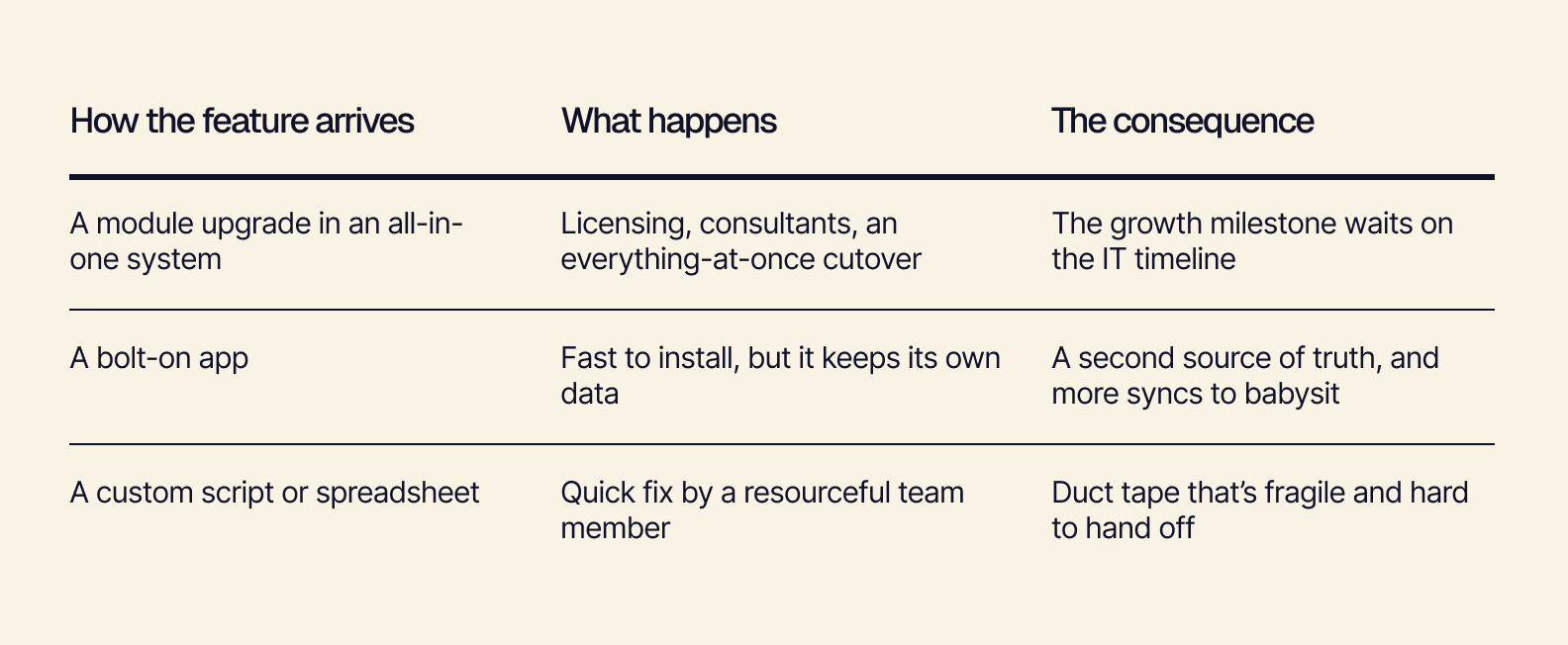
While each of these can help you get the milestone live in the moment, they’re only going to add more friction over time.
How Composable ERP Adds Capabilities Instead
A composable, headless ERP like Tailor takes a different approach. Instead of adding features to or alongside a fixed system, new capabilities connect right to the same shared record. Here’s how Tailor makes that work:
-
Composable, modular design: Tailor’s capabilities — inventory management, omnichannel order management, purchasing, production, and cost accounting — run as independent modules on one shared data model. Turn on the ones you need now and add others as you reach milestones. Since each module reads from the same record, adding B2B pricing or multi-location inventory doesn’t interrupt what’s already running.
-
Headless architecture: Tailor separates the backend, where your data and business logic live, from the screens your team and customers use. A new store POS, wholesale portal, or warehouse scanner app is a new front end on the same data, not an entirely new system to sync. You can design each screen for the people using it, while every channel works from the same numbers.
-
API-first connectivity: Everything in Tailor is available through documented APIs. That means any API-enabled tool can connect — you don’t need a one-to-one integration. Shopify, Amazon, your 3PL, and QuickBooks all plug into the same record. As your stack changes, you can keep what works and connect new tools.
-
Quick to integrate: Brands turn on capabilities milestone by milestone, with phased go-lives in roughly six-week increments. Your team leads with hands-on support from ours.
You get the ability to say yes to opportunities, like accepting the wholesale deal next month instead of next year. And because every capability shares one record, your newest ERP features have trustworthy data to work from — which matters most for AI.
Modern ERP Features: Where AI Fits, With Your Team in Control
The newest ERP features are AI-native: suggestions, forecasts, and flags that save time. They work best when they build on that shared record of truth, and when a person makes the final call. Your team knows things the data doesn’t — that a certain supplier always ships late in Q4, or that an influencer post is going live on Friday.
Let AI handle the number-crunching while people add the context. Take a look at these AI-native ERP features that support each milestone:
-
Replenishment suggestions: The system drafts POs from sales velocity and lead times. The buyer reviews, adjusts, and approves. This is especially helpful once wholesale adds case-pack quantities and future-dated orders to the math.
-
Demand forecasting by channel: The system projects demand by channel. Planners add what they know, like an upcoming promo or a wholesale order. This is useful when a marketplace launch makes it difficult to rely on historical data.
-
Exception flags: The system marks unusual stock movements, margin dips on a bundle, or a 3PL count that doesn’t match. Then a person investigates.
-
Allocation recommendations: The system suggests channel buffers before a big sales event. Ops sets the final numbers.
AI that runs on scattered data gives scattered suggestions. A replenishment model that can’t see the wholesale orders reserved for next month will suggest reordering too late, and eventually, your team will stop trusting it. On a shared record, however, AI-native features become more and more useful with each milestone.
Your Next-Milestone Checklist
Before your next ERP conversation, these three questions can help clarify what you need:
-
Which milestone are we most likely to hit in the next 12 months?
-
Which of its features do we already have?
-
Would adding the rest mean another tool to connect, or a new capability on the system we already run?
If the answer is a new capability, you’re building on a foundation that’s ready to grow.
Features That Keep Up With Your Growth
Growth milestones should feel like wins, not projects. With features that share a single record and arrive as you need them, your next wholesale deal, store opening, or gift set launch can go live with confidence — and fewer headaches.
Tailor’s headless, composable, AI-native ERP is built to be a flexible retail operations system for brands that are growing fast.
Book a demo to see which capabilities fit your next milestone.