ERP integration is supposed to provide a single source of truth across all business systems.
But for many mid-size teams, the reality is very different.
Your team is stuck doing constant manual reconciliation. Connections are continually breaking. And each new tool feels like a liability, not a capability.
ERP integration should have simplified your systems. Instead, it’s making everything more complex.
ERP integration itself, however, isn’t the real issue. The true problem lies upstream, with the architecture behind it. That’s the stage where your integration is make-or-break — literally.
Let’s look at why your integrations keep breaking and the model that solves the problem for good.
What You’ll Learn
- What ERP integration is actually supposed to do
- Why your integrations keep breaking
- The model that makes integration chaos inevitable
- What unified ERP integration looks like in practice
- What ERP integration should unlock for growing teams
What ERP Integration Is Actually Supposed to Do
The goal of ERP integration is to give your business a single source of truth across all tools.
Integration connects your ERP system with the other tools you use to run your business so they can automatically exchange data. Your integration points will probably include:
- Ecommerce platforms (Shopify, BigCommerce, Amazon)
- Warehouse management systems
- Shipping and logistics tools
- Finance and accounting systems
- CRM and customer platforms
Typically, ERP integrations make this happen via APIs (Application Programming Interfaces). By allowing your various software systems to exchange information, the API ensures every system is working from the same set of data.
If your data is inconsistent, you can’t help making inaccurate decisions. You’ll sell inventory you don’t actually have in stock, or inaccurately report financial information.
And if you don’t have ERP integration at all, well, you’re looking at a whole lot of wasted time and human error coming your way. Your employees will be forced to manually type (and retype) orders and reconcile reports. Everything gets slower… and your customers will feel the impact.
Why Your Integrations Keep Breaking
When ERP integration works well, everyone is working from the same operational data — creating organizational alignment.
But too often, this doesn’t happen, and ERP integration results in a long checklist of maintenance items instead. It shouldn’t feel like a part-time job to maintain. When you rely on point-to-point connections, however, that’s too often what happens.
If you’re like most companies, you’ve added more tools over time as your company has grown. Most likely, you added those tools using point-to-point integration: connecting each system directly to the other systems it needs data from. You end up with a bunch of custom integrations — each one with its own API connections, data mappings, sync logic, and error handling. This is what leads to so much maintenance.
With point-to-point connections, each new tool you add multiples the problem. Your integrations become more and more complex because of something called combinatorial growth. We know, you didn’t come to this blog post for an algebra lesson, but stay with us: When systems connect point-to-point, the number of potential connections grows according to this formula:
Connections = n(n−1)÷2
n = number of tools. This formula shows the number of unique connections between systems, demonstrating how point-to-point connections grow quadratically, not linearly.
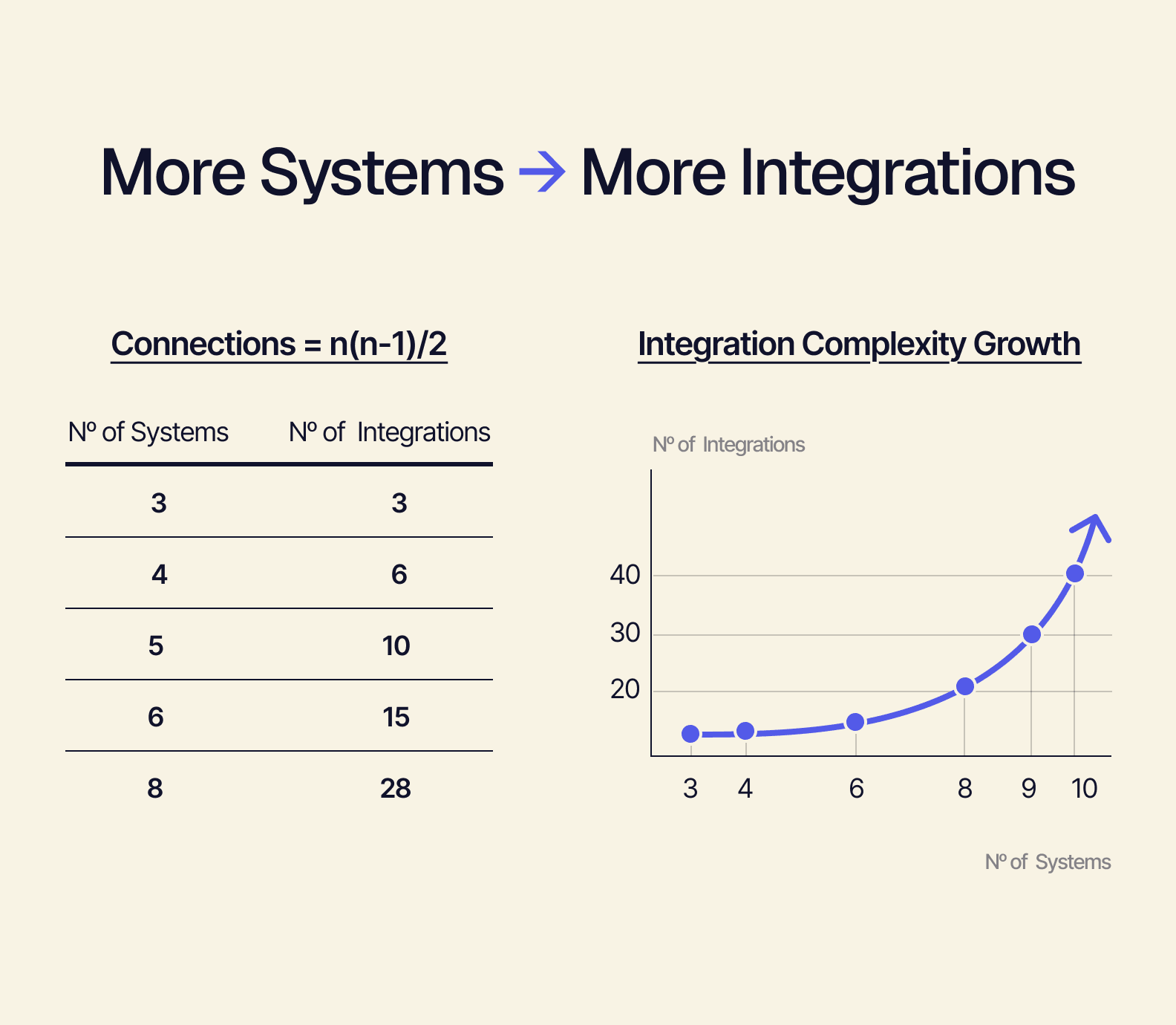
Maybe you have six systems that are connected point-to-point. If we plug that into the formula…
6(6−1)÷2 = 15
… you have 15 potential integrations. Adding just two additional tools (bringing you to eight total)…
8(8−1)÷2 = 28
… almost doubles the number of connections, bringing you to 28.
And the more integrations you have, the more failure points you have across your system — so that’s 28 opportunities for failure. If Shopify updates its API, for example, this change can break every individual Shopify integration.
Point-to-point connections aren’t a solution. They’re a structural liability.
The Model That Makes Integration Chaos Inevitable
“Integration best practices” like middleware platforms, iPaaS connectors, or stricter data governance might help manage point-to-point integrations. But they aren’t going to fix the root cause. As long as you’re still adding connections, that base equation is unchanged. To solve the underlying problem, you need an entirely different model.
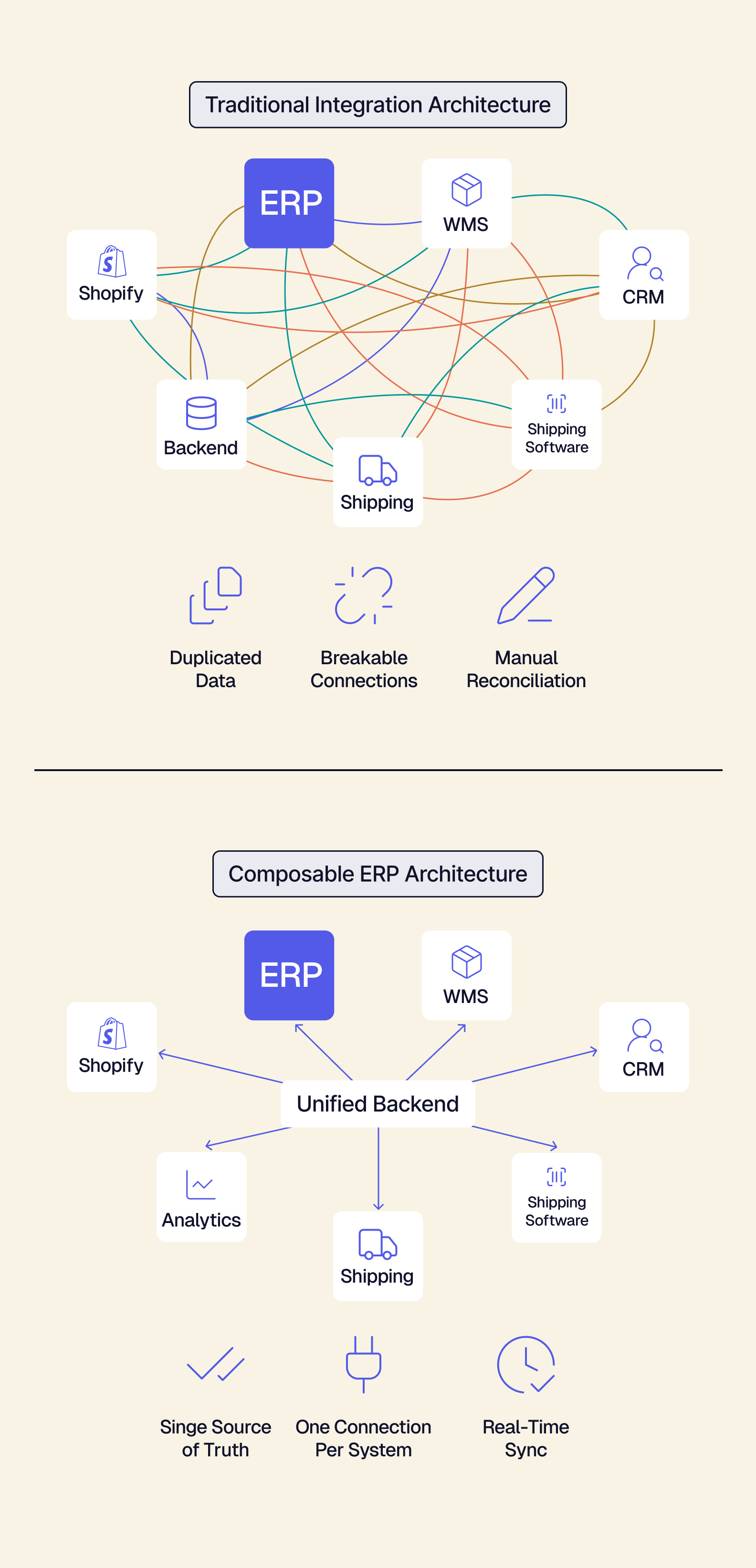
The solution is a shared backend layer where the backend is the central operational platform and all other tools connect to the backend — not to each other. In this case, your architecture is composable. You build, or compose, a system by selecting your preferred tools and connecting them to the backend.
Point-to-point architecture has too many structural problems to be successful. It’s architecturally guaranteed to fail at scale.
But with composable architecture, adding tools actually strengthens the system instead of complicating it. The backend contains the shared data model, business logic, APIs, and integration layer. So connecting a tool to the backend improves flexibility, not fragility.
What Unified ERP Integration Looks Like in Practice
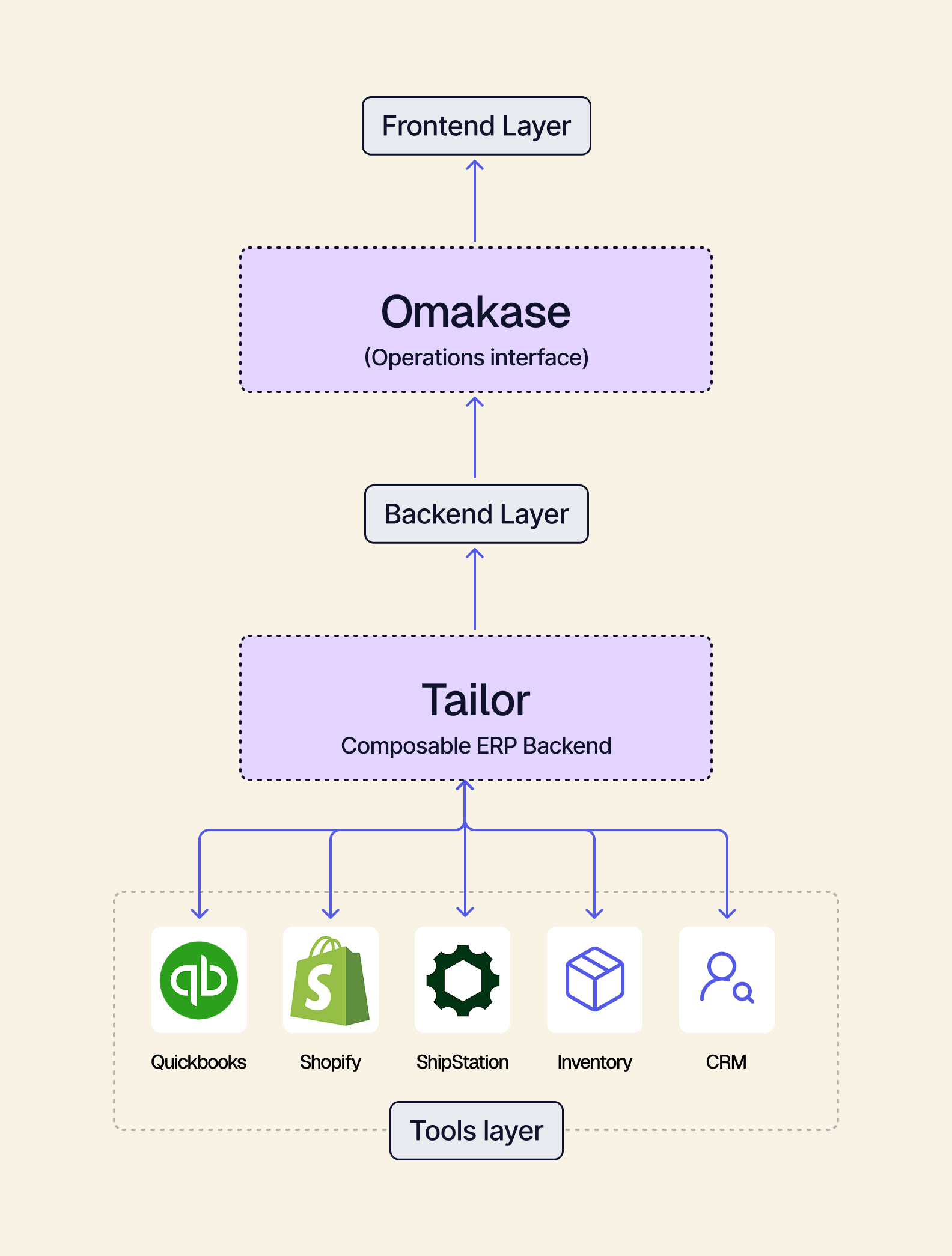
Going composable means you can keep the tools you currently use and simply connect them to your unified backend. There’s no need to rip everything out and start from scratch. Just take QuickBooks, ShipStation, Shopify, or whatever else you use and connect them to one unified layer.
Implement this unified backend model with a solution like Tailor. Tailor has a composable ERP backend and is also headless. The backend is decoupled from the frontend, with an operational frontend called Omakase. Omakase serves as a single unified interface where your team can access all of the information they need. This prebuilt frontend provides procurement, inventory, sales, and manufacturing in one modern UI, all pulling from the same unified backend. Your team no longer has to jump between five different tools to find one number.
With a unified backend and a separate headless frontend, you can add or swap out new tools anytime without breaking the system.
You can also benefit from Tailor’s:
- Pre-built, standardized integrations
- Real-time data synchronization
- Faster implementation (weeks vs. months)
There’s no need for manual reconciliation, and your workflows will move much more quickly.
What ERP Integration Should Unlock for Growing Teams
Is ERP integration worth it for mid-size teams? Yes — if it’s built on a unified backend.
When your integrations are no longer based on fragile, complex connections between siloed systems, growth stops being a systems problem.
With composable ERP, everything connects to the same operational layer. This flexible stack gives you the freedom to add a new sales channel without a new integration project, and stop deferring the tools you actually want — because every addition strengthens the backend instead of complicating it.
Explore Tailor Omakase to see the prebuilt frontend that connects Shopify, QuickBooks, ShipStation, and more.
Or dive deeper and learn more about the difference between connecting tools and unifying your backend.