If you’ve found yourself thinking “this shouldn’t be so difficult” at any point in your ERP search, there’s a reason for that.
Every vendor is listing the same features and promising similar outcomes. This makes it hard to tell what makes one solution better than another — and leaves you uncertain of the best decision to make for long-term growth.
The problem is that these conversations are based on the wrong criteria. In this guide, we’ll explain how to evaluate ERP integration solutions according to what really matters: how they handle complexity, how quickly they deliver value, and how well they support growth over time.
What You’ll Learn
- What ERP Integration Solutions Are Supposed to Do
- Why ERP Integration Solutions All Sound the Same
- How to Actually Compare ERP Integration Solutions
- Three Questions to Ask Any ERP Vendor Before You Commit
- What the Right ERP Integration Solution Should Unlock
What ERP Integration Solutions Are Supposed to Do
ERP integration promises benefits including:
- Automation to replace manual reconciliation
- Systems that share data automatically
- A single source of truth with real-time visibility across inventory, orders, finance, and operations
As you’re scaling up, you’re going to hit a point of volume, speed, and complexity that’s impossible to continue managing manually. ERP integration solutions replace manual processes so you can handle growth with confidence and ease.
If you’re only evaluating solutions based on these benefits, however, you’re missing a massive piece of the puzzle. Features aren’t what make one solution stand out over another. The most important question to ask when comparing options is:
- How does this ERP integration solution handle complexity as my business grows?
For example, if you decide to add a new tool, a new channel, or a new team, does the system become more fragile or does it stay stable?
This helps you cut past the marketing fluff to truly understand how effectively a certain system will help you grow.
Architecture is make-or-break — quite literally.
Learn more about how integration works and why architecture matters.
Why ERP Integration Solutions All Sound the Same
First of all, you’re not missing something: Yes, all ERP integration solutions sound the same.
If you get deja vu every time you visit another vendor website (seeing words like “real-time sync,” “seamless integration,” “single source of truth,” or “unified data” come up again and again), or you’re laying out feature lists side-by-side but struggling to tell which one is “better”... this is because every vendor uses the same surface-level language to promise the same outcomes.
And that makes comparison really, really hard.
Remember, while features and pricing matter to a degree, they can’t tell you what you really need to know. Two solutions might have the exact same features, yet entirely different outcomes, because their architecture is different.
Features are what a solution does. Architecture is how the solution does it.
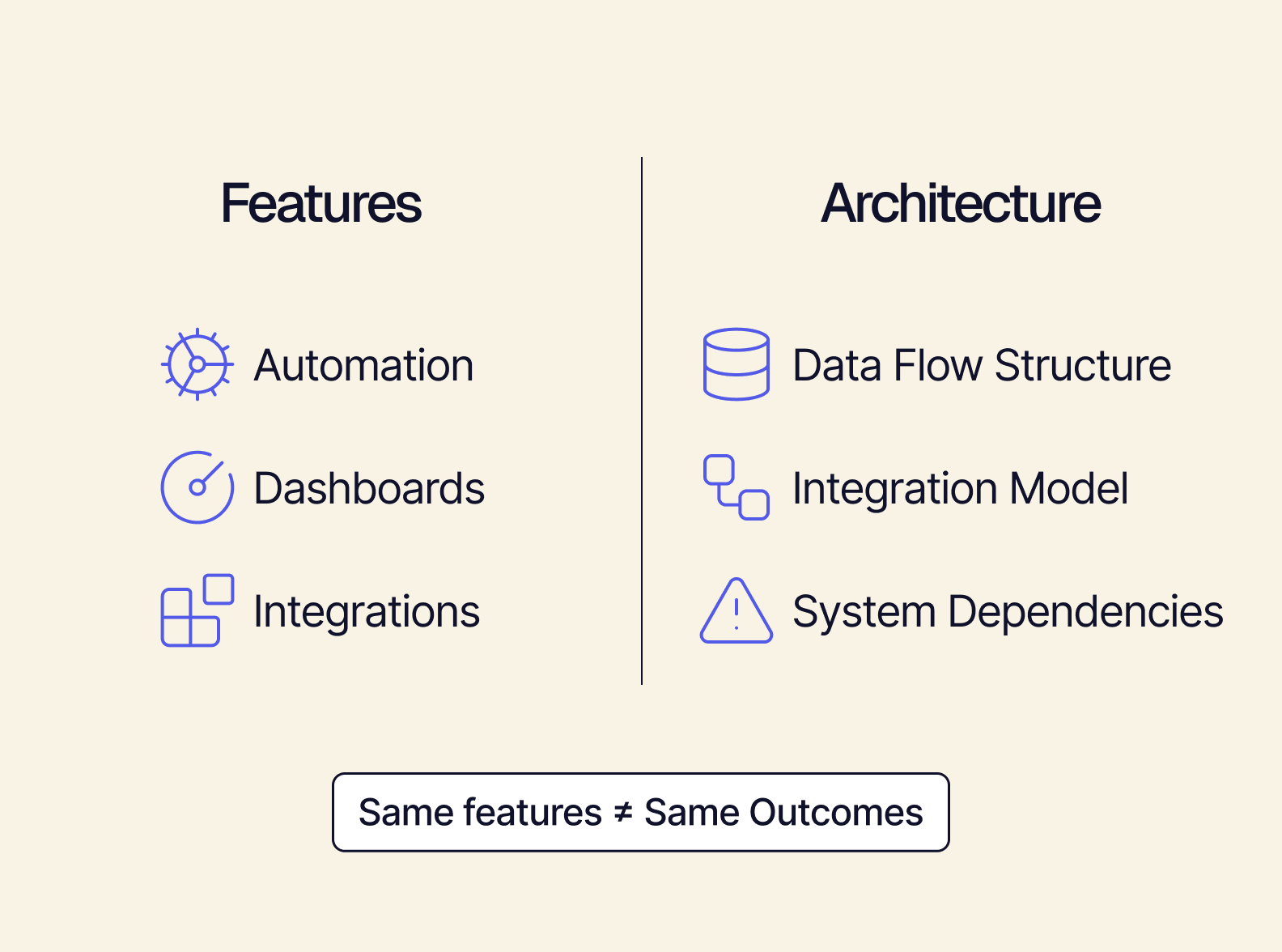
There are two major concepts that are helpful to understand about ERP architecture:
- Does a given solution connect your tools or replace them? If you’re just connecting your tools, all systems remain separate. Each one is its own, independently maintained project — which not only keeps your existing complexity, but adds to it. What you want is a unified backend: a composable model where all tools connect to a single central layer, adding flexibility instead of chaos.
- Does a solution’s complexity grow linearly or exponentially? It seems logical to think that adding one more tool means managing one more integration (linear growth). But when you’re dealing with point-to-point architecture, each new tool has to connect to every existing tool — so complexity grows quadratically instead. With the wrong architecture, the more integrations you add, the more failures and breakage you’re going to experience.
How to Actually Compare ERP Integration Solutions
So what questions should you be asking ERP vendors to get the information you need?
- How complexity scales
- Whether migration is required
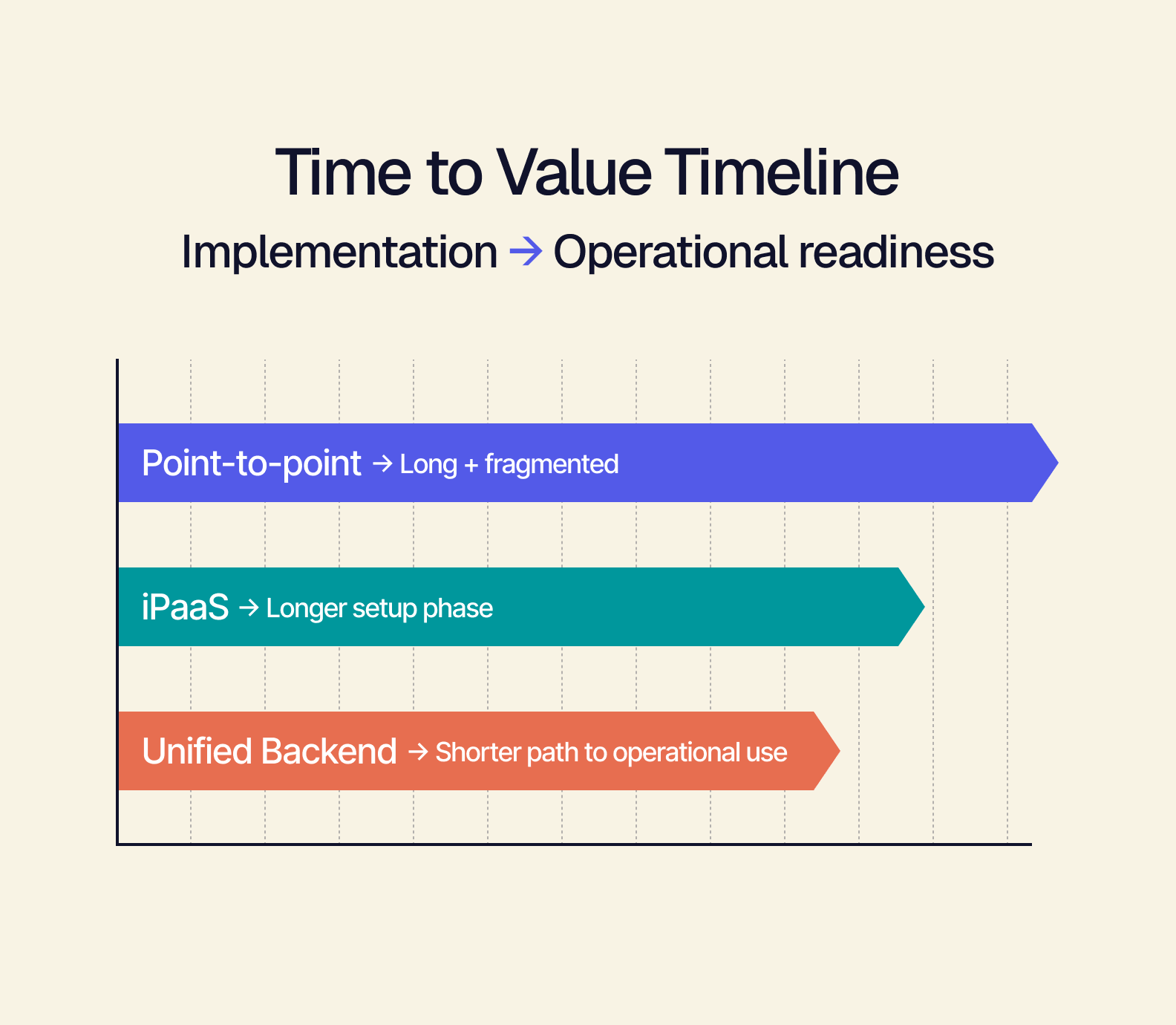
- How long is the time to value
Here, we’ve compared the three major architectural approaches across these criteria. Unified backend performs better across the board:
3 Questions to Ask Any ERP Integration Vendor Before You Commit
The comparison framework above is something you can apply in a real vendor conversation. Your goal is to drill down behind marketing language and get at the architectural answers. If a vendor gives you a confident, specific answer to these questions, that’s a green flag. Talking in a circle or going back to benefits language is the opposite.
Here are those three helpful questions to ask:
- Does your solution connect my existing tools, or do I need to replace them? With a point-to-point or iPaaS connection, your tools can stay, but this will multiply complexity. A unified backend also keeps your existing tools, but connects them to the backend instead of to each other — a much better solution. (You can also ask how many of your current integrations would need to be rebuilt.)
- What happens to my integration complexity when I add a new tool? If the vendor responds by talking about building a new connection, configuring mappings, testing, and maintaining it — that’s not a unified backend, regardless of what they call it.
- How long until we’re actually operational, not just implemented? A “go-live date” only refers to implementation — meaning the technical setup is complete. But you also need to know when you’ll actually be able to start working from the system.
What the Right ERP Integration Solution Should Unlock
You may have been thinking of that new sales channel you haven’t launched or the wholesale program that keeps getting pushed off as a business problem. But what if it’s actually an integration architecture problem?
Now, you know what you need — a composable, unified backend — and you know how to evaluate ERP integration solutions against the criteria that matter. Armed with the right questions to ask in vendor demos, you can move forward with ERP integration in weeks, not months, with no rip-and-replace needed.
That’s what Tailor is built to do — connect your existing tools into one unified backend, without replacing what’s already working.
If you’ve been evaluating complexity, migration, and time to value, see how Tailor’s pre-built modules and integrations measure up with each.
Or, read more about how to use composable ERP to build a framework that prevents tool chaos.