The purchase order process is the series of steps a business follows to buy goods from a supplier. For retail brands, each PO also serves as an inventory decision. The more closely purchasing and inventory are connected, the smoother your PO process will be.
What you’ll learn
-
Each step of the purchase order process
-
The difference between purchase requisitions and purchase orders
-
Three ways the process changes with composable, headless ERP
Purchase Order Process Steps
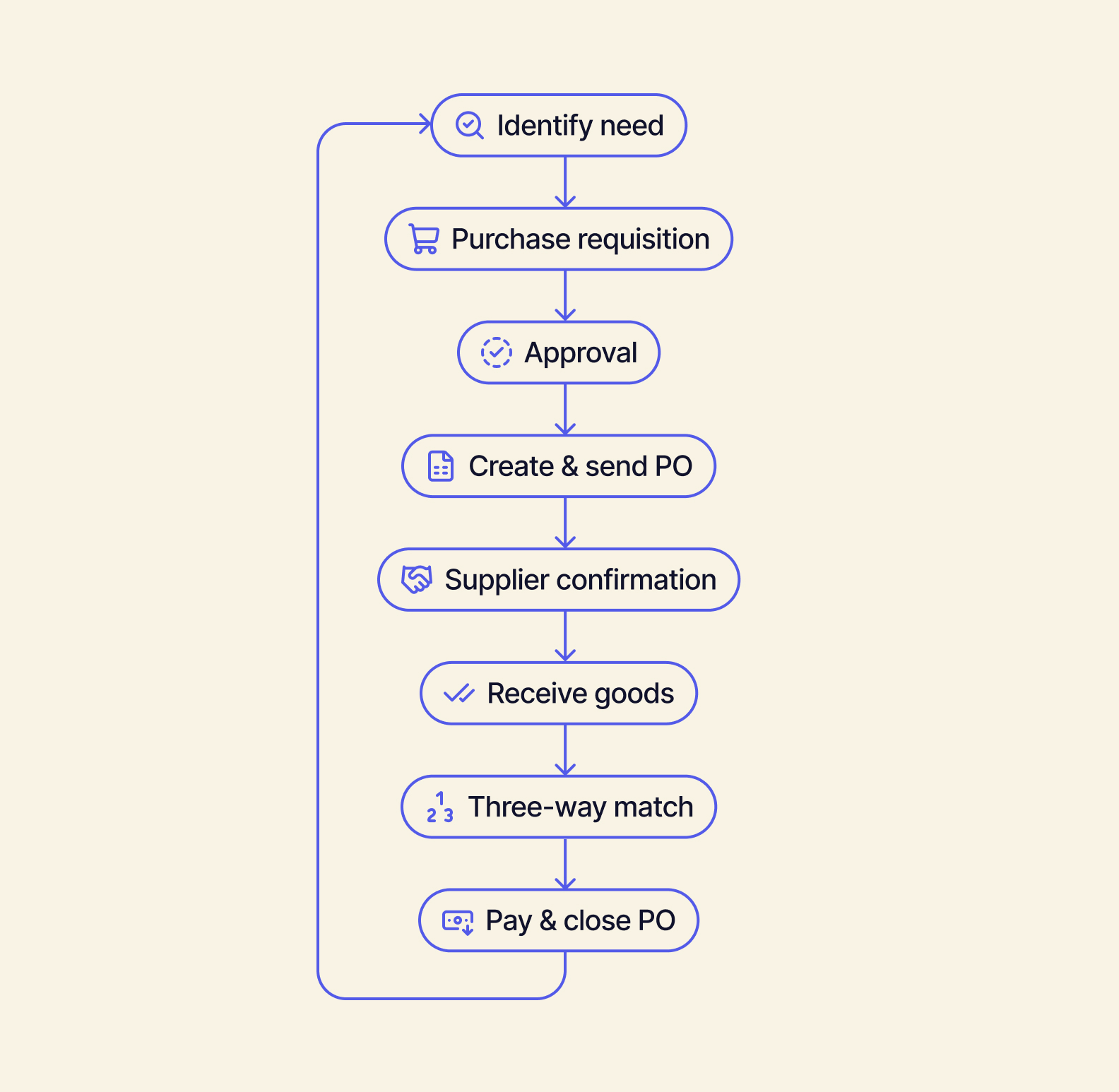
Most PO processes follow the same eight steps. The details at each step — who triggers it, approves it, and what gets checked — separate a smooth process from a manual one.
To see how this works in practice, let’s take an example reorder at a home goods brand that sells candles on Shopify, Amazon, wholesale, and two retail stores. Throughout the following steps, we follow this same reorder from the moment stock runs low to the moment the purchase order closes.
1. Identify the Need
Every purchase order is initiated because of a need. Maybe you have low stock, an upcoming launch, or a material has run out. For product brands, that PO trigger is typically an inventory number (a reorder point) — not somebody submitting a request.
Example: After a strong weekend of in-store POS sales, the brand’s bestselling candle drops below its reorder point of 500 units.
2. Create a Purchase Requisition
A purchase requisition is an internal request employees submit to buy an item. It covers the item, quantity, preferred vendor, and estimated cost. This document is just an internal request — not a binding commitment to the supplier (that’s your purchase order).
Example: The ops manager requests 2,000 candles from the brand’s usual manufacturer at ~$8/unit, equaling ~$16,000.
3. Review and Approve the Request
Someone else within the company compares the purchase requisition against budget, demand, and current stock before approving. Orders that are greater than a predefined amount require signoff from a higher level of management (this is called an approval threshold).
Example: Because the $16,000 order is over the brand’s $10,000 threshold, the purchase requisition goes to the owner. They check stock across both stores and the warehouse before signing off to continue moving the purchase order approval process forward.
4. Create and Send the Purchase Order
Now, the approved request can turn into a formal PO to send to your supplier. A purchase order should include information including:
-
PO number
-
Items and SKUs
-
Quantities
-
Unit prices
-
Payment terms
-
Ship-to location
-
Delivery date
The PO becomes legally binding after the supplier accepts it.
Example: PO #1042 goes out for 2,000 candles at $8 each, shipping to the brand’s warehouse by March 15th.
Supplier Confirmation and Tracking
Upon receipt, the supplier confirms the PO’s quantity, price, and ship date. The PO will remain open until the goods arrive. Open purchase orders are valuable information: they represent incoming stock you can plan around.
Example: The manufacturer confirms the order, but notes that 200 units will ship two weeks late. In response, the brand adjusts its wholesale delivery promises.
Receive the Goods
When a shipment arrives, the warehouse counts it, double-checks it against the PO, and records a receiving report (also called a goods receipt). Partial and short shipments are common retail issues. If this happens, the PO will stay open until all units have arrived.
Example: The first shipment of 1,800 candles arrives on time. The team logs the receipt, notes 12 broken jars, and keeps the PO open to await the remaining 200 units.
Three-Way Match
This step in the purchase order process involves three documents:
-
The purchase order (what you ordered)
-
The receiving report (what arrived)
-
The supplier invoice (what you’re billed)
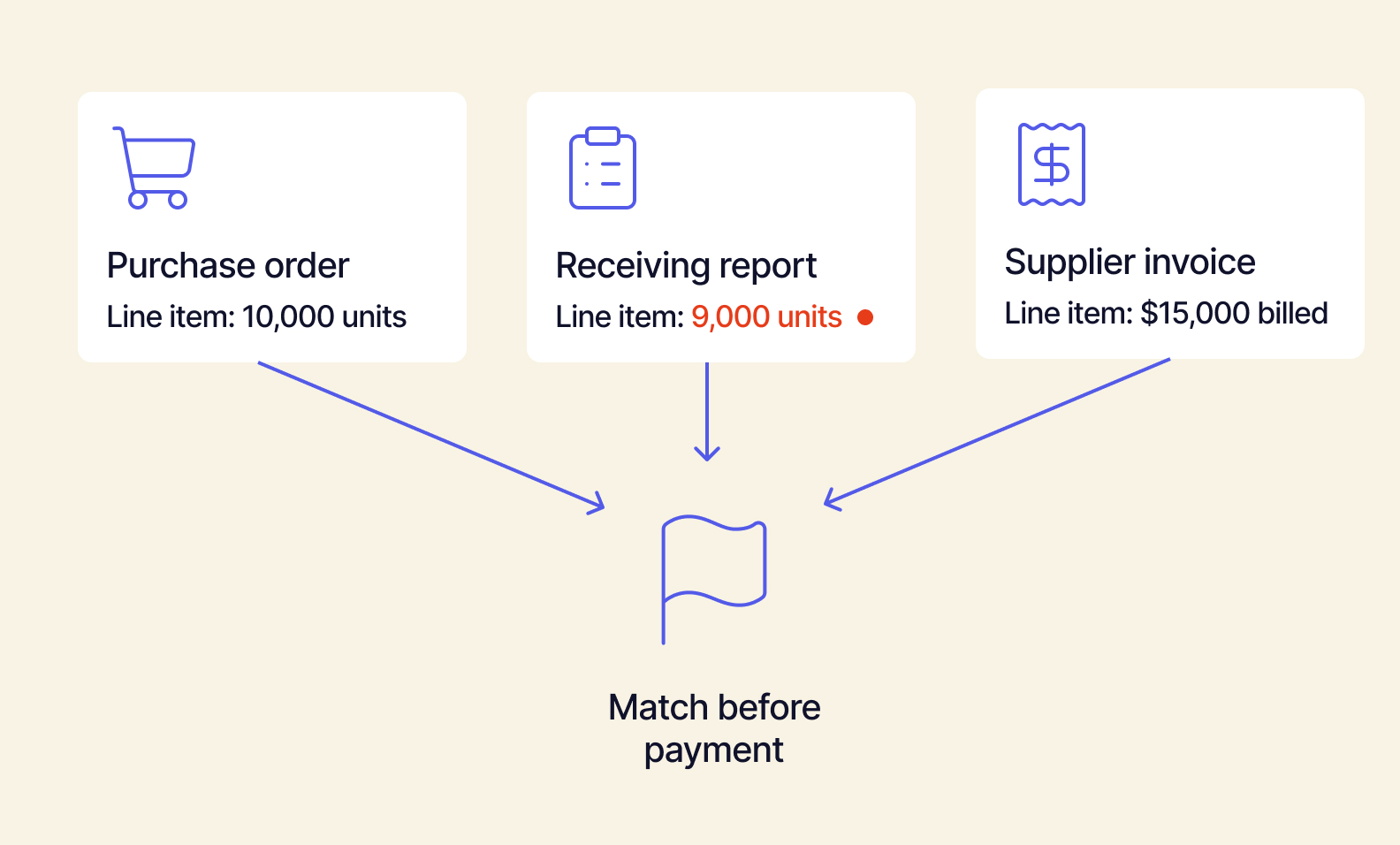
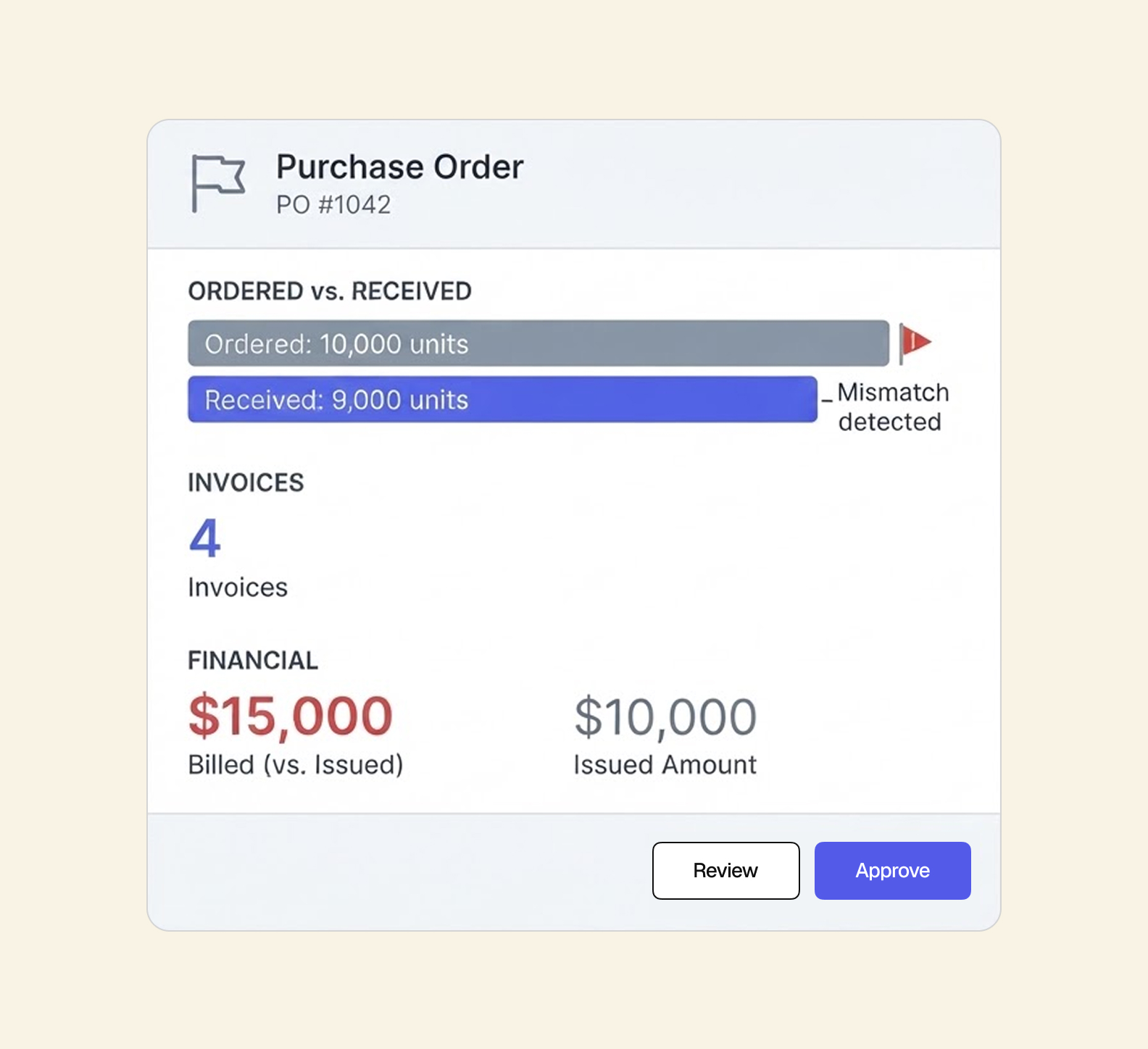
Before payment, you compare these three to make sure they align. Minor price changes or rounding are okay. But three-way matching is an important step to catch duplicate invoices, create a paper trail, and make sure you aren’t overpaying before the money leaves your account.
Example: The supplier invoices for all 2,000 candles, but the receiving report only shows 1,800 (with 12 of those damaged). Three-way match flags the discrepancy. The brand only pays the supplier for the good units it received.
8. Approve Payment and Close PO
After you pay the invoice (and any delayed units have been received), the PO can be closed. Closed POs update inventory and costs so the next reorder starts from accurate numbers.
Example: After the last 200 candles arrive, the brand pays for the 1,988 undamaged units, sends the record to QuickBooks, and closes PO #1042. Updated stock levels set the next reorder point.
Purchase Requisition vs. Purchase Order
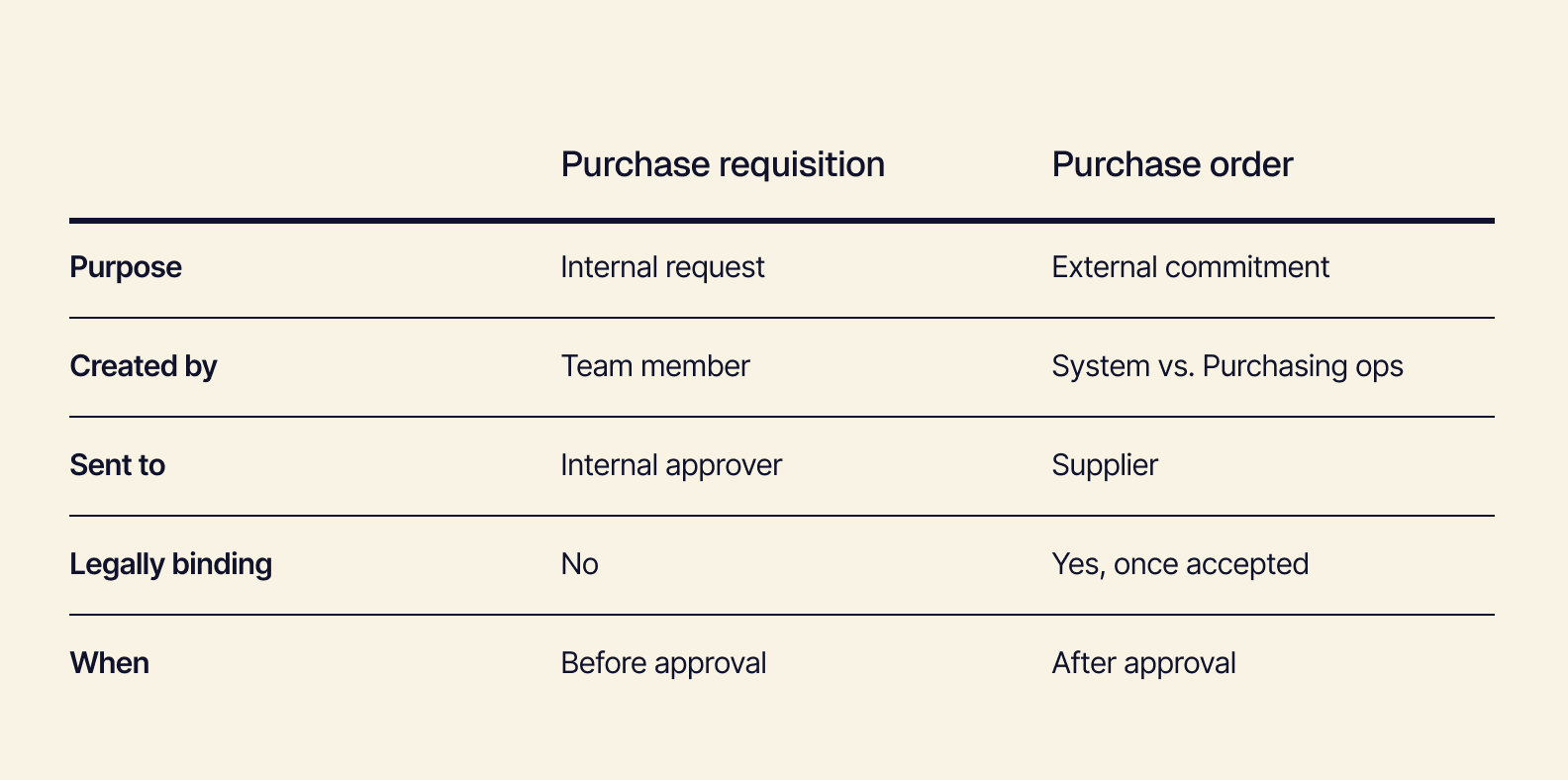
A purchase requisition is an internal request to buy. A purchase order is the external commitment sent to a supplier. The requisition asks permission, and the PO makes it official.
In the candle example, the request for 2,000 units was the requisition. PO #1042 was the purchase order.
Often, smaller retail teams skip the requisition and go straight to the PO. This is doable until your spend and SKU count start to grow. You can use approval rules instead of the requisition without adding any extra work. Instead of adding a separate request form, approval rules can route any PO that’s over a set amount to the right person for signoff before the PO goes to the supplier. The PO itself does the requisition’s job.
When reorders are triggered by inventory levels, the requisition can also show up as a system-generated reorder suggestion that a person then reviews and approves.
Purchase Requisition vs. Purchase Order FAQs
Is a purchase requisition required before a purchase order? No — not necessarily. It depends on factors like company size, spend thresholds, and internal controls.
Can a purchase requisition become a purchase order? Yes. After being approved, the details of a requisition carry over directly into the PO.
Who approves a purchase requisition? This is typically a job for the ops manager, department lead, or finance depending on the dollar amount and the brand’s approval thresholds.
Is a purchase order a contract? A PO becomes legally binding once a supplier accepts it.
See how Tailor’s purchase management software turns reorder suggestions into pre-filled, approval-ready POs.
3 Ways the Process Changes With Headless, Composable ERP
For retail brands, the PO process is tied to stock in every channel, warehouse, and store. It gets much easier when purchasing and inventory share one record.
Tailor is a headless, composable ERP built for fast-growing retail and ecommerce brands. Orders, inventory, and purchasing all live in the same shared record, so every step of the PO process reads from the same numbers.
1. Reorders Start From Live, Multi-Channel Stock
The retail reality is that the same inventory gets sold across Shopify, Amazon, wholesale, and retail stores. Often, each channel reports stock in its own tool.
If you reorder based on a single channel’s numbers, you’re going to either overbuy or run out.
What changes with composable ERP:
-
Stock in the inventory management system is synced across every channel, warehouse, and store in real-time. The reorder point reflects actual available inventory.
-
Replenishment suggestions incorporate factors like seasonality, sales trends, and incoming supply from open POs — not just current stock.
-
Suggestions arrive as pre-filled POs. A person can review and approve with one click.
2. POs Account For Raw Materials and Components
Many retail brands make at least part of what they sell. That means one finished product is dependent on several materials from several suppliers — each one with its own lead time.
If there isn’t a connection between finished goods and components, someone has to calculate by hand how much of each to order. The slowest supplier ends up delaying the entire product.
What changes with composable ERP:
-
A system that’s aware of your bill of materials (BOM) takes demand for finished goods and translates it into component-level quantities. (2,000 candles automatically becomes 2,000 jars, 2,000 wicks, etc.)
-
Component POs can be matched to each supplier’s lead time. Order the items with the longest lead time first.
Receiving and Matching Reflect What Actually Arrived
It’s rare for shipments to arrive all at once and exactly as you ordered them. As a result, invoices don’t always match up with what you actually received. What’s more, the number on the PO isn’t the true cost of the product after adding freight, duties, and fees. Matching by hand across PDFs, spreadsheets, and the accounting system is a major time suck.
What changes with composable ERP:
-
Partial receipts update available stock right away.
-
Landed costs — like freight, duty, and fees — roll into the unit cost, so margins reflect what each candle actually cost.
-
Tailor’s AI compares POs against supplier invoices and PDFs and flags any exceptions for a person to review and approve.
-
Matched records hand off cleanly to QuickBooks or Xero.
Each step of the PO process feeds the next reorder. When the data is clean at every step, purchasing can keep up with growth.
Purchase Orders That Keep Pace With Growth
A smooth purchase order process is about making sure every step works from the same numbers. With the right data foundation in place, adding a new channel, product line, or supplier doesn’t mean more manual work. It’s one more part of modernizing retail store operations for growth.
Book a demo to see Tailor’s purchase management in action.