If you’re evaluating tools like Celigo, Workato, or MuleSoft, it’s probably because reconciliation is eating away at your week. Numbers don’t match across systems, and someone is doing a lot of manual work to make everything line up.
But ERP integration tools aren’t actually built to remove silos. They can move data faster and more reliably than a person using spreadsheets. At the end of the day, however, you’re still going to have separate systems that each have their own version of the truth.
This piece walks through the basics of ERP integration tools, gives you a scorecard to help evaluate any option that’s on the table, and shows what composable ERP does differently — unifying those systems into a single source of truth rather than just connecting them faster.
What You’ll Learn:
-
The ERP integration tools landscape
-
How to choose ERP integration tools
-
Where ERP integration tools stop: Connecting systems vs. unifying them
-
ERP integration tool vs. composable ERP
The ERP Integration Tools Landscape
An “ERP integration tool” is a type of software with five separate approaches (depending on how you draw the lines). If you’ve been looking for an integration tool, you’ve probably already come across two or three of these without realizing they’re structurally different.
What’s important to know, however, is that the most important distinction between categories isn’t about which tool has the most connectors or the best UI. It’s about how each approach moves data between systems.
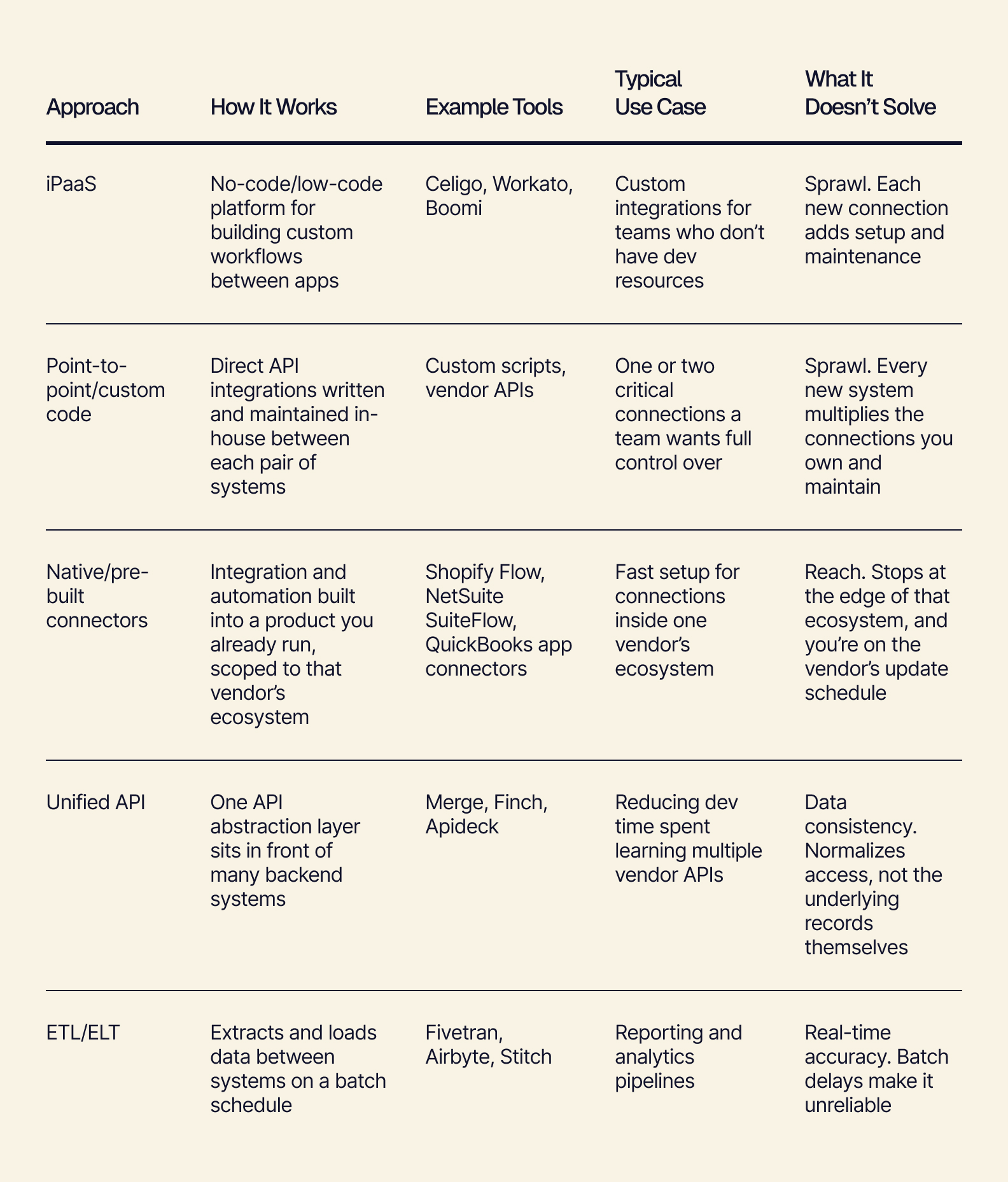
Every approach listed here is essentially a connector. It’s built to move or expose data between systems that stay separate.
But moving data around and having data you can trust are two different things.
How to Choose ERP Integration Tools
Before committing to a tool, it’s helpful to think about what problem you’re looking to solve: moving data between systems, or trusting the data you end up with.
You can score any integration approach based on whether it centralizes truth; who’s responsible for fixing it when it breaks; and what happens as you scale up and add more tools.
When you score the approaches from above on those three criteria, you’ll notice that each one of them fails on at least one axis as systems are added.
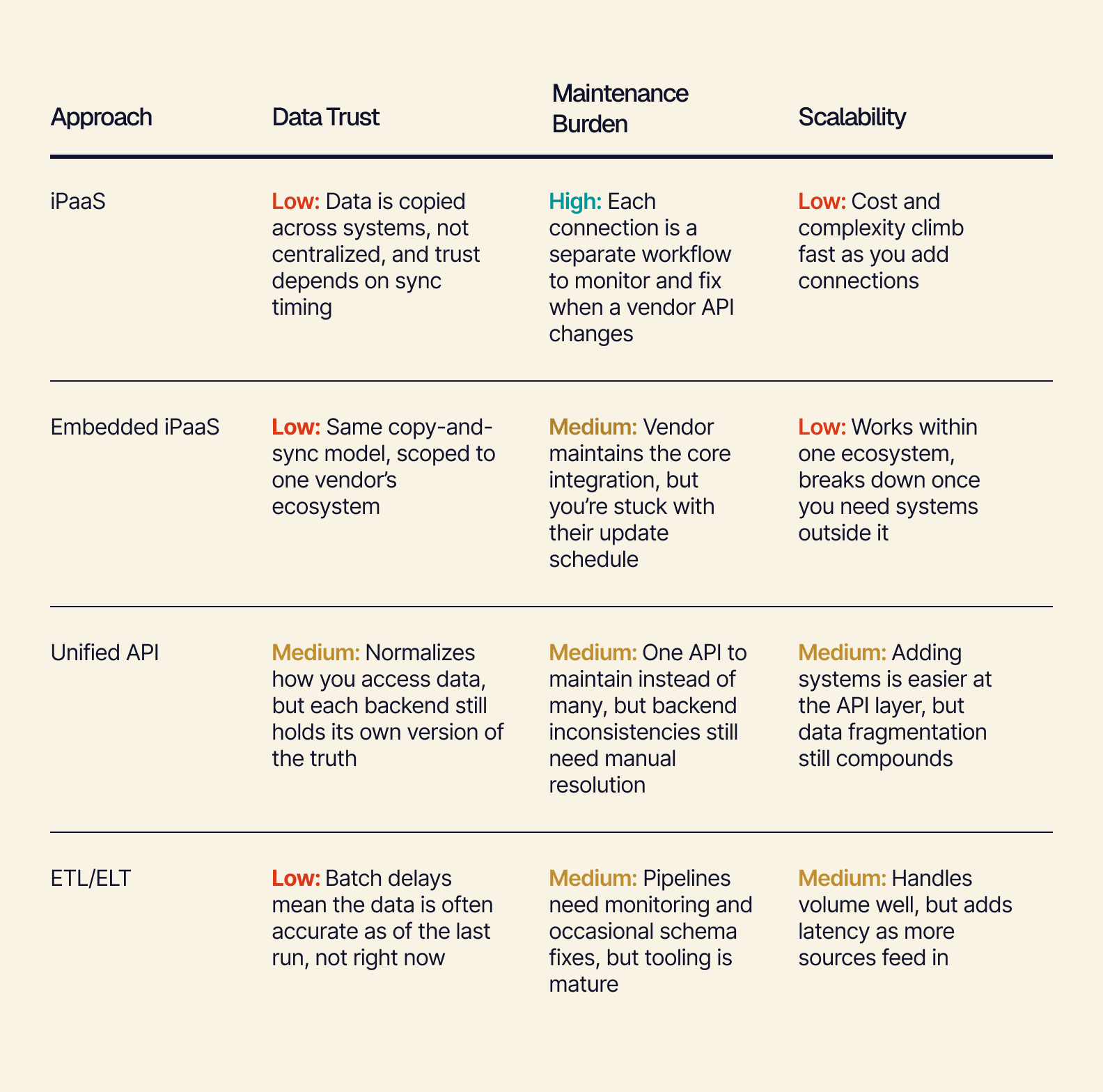
No approach scores well across all three criteria. The ones that come the closest with data trust tend to be the ones that centralize something.
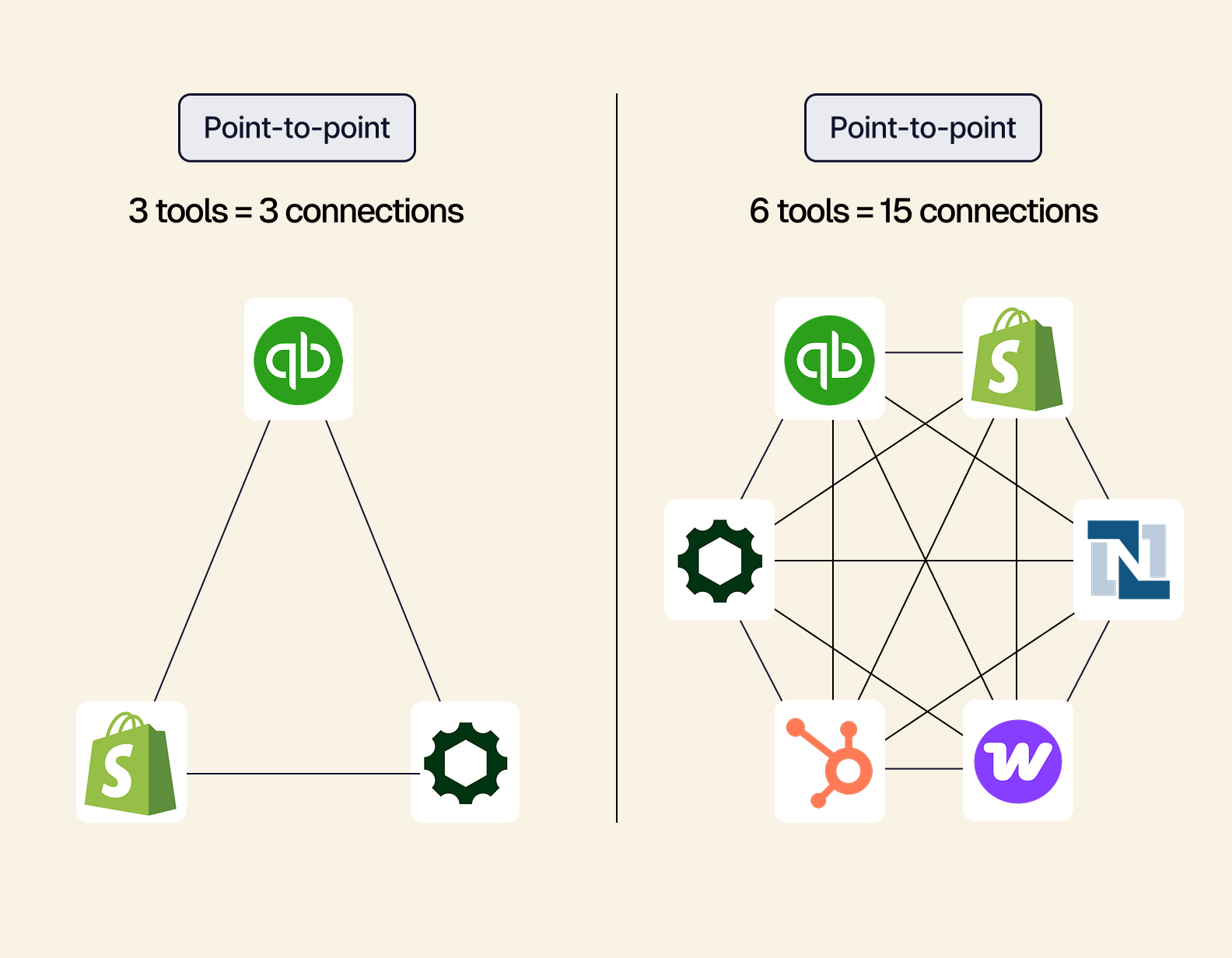
Scalability is where things fall apart the most. What does it actually look like as connections stack up and this area becomes harder to manage?
With every new system, you’re responsible for keeping more connections alive. More wiring doesn’t help with creating a single source of truth. It just increases the maintenance burden.
Where ERP Integration Tools Stop: Connecting Systems vs. Unifying Them
Even a perfectly-scored integration tool still runs into a wall. It wasn’t designed to create a system of record. It was designed to sync data between systems of record.
For example, perhaps your inventory system says you have 40 units of a product, but your storefront says you have 42. Both are accurately reflecting the last sync that ran. They’re both “correct.” And yet, they disagree.
Nobody messed up. The sync worked as it was designed. The issue is that “designed to sync eventually” and “true right now” are two different things.
Adding more integrations doesn’t fix reconciliation. It just adds more gaps that need to be reconciled.
To fix this — to get one record instead of moving data between two — you need an entirely different architecture. That architecture is a composable, headless ERP.
A composable ERP lays a single backend under the tools you already use (like QuickBooks, Shopify, or ShipStation). Each tool continues doing its job, but it reads from and writes to the same underlying data layer in real time. There’s no longer a second copy of the data that needs to be synced. The number is the same everywhere.
That should be the primary factor driving your ERP integration tool decision: whether you’re trying to move data faster between systems, or you’re trying to stop needing to move it at all.
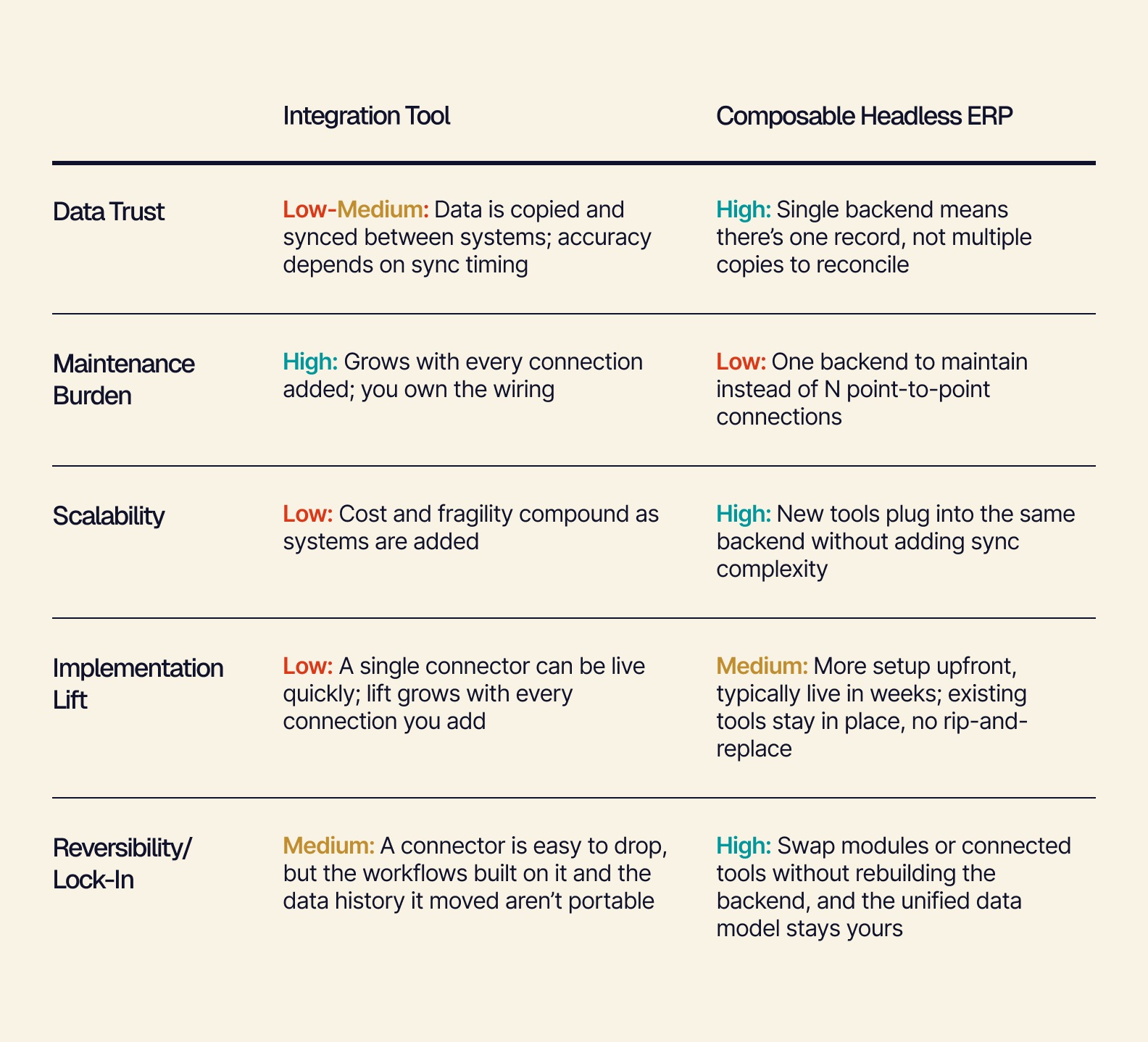
ERP Integration Tool vs. Composable ERP
Integration tools connect what you have. Composable ERP unifies. The choice of which one is best for you depends on whether reconciliation is a symptom you’re managing, or a root cause you’re removing.
Tailor is best-in-breed, not all-in-one. You’re not ripping out the tools your team is already familiar with. You’re replacing the duct tape underneath the tools.
This quick guide can help you figure out whether an ERP integration tool or a composable ERP will best fit your current needs:
-
If you’re connecting fewer than three systems, primarily for reporting/analytics, an integration tool is a reasonable fit.
-
If you have a growing system count, reconciliation is a daily operational cost, and you need real-time accuracy, a composable ERP is the better choice.
If an integration tool is sufficient for now, that answer is worth revisiting as your system count grows.
If you landed on composable ERP, remember, you can reach unification without having to start from scratch.
From ERP Integration Tools to One Source of Truth
The reconciliation problem isn’t really about which ERP integration tool moves data the fastest or has the most connectors. It’s about whether you’re working from one number, or several numbers that are supposed to match.
You don’t have to rip out your stack to get a single source of truth. Tailor unifies the tools you already run (QuickBooks, Shopify, ShipStation) into one backend, in weeks.
See how Tailor can unify your existing tools into one source of truth.