What Is an ERP System?
ERP stands for Enterprise Resource Planning, and it's software that connects and manages your core business processes — finance, inventory, orders, fulfillment — through a single, shared database.
The promise is straightforward enough. Instead of your sales team working in one system, your warehouse in another, and your finance team reconciling everything in spreadsheets at month-end, an ERP gives everyone access to the same data. Sales enters an order. Inventory sees it. Finance sees it. Nobody's copying and pasting between tools or arguing about which number is right.
How you achieve one source of truth has changed significantly.
An ERP system can unify your business operations. But how it unifies them determines whether implementation takes years or weeks — and whether your team actually uses it.
If you've been running a business on disconnected tools — QuickBooks over here, ShipStation over there, a dozen spreadsheets barely keeping things connected — you already know why unified business operations sounds appealing. You've lived the alternative: manual data entry, conflicting reports, orders getting lost between systems.
For decades, getting that unified view meant one thing: rip out your existing tools and replace them with a monolithic system. Want unified data? Adopt our finance module, our inventory module, our order management, our CRM — all of it. That was the deal.
More on why that is no longer the only option, but first, let's look at how these systems actually work.
How Do ERP Systems Work? The Mechanics Behind Unified Data
At the center of your business operations sits a database — one database — that every department accesses. Not finance's database and operations' database and sales' database, all of which need to be reconciled later. One.
When a sales rep enters an order, it doesn't disappear into their system and wait for someone to manually update inventory. Inventory sees it immediately. Finance sees the revenue hitting. The warehouse sees what needs to ship. Procurement sees if you're running low on materials.
Real-time, shared, and automatic.
This is the main benefit, and it's worth pausing on because it sounds obvious until you've lived without it. If you've ever spent a Friday afternoon hunting down why the inventory count in one system doesn't match the inventory count in another — only to discover someone fat-fingered a manual entry three weeks ago — you understand the problem ERPs are designed to solve.
The promise is simple: your tools finally talk to each other.
Manual handoffs disappear. So do month-end reconciliation marathons and the constant "let me check with accounting" when a customer asks a straightforward question about their order.
In theory, anyway.
Traditional ERPs demand you replace all your tools before they'll talk to each other.
In practice, most traditional ERPs deliver on this promise by asking you to do something painful: replace all your existing tools with their modules. Want unified data? Great — stop using QuickBooks, stop using ShipStation, stop using the tools your team actually knows, and learn our system instead.
That's the tradeoff the industry accepted for decades. Unified data, but at the cost of a massive, disruptive migration.
That tradeoff is no longer necessary. But before we get there, let's look at what these systems actually include.
ERP Modules Explained: Finance, Inventory, Orders, and More
Most ERPs are built around a set of functional modules — discrete chunks of the system that handle specific business processes. Here's what you'll typically find:
Finance and Accounting
The financial core. General ledger, accounts payable, accounts receivable, budgeting, and financial reporting. This is usually the module that matters most to leadership because it's where the numbers live — and where "which number is right?" gets answered.
Inventory Management
What you have, where it is, and how much of it. Stock levels, warehouse locations, reorder points, and inventory valuation. For product businesses, this is where you either have control of your stock or you don't.
Order Management
The lifecycle of a customer order from placement to fulfillment. Order entry, tracking, invoicing, returns. The goal: no order falls through the cracks, and anyone who needs to can see exactly where things stand.
Supply Chain and Procurement
The upstream side — purchasing, vendor management, receiving, and demand planning. Knowing what you need to buy, when, and from whom. Tracking what's coming in so you can plan what's going out.
HR and Payroll
Employee records, time tracking, benefits, compensation. Not every ERP includes this, and plenty of companies keep HR in a separate system. But for those who want everything under one roof, it's often an option.
CRM (Customer Relationship Management)
Sometimes built in, sometimes integrated. Customer data, sales pipeline, and communication history. The argument for including it: Sales needs to see inventory and order status. The argument against: dedicated CRMs often do it better.
Benefits of an ERP System — What Changes When You Trust Your Numbers
Let's be clear about what you're actually buying when you invest in an ERP system:
One source of truth. This is the big one. When finance, operations, and sales are all looking at the same data, "Which number is right?" stops being a recurring meeting topic. The inventory count is the inventory count. The revenue number is the revenue number. You stop reconciling and start deciding.
Visibility across the business. You can't manage what you can't see. ERPs give you line of sight into what's happening across departments — not through secondhand reports or stale spreadsheets, but through live data. What's selling? What's stuck? Where the bottlenecks are.
Less manual work, fewer errors. Every time someone copies data from one system to another, two things happen: time disappears, and mistakes creep in. Unified systems eliminate the copy-paste workflow. The data moves itself, and it moves correctly.
Faster, better decisions. This is where it gets interesting. When you trust your data — actually trust it — you make decisions differently. You stop hedging. You stop waiting for someone to "double-check the numbers." You see something, you act on it.
When you trust your data, you decide faster.
For a lot of growing companies, the inability to make confident decisions is the constraint most companies don't see. Not because leadership lacks judgment, but because they can't get a straight answer from their tools. Every decision requires a side quest to figure out what's actually true.
You can finally trust your data — and make confident decisions because of it.
These benefits are real. They're why companies have been buying ERPs for decades, despite the pain of implementation.
But here's the question most ERP guides won't ask: Do you have to accept the traditional tradeoffs to get these benefits?
ERP Then vs. Now: From Monoliths to Modular
The monolith ERP model forced you to abandon working tools for unified data.
You have disconnected tools creating chaos. You need unified data. So you buy a big ERP from a big vendor, and you spend 12-18 months (if you're lucky) migrating everything onto their platform.
Two painful things happen:
First, you get the whole system whether you need it or not. The ERP comes with a fulfillment module, but you've got a 3PL handling that? Doesn't matter. You can't just disable that module and plug in something else. These systems weren't built to be taken apart. It's all or nothing — a monolith.
Second, you abandon tools that were already working. Your finance team knows QuickBooks cold. Too bad — the ERP has its own finance module, and unified data means everyone's on the same system. So you migrate. You retrain. You lose months of productivity while people learn new software that does what their old software did just fine.
The pitch was integration through consolidation. One vendor. One system. One way of doing things.
The pain was real: massive implementations, forced migrations off tools that worked, bloated systems with modules you didn't need, and vendor lock-in that made switching feel impossible. For a lot of mid-market companies, traditional ERP wasn't a solution — it was a bet-the-company project that took years to pay off, if it ever did.
The assumption underneath: To get unified data, you have to unify your tools. One source of truth requires one system — the whole system — whether it fits or not.
That assumption is wrong.
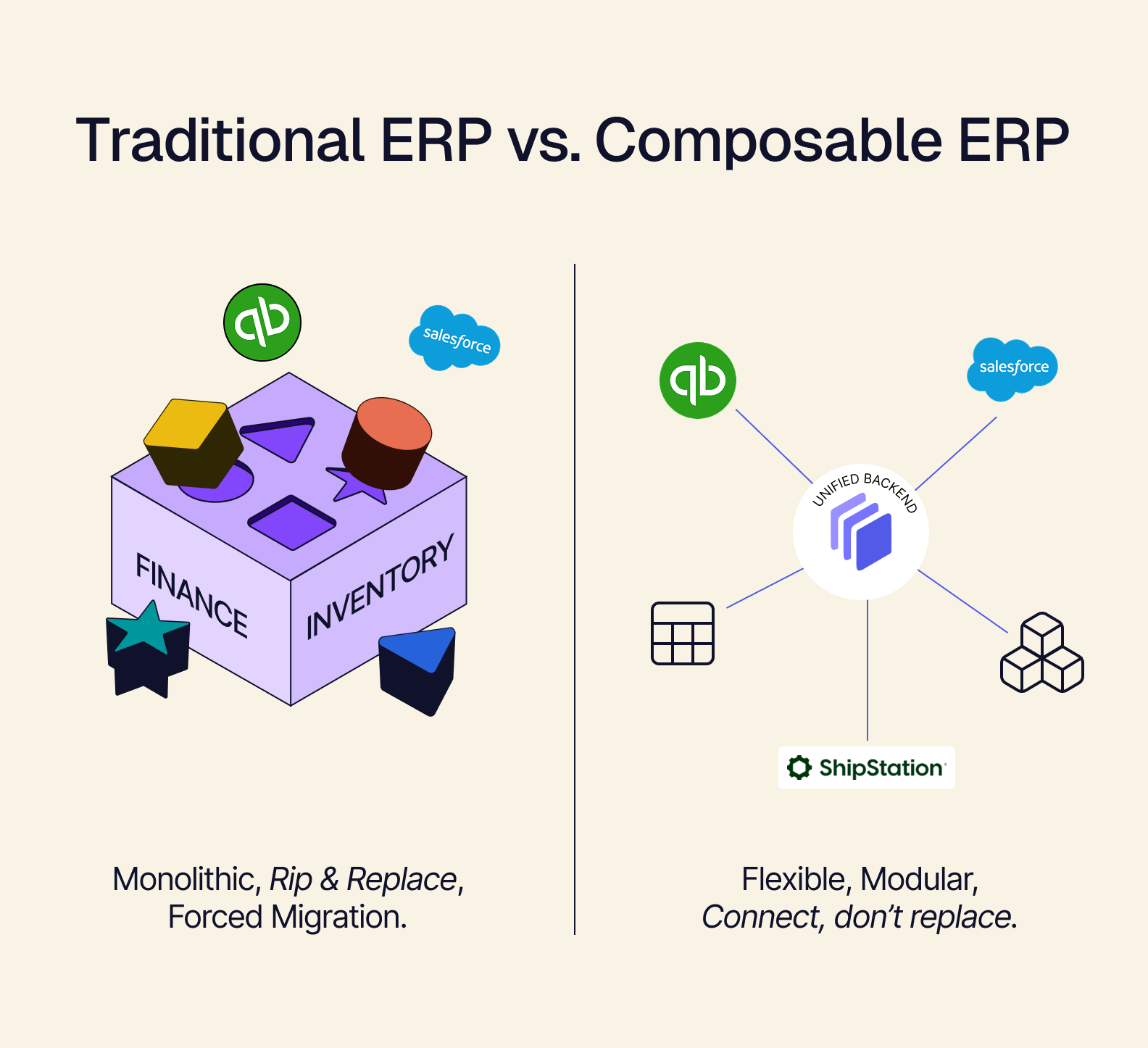
Modular ERP lets you pick only the pieces you need while keeping your existing tools.
Composable ERP starts from a different premise. The goal isn't to replace your tools — it's to connect them. And you take only what you need.
Need inventory management and order orchestration, but your accounting setup is solid? Take those pieces. Keep QuickBooks. Keep ShipStation. Keep Salesforce. Instead of ripping out what works, you connect it to a unified backend that becomes your single source of truth.
Same data unification. Same "one number is the right number." But without the 18-month migration. Without forcing your team onto unfamiliar systems. Without paying for modules you'll never use. Without the vendor lock-in that comes from putting all your eggs in one basket.
Traditional ERP asks you to start over. Composable ERP asks: what if you didn't have to?
This isn't a minor tweak to the model. It's a different architecture — one that gives you the benefits of ERP without demanding you abandon what's already working or adopt what you don't need.
And it raises another question: even if you get unified data, do you have to live with the interfaces that come with it?
Your ERP Doesn't Have to Look Like an ERP: The Case for Headless Architecture
You know the screens. Gray interfaces. Tiny fonts. Seventeen tabs across the top, half of which you'll never click. A navigation structure that made sense to someone, somewhere, but not to anyone on your team.
This is what ERP has looked like since the 1990s.
The old assumption: ERP software is built for thousands of companies, which means it's built for no company in particular. You get generic screens designed for generic workflows, and your job is to adapt. Learn the system. Train your team. Figure out where they hid the button you need.
The problem that creates: People don't adapt. They resist. They build workarounds. They keep their own spreadsheets "just in case." The expensive system of record becomes the system everyone avoids — while the real work happens in shadow tools that leadership can't see.
The ERP was supposed to be the single source of truth, but half the team doesn't trust it because the interface fights them at every turn. So they copy data into their own tools, and suddenly you've got two sources of truth again. Then three. The problem you paid six figures to solve is back, just with different symptoms.
You can unify your data without forcing everyone onto the same interface.
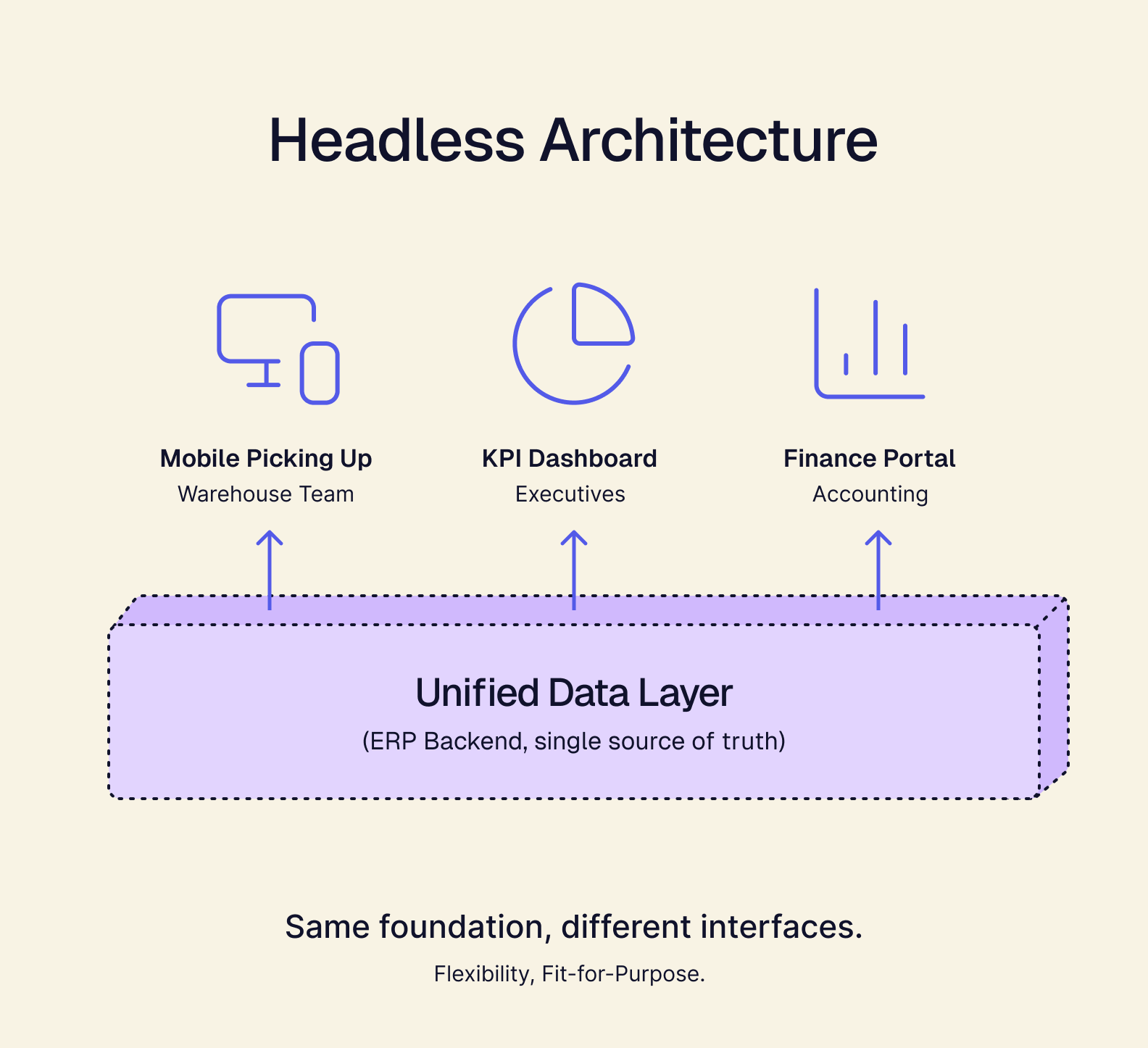
Headless architecture separates the backend (where your data lives) from the frontend (what people actually see and interact with). Your unified data stays unified. But the interfaces? Those can be anything.
Build a picking app for the warehouse team — simple, mobile-first, designed for exactly how they work. Build a KPI dashboard for executives — clean, visual, no training required. Build a portal for your finance team that surfaces exactly what they need without the clutter they don't.
Same data underneath. Different views for different people.
Your warehouse team doesn't need the same view as your CFO. With headless architecture, they don't have to pretend they do.
This is the second half of the shift. Composable ERP means you don't have to replace your tools. Headless ERP means you don't have to live with interfaces designed for someone else's workflow.
The question isn't just "can we unify our data?" It's "can we unify our data and give every team an interface that actually fits how they work?"
The answer used to be no. Now it's yes.
Signs You Need an ERP: When Spreadsheets and Workarounds Stop Working
Maybe you're reading this because someone told you to look into an ERP system. Or maybe you've just got a growing suspicion that the way you're running things isn't going to scale.
Here's how to know if that suspicion is right:
You're manually copying data between systems. Export from here, import to there, hope nothing breaks in between. If your team spends real hours every week moving information from one tool to another, you don't have a workflow — you have a workaround. And workarounds don't scale.
You don't trust your numbers. Someone asks a simple question — how much inventory do we have? What did we sell last month? — and the answer depends on which system you check. Or worse, you have to check three systems and reconcile the differences before you can say anything with confidence. When "which number is right?" is a recurring question, something's broken.
You have multiple "sources of truth." This is the more advanced version of the problem above. Finance has their spreadsheet. Operations has theirs. Sales is working off something else entirely. Everyone's confident in their data, and none of it matches. You don't have one source of truth — you have three sources of fiction.
Growth is creating chaos instead of opportunity. This is the one that stings. You should be excited about growth. Instead, every new customer, every new channel, every new opportunity feels like it might break something. The infrastructure that got you here is buckling under the weight of where you're trying to go.
Your team spends more time on workarounds than work. When the system doesn't work, people get creative. They build shadow processes, side spreadsheets, and manual checks. They make it work, but that workaround becomes a full-time job. You're paying people to fight your tools instead of do their jobs.
If you're dealing with these problems, you don't just need software. You need a unified backend — a single source of truth that lets your systems finally talk to each other.
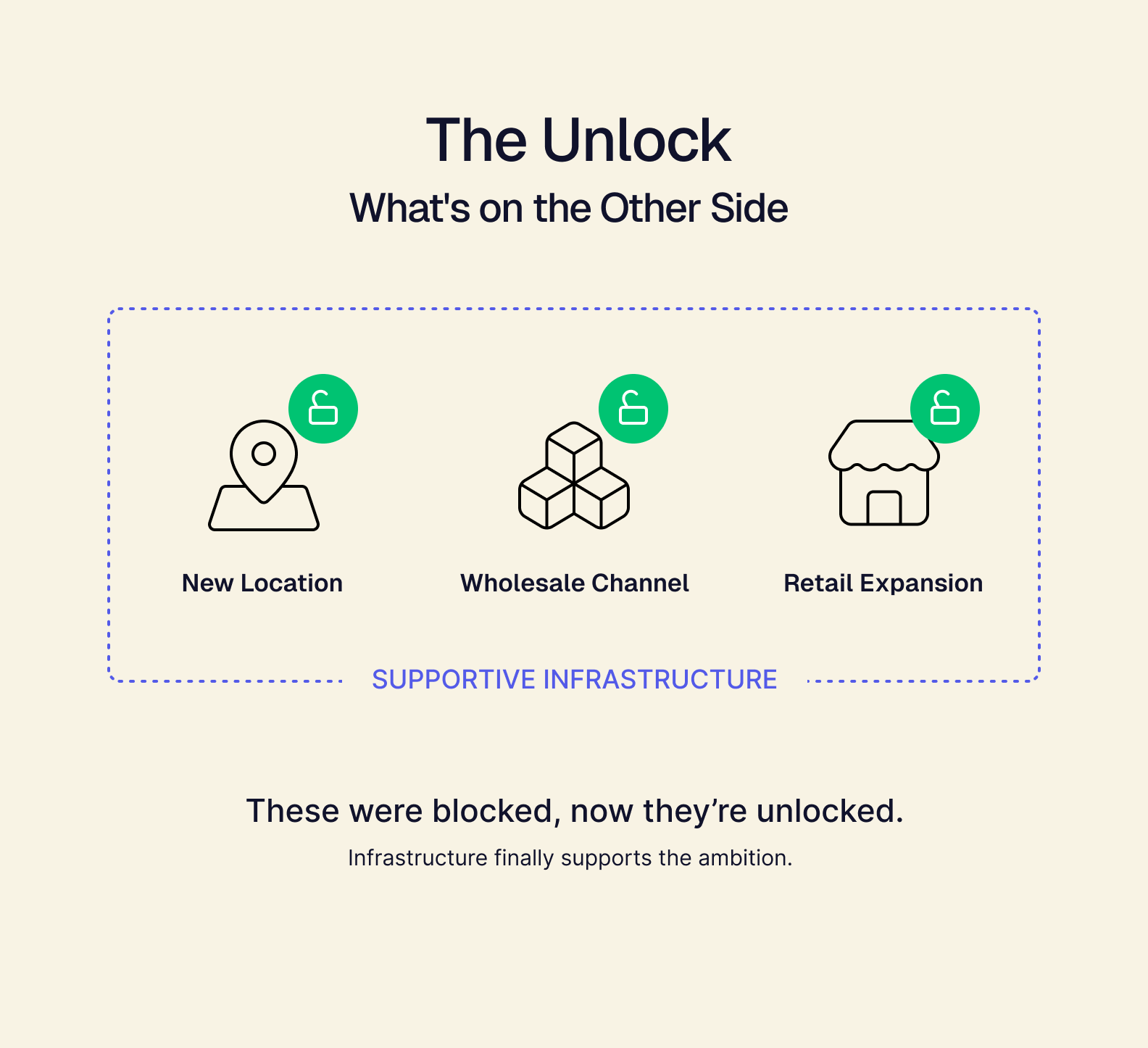
And here's what's on the other side: The wholesale channel you've been putting off. The new location you've been "not ready" for. The retailer asking about 200 stores that you had to say "not yet" to. The growth you've been deferring because the infrastructure couldn't support it.
Those opportunities open up when your infrastructure can handle them.
ERP for the Way Business Works in 2026: Composable + Headless
Let's recap what we've been building toward.
The old ERP model asked you to accept a painful tradeoff: unified data, but only if you ripped out your existing tools and adopted a monolithic system designed for everyone and optimized for no one. From the 1990s through the 2010s, that was the only option.
Cloud computing and API-first architecture made those assumptions obsolete.
Composable architecture means you don't have to replace what's working. Connect your tools instead. Keep QuickBooks, keep Shopify, keep ShipStation, keep Salesforce — unify them into a single backend without forcing your team onto unfamiliar systems or paying for modules you'll never use.
Headless architecture means you don't have to live with generic interfaces. Build what fits. A picking app for the warehouse. A KPI dashboard for leadership. A customer portal that actually makes sense. Same unified data, different views for different people.
This is what Tailor does.
Tailor is a composable, headless ERP built for the way businesses actually operate now — not the way they operated when the legacy vendors wrote their first line of code. It connects your existing tools into one source of truth, and it lets you build any interface on top of that unified data. Tailor was built with AI from the start, so automation improves as you use it.
Keep your working tools connected, build interfaces that fit each team, and grow without starting over.
What that looks like in practice:
- Keep your current best-of-breed tools like QuickBooks, Shopify, ShipStation, Salesforce — Tailor connects them, not replaces them.
- Create dashboards, apps, portals — whatever your team needs, built on one source of truth.
- Different interfaces for different teams — warehouse gets a picking app, execs get a KPI dashboard, finance gets their reports. Same data, different views.
The outcomes are the ones you've been chasing: one source of truth, no rip-and-replace migration, and the ability to finally say yes to the growth you've been deferring.
That wholesale channel. That new location. That retailer who's been asking. The infrastructure finally supports it.
What to Learn Next: Go Deeper on Composable and Headless ERP Architecture
You came here asking, "What is an ERP system?" Now you know the textbook answer — and why it's incomplete.
The better question: what kind of ERP fits the way your business actually works? If you're ready to go deeper:
What is Composable ERP? — How modular systems solve the flexibility problem that traditional ERPs created.
Why Headless? — Breaking down the benefits of building any interface on your unified data.
See how Tailor rethinks ERP → — A composable, headless ERP built for the way business works now.