Growing an ecommerce brand has never been easy: with rising operational costs, multi-warehouse operations, and more sales channels, scaling is harder than ever before.
This is what makes Shopify a great choice for early-stage brands.
It enables a fast launch, helping you gain early momentum. However, that initial drive is going to flag: As your operations get more complex, Shopify actually starts to work against you, limiting what you can do.
In this guide, you’ll learn the key signs you’ve outgrown a Shopify-only stack and why common fixes fail. By the end, you’ll also know when it’s time to add a composable operational layer that supports your stack for ultimate Shopify scalability.
What You’ll Learn
- Why Shopify excels early on
- Seven signs you’re outpacing your Shopify stack
- Why “quick fixes” don’t work for Shopify scalability
- Future-proofing your eCommerce stack
Why Shopify Excels Early On
If you’re in the early stages of building and launching your commerce business, Shopify is a smart choice. Product pages, checkout UX, speed to launch — these are the things Shopify is built for, helping drive early growth.
But when your needs move from merchant-facing complexity to operational complexity, that’s where it starts to break down.
Shopify’s architectural strengths lie in:
- Serving as a commerce engine that provides seamless storefront, conversion, and merchandising
- Assuming simple product structures, centralized inventory, and standard fulfillment flows
- Getting you off the ground fast with preconfigured apps
For an early-stage merchant looking to accelerate growth, this is ideal. But when multi-warehouse operations, wholesale workflows, or demand forecasting come into the picture, scalability suddenly becomes much more difficult.
At this point, Shopify’s commerce architecture actually starts to create operational limits.
- You no longer have a single inventory source of truth.
- Your apps are siloed, each one solving a separate problem instead of all working together.
- Shopify lacks any data interpretation capabilities — no guidance on demand forecasting, risk tolerance, or replenishment.
Long story short: You need a composable operational layer as part of your scalable ecommerce platform. Without this layer, you won’t have the architecture you need for seamless Shopify scalability.
Seven Signs You’re Outpacing Your Shopify Stack
As you grow, you’ll notice red flags showing up little by little in your daily operations. Taken together, they’re a signal that you’ve gone as far as you can go with Shopify’s native tools and hitting its scalability limits.
#1. Fragmented Inventory Visibility
Shopify assumes you have a straightforward product and fulfillment route. It can’t keep track of complex inventory or supply chain data. And when you’re getting different numbers from every app, it doesn’t have a method of standardizing all that different data.
This makes it all too easy for inventory data to become inconsistent, duplicated, or delayed across various tools, channels, or locations as you grow. And when your visibility isn’t transparent, the consequences are overbuying, unassured decision-making, and overall inefficiency.
You might be experiencing this if:
- You’re often unsure which data source is accurate.
- Your team is pulling different inventory numbers from several apps or spreadsheets.
- You’re wary of running promotions or pre-orders because you can’t trust stock levels.
#2. Inadequate Forecasting
If you’re making purchasing decisions based on historical sales data instead of forward-looking insights, this is inadequate forecasting. Inadequate forecasting means that while your sales might grow, you won’t reliably be able to support that growth, which ultimately is going to limit scalability.
But if you’re still using only Shopify’s native stack, you can’t get the predictive insights you need. Shopify only shows you past sales. It doesn’t calculate risk modeling, pull data from other apps, or give you replenishment recommendations.
You might be experiencing this if:
- You make purchase orders based on intuition, not accurate demand projections.
- Forecast accuracy is rarely aligned across teams.
- You seem to alternate between overstock and stockouts.
#3. Gaps in B2B Operations
Shopify was designed for direct-to-consumer transactions — a single product catalog with simple customer profiles and straightforward checkout.
But as you reach the point of wholesale, distributor, or retail partner sales, you’ll need more complex B2B workflows that Shopify doesn’t support. These might involve role-based pricing, contract-driven product catalogs, minimum order quantity (MOQ) rules, and more.
When you try to work around Shopify’s deficits with exceptions or other apps, you’ll run into more errors and delays than it’s worth.
You might be experiencing this if:
- Your wholesale partners regularly have to ask for order status updates or corrections.
- B2B orders require manual review before fulfillment.
#4. Issues with Multi-Channel Fulfillment
Growth brings more sales channels beyond just Shopify. You might be selling from Amazon, wholesale platforms, or a physical retail store.
But since Shopify assumes you have a simple fulfillment flow, it starts to break down when working across multiple warehouses, multiple order channels, and various shipping models.
The result: You’ll see increased shipping costs, customer dissatisfaction, and a cap on scalability since each additional channel makes things more complex.
You might be experiencing this if:
- Fulfillment teams have to manually decide which warehouse should fulfill which order.
- As orders increase, shipping delays or errors are increasing, too.
- You’re using spreadsheets or separate apps to track multi-channel stock.
#5. App and Integration Overload
As you notice more gaps in what Shopify can and can’t do, your first response might be to patch these gaps with multiple individual apps — each one with a separate function.
Unfortunately, this doesn’t work long-term. You’re creating more work for yourself, adding complexity instead of streamlining operations. And importantly, your data will be siloed between these apps versus located in a single source of truth.
You might be experiencing this if:
- You use multiple apps for inventory, fulfillment, and reporting.
- Data from these apps is often contradicting or needs to be manually corrected.
#6. Unable to Support Advanced Analytics
The richer your data, the easier it will be to scale. And the more you grow, the higher-quality data you’ll need.
Shopify’s native reporting isn’t deep enough to support predictive insights, multi-channel analytics, and other operational data that connects all of your systems.
For smart, proactive decision-making, you need to have a unified layer that provides more advanced analytics. Otherwise, you’ll be facing difficulties when forecasting inventory needs and planning ahead.
You might be experiencing this if:
- Your teams are making decisions based on guesses, not data or insights.
- You can’t tell at a glance which of your products, channels, or warehouses are most profitable.
- It’s hard to design theoretical what-if scenarios for new products or promotions.
#7. Manual Operations and Customer Support Overload
Customer service and day-to-day ops — repeatable tasks that could be automated — are going to suck up more and more time as your business grows. Shopify isn’t designed to handle this volume of operational workflows.
If you stay with Shopify only, you’re going to be stuck slogging through endless manual processes. You’ll have a slower customer response time and a higher risk of errors as you’re constantly putting out fires.
You might be experiencing this if:
- Refunds and exchanges take hours, or even days, to process.
- Your team needs spreadsheets, apps, and Slack messages to complete tasks that should be routine.
- Customer support is constantly asking your operations or fulfillment teams for inventory or order status updates.
Why Patching Holes Creates Bigger Problems
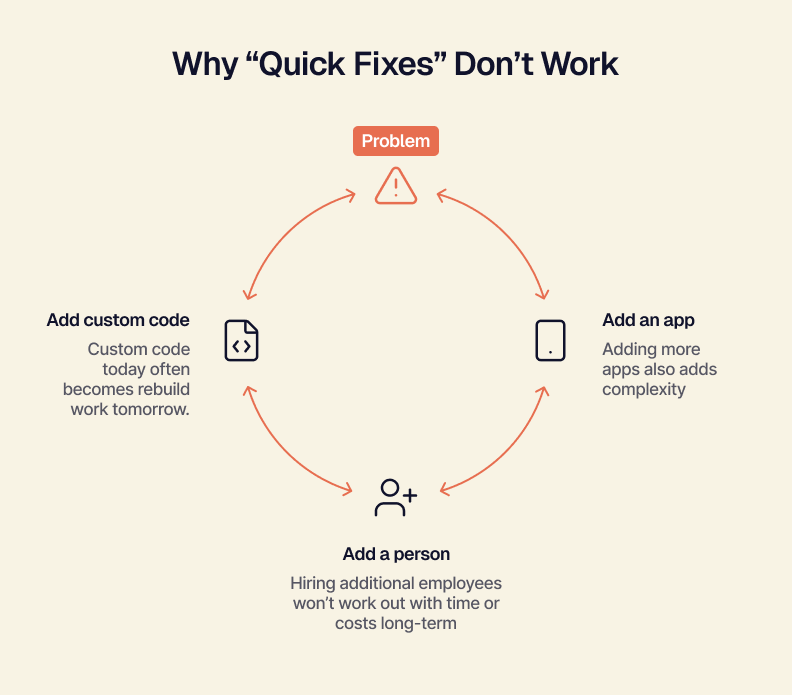
You might be tempted to spackle the cracks you’re seeing in Shopify and keep limping along. But this won’t work for scalability long-term. Patching holes just creates more problems.
For example:
- Adding more apps increases complexity. Introducing more apps to solve individual problems creates inconsistency and multiplies error risk. (That’s what Universal Jewelry found when using a third-party connector app for Shopify and Odoo. The consequences? Delays, breakable workflows, and limited support.)
- Hiring additional employees cuts into time and costs. More manual work = the need for more hands to get it all done. But this isn’t a systems-level fix — it’s just adding expense and inefficiency to your operations.
- Using custom code adds risk. If you try to adapt your stack by creating custom scripts or integrations, you’ll eventually end up with technical debt that’s difficult to maintain and extend.
At the end of the day, you’ve just swept your real problem under the rug. None of these strategies truly improve Shopify scalability, because they don’t target the root cause: fragmented data.
To see real growth, you need to make a change at the architectural level by adding a composable operational level that will unify data, streamline workflows, and accelerate scalability.
Future-Proofing Your Ecommerce Stack: How Composable ERPs Extend Shopify
The real problem isn’t your apps or your team; it’s your architecture.
Shopify is a commerce engine, not an operations platform. As your business needs grow more complex, you need a composable ERP layer to add flexibility, visibility, and automation — not to replace your Shopify engine, but to help scale it.
How do you know if you’ve outgrown your current setup? Look for these key signs:
- You use multiple apps to manage basic operations.
- Your team spends more time reconciling data than acting on it.
- Upgrades or other app changes break critical workflows.
- You’re operating multiple channels (B2B, retail, DTC) and can’t get unified visibility into them all.
- You rely on manual exports for inventory, forecasting, or pricing.
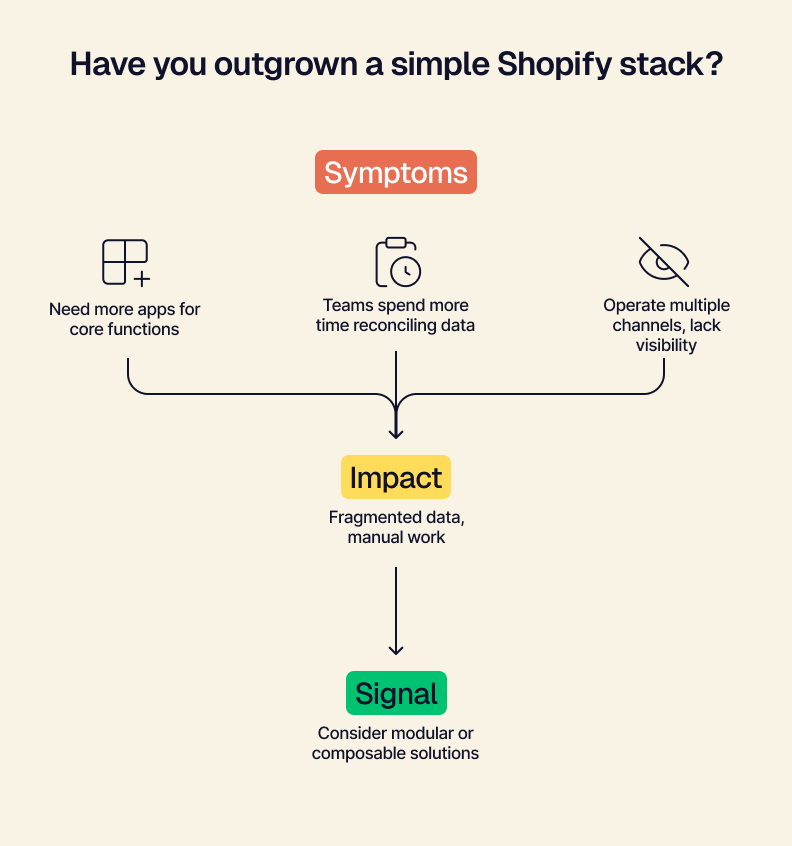
For sustainable scalability, a composable foundation is the best place to start. All of your data should be connected within a single ERP. From there, your operational processes and workflows can be streamlined with ease. And with automation capabilities for repeatable tasks, you can boost efficiency and reduce error risk even more.
Choosing a modular tool that adapts with your business over time is important, too. This gives you the freedom to grow and expand in whichever direction you’d like.
Tailor serves as the link between Shopify and your other systems. You can keep Shopify as your storefront and checkout while Tailor acts as your operational layer: standardizing data, routing orders to the correct fulfillment workflows, updating inventory in real-time, and more.
At the end of the day, you have a scalable ecommerce platform — a well-oiled machine that’s set to support your operations as you continue to grow.
Positioning Your Shopify Store For Scalability
Adding more apps, hiring more people — these things aren’t going to help with Shopify scalability. To achieve true flexibility at scale, you need a composable ERP. Introducing an architecture that can sync your data, boost efficiency, and extend workflows is the key to sustainable growth.
If you’re experiencing warning signs that your Shopify is growing stagnant, see how Tailor’s Shopify integration can help.
Quick Answers
Why does Shopify excel for early-stage brands?
Shopify works well for early-stage brands because it’s built for simplicity. Shopify is designed to drive growth by serving as a commerce engine, helping you get off the ground fast with storefront, conversion, and merchandising.
What are the signs you’re outpacing your Shopify stack?
If you’re experiencing fragmented inventory visibility, issues with multi-channel fulfillment, or gaps in B2B operations, you’re likely hitting Shopify scalability limits. Inadequate forecasting and customer support overload are also warning signs.
Why doesn’t adding more apps solve Shopify scalability issues?
Adding more apps doesn’t solve the root cause. Each third-party app you introduce only solves a single, individual problem — ultimately adding more complexity and increasing error risk.
How do composable ERPs extend Shopify scalability?
A composable ERP layer helps scale your Shopify engine by adding flexibility, visibility, and automation. When your architecture is composable, you can connect your data, streamline workflows, and expand your business however you’d like.