Landing on the right ERP solution for your business can be tough — with so many different types of systems out there, it can be hard to know which tool is right for the job. Will you get a popular ERP suite designed for larger businesses (and try to make that work until your operation is big enough to fill those shoes)? Maybe you’d benefit from a cloud system since most of your team is remote, but you also need a system that integrates your manufacturing team.
How in the world are you supposed to choose when there are so many options?
Well, you’re in luck because this guide will help you narrow down the many types of ERP systems and discern which one fits YOUR business.
What You'll Learn
-
Make sense of the different types of ERP systems from an architecture, deployment, and open source perspective
-
The pros and cons of each system type
-
Which systems work for which business size
-
How a headless ERP system can help you 10x your business
The Types of ERP Systems and Which Works for Your Business
ERP Systems Types by Architecture
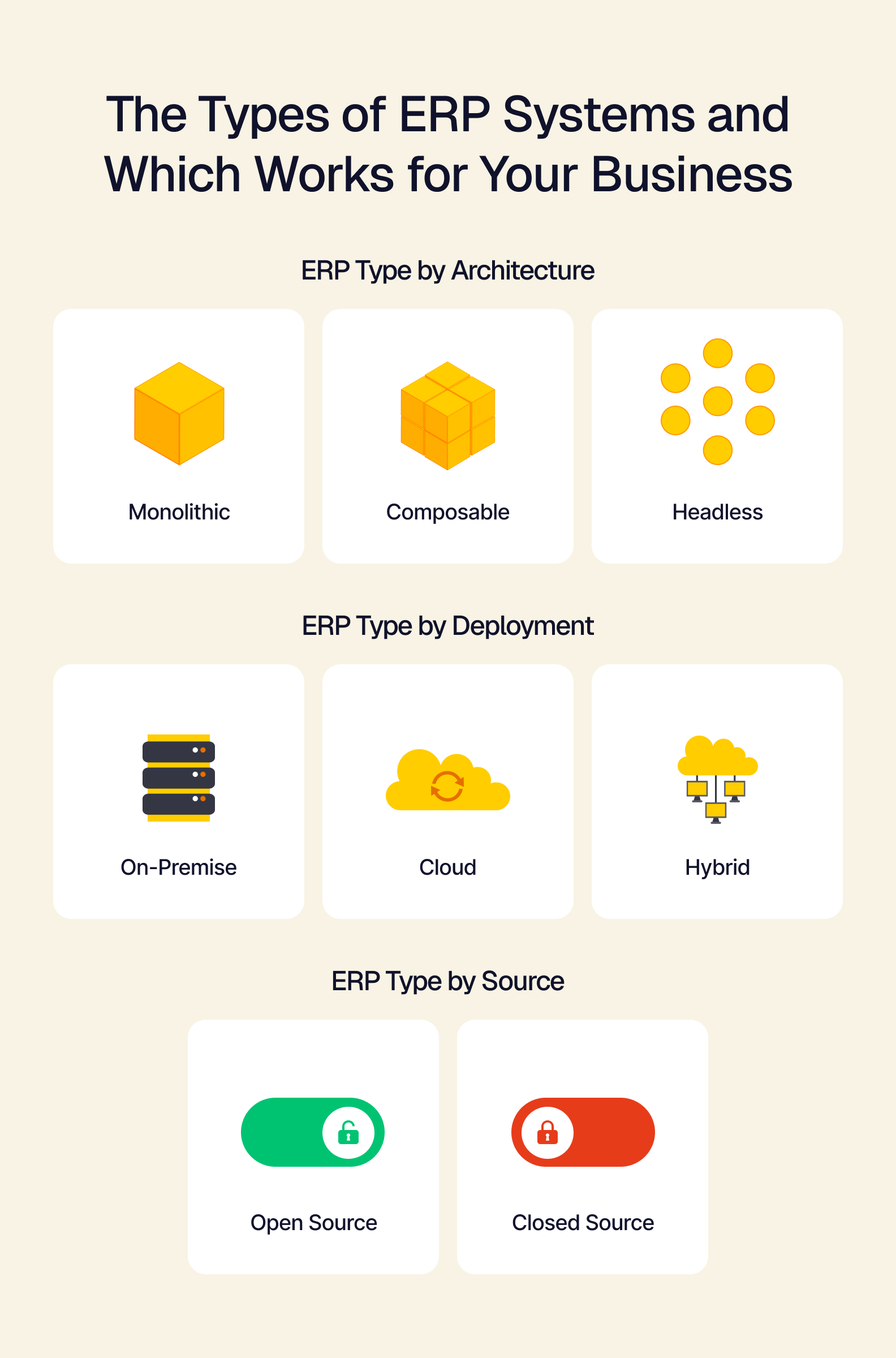
For this section, we’re discussing the different types of ERPs based on their architecture, or how they’re structured. The top line is that monolithic ERPs are all-in-one products that provide a business with a set UI and many different tools. A composable and headless ERP is a customizable product purpose-built to support the tools a business already has.
Monolithic
Monolithic ERPs are all-in-one suites with every tool a business needs to support its daily operations. These suites tend to be expensive and can take months (up to over a year) to fully implement, depending on the size of the company. Because these all-in-one systems come with a complete tool suite for a company, processes, workflows, and data must be migrated into the new system.
Pros
-
Helps medium to large companies replace their aging tech stack
-
Gives teams a fresh start on how they handle their daily operations
-
Brings tools, data, and workflows into a unified interface for ease of use
-
Massively increase capacity for scaling and business growth
Cons
-
Often extremely expensive and time-consuming to implement
-
Growth potential is tied to the capacity and workflows dictated by the ERP system
-
Predetermined User Interface can lead to friction with users or cause issues with adapted workflows
-
Too rigid for SMBs to take advantage of
Composable and Headless
Choice and flexibility are the focus of headless, composable ERP systems. They forgo a predetermined graphical UI and feature an API-enabled backend to elevate customer choice and maximize efficiency. The composable backend means that businesses can integrate the tools they’re already using, rather than replacing them. The headless frontend means that users can have a customized UI experience that shows all the information needed, while giving teams access to a way to interact with all their tools in a single application.
Pros
-
Far less expensive than other solutions
-
Get customized tools that are designed to fit your business
-
Allows for incremental growth, which helps businesses stay agile
-
Unifies disconnected tools to prevent ripping and replacing
Cons
-
Designed for modern businesses — companies using legacy tools (non-API enabled) may struggle with implementation
-
Highly specialized, high-capacity manufacturing operations are better off with industry tools
-
Businesses large enough to require proprietary tools won’t be able to make the best use of a composable ERP
ERP Systems by Deployment Type
This section highlights ERP systems by how they’re typically deployed within a business. The top-line for deployment type is that on-premise requires physical infrastructure on location, cloud enables digital infrastructure, and hybrid requires a bit of both.
On-Premise
ERPs that are deployed on-premise require localized infrastructure to support. This means that a business needs to have an IT team to manage the system, along with the hardware necessary to host internal servers, and of course, the space necessary for these things. On-premise deployments are often expensive, due to the infrastructural prerequisites and are meant for much larger businesses.
Pros
-
On-premise makes servicing the ERP much easier if patches and updates are managed by an IT team
-
Increased isolation from outages affecting a service provider
-
Allows for greater security control
Cons
-
Extremely expensive for small businesses to consider
-
Hardware failures are the business’s problem
-
Needing service from the ERP vendor can be more time-consuming
Cloud
Cloud-based ERPs are digitally managed solutions that are serviced and run on the vendor’s own infrastructure. This allows for smaller businesses to integrate an ERP solution without needing equipment and technical teams to support the system. Cloud ERP systems are often much cheaper to implement and offer different configurations based on the size of the business.
Pros
-
Lightweight implementation means an ERP system can be up and running fairly quickly with minimal hardware
-
Upkeep costs and hardware maintenance are handled by the vendor
-
Less expensive to acquire than on-premise ERP solutions
Cons
-
ERP vendor outages directly affect the business’s ability to operate
-
If the ERP vendor shuts down, an ERP migration will have to happen
-
Custom integrations are much more difficult to achieve (but not impossible), limiting growth options
Hybrid
A hybrid ERP deployment features a mix of on-premise and cloud infrastructure. Often, a hybrid deployment will function in a 2-tier capacity, where the core of the business (the corporate office) will have an on-premise ERP solution, and either satellite offices or offices in another region of the world may operate with a cloud solution that uses the same tools.
Pros
-
Split the difference on ERP costs by lowering the amount of hardware needed to support all aspects of the business
-
Enables flexibility in how the business grows, allowing for regional or worldwide expansion
-
Cost-efficient for large operations
Cons
-
Meant for large, complex operations
-
The on-premise tier can be impacted by vendor outages affecting the cloud tier
Open Source and Closed-Source ERP Systems
ERPs by source type are a simpler breakdown. Open-source ERPs are free or white label (licensable) ERP cores that can be built upon by a business’s software development team. By using the open-source code as a starting place, a business can develop a proprietary ERP solution for its needs. Closed-source ERPs are software products that are copyrighted and cannot be modified by another company (closed-source ERPs would cover most ERP products available right now). Since closed-source ERPs are the norm, let’s cover the pros and cons of open-source ERP systems:
Pros
-
Unique businesses can create fully custom solutions for their operations
-
Potentially far more cost-effective with the right team behind developing the software further
-
Some free solutions can instantly level up an SMB’s productivity
-
A business’s technical team can modify and service the software without having to rely on a vendor
Cons
-
It takes a lot of development time to develop a proprietary system, even if it has a usable core
-
With the wrong technical team, developing an open source ERP further can be substantially more expensive than purchasing a finished product directly
-
Without a technical team, servicing the ERP can be extremely difficult
Off the Beaten Path: Why Following Niche Expectations Can Lead to Rigidity
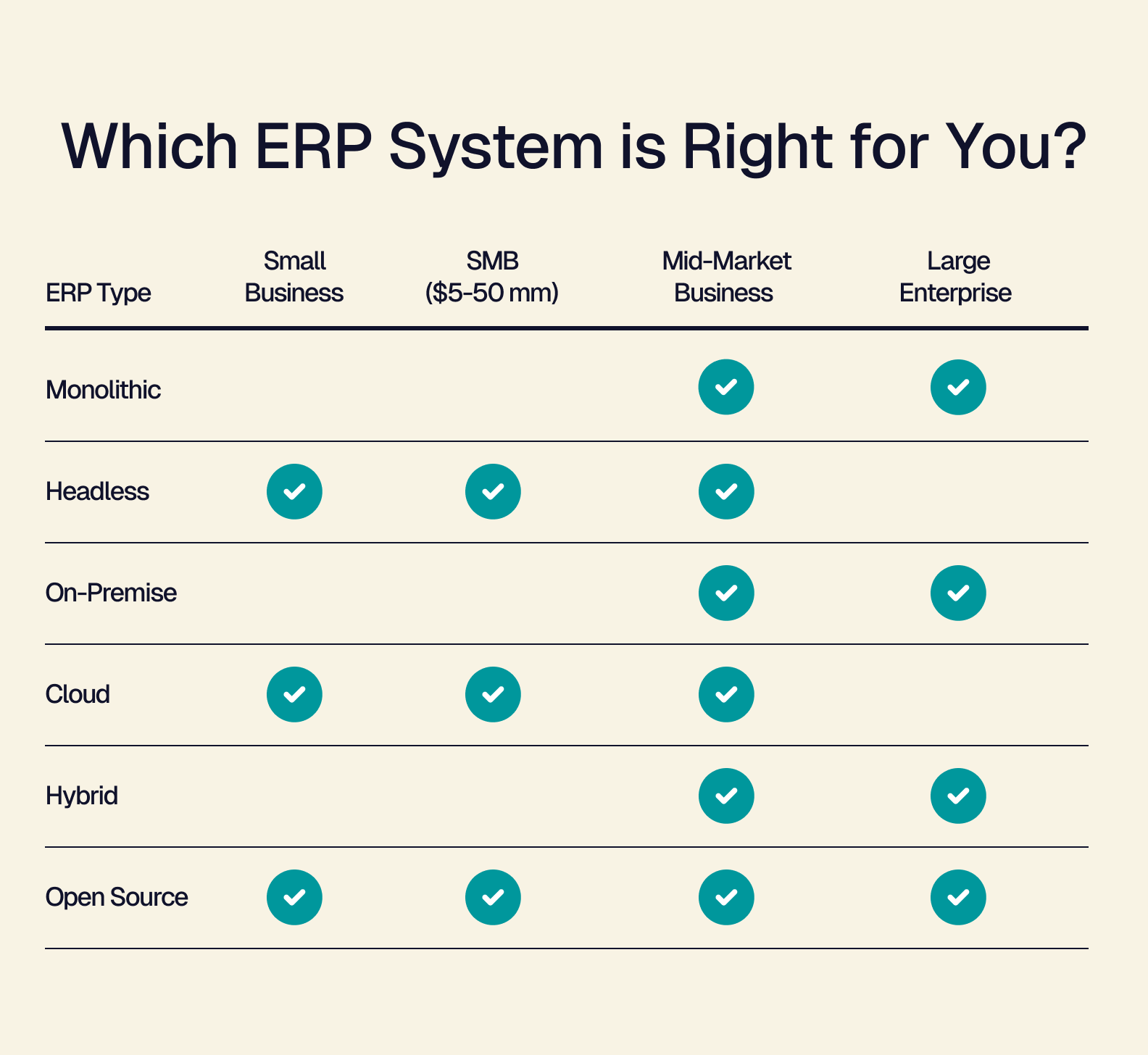
While the type of ERP absolutely matters when you’re choosing an ERP for your business, it can be easy to refer to the table above, find the size of your business, and then just find an option that fits based on a generalization. Likewise, it’s all too easy to rely on following the expectations of your particular market and niche.
Why think about what ERP solution is best for your business when every competitor is using a solution like SAP S/4HANA, NetSuite, and Microsoft Dynamics 365? Using the same tools as your competitors just because it's the industry norm is no different than letting someone beat you in a game on purpose.
So rather than limit your potential, consider what makes your business unique — and find the best ERP solution for you.
Why Choosing Composability is a Bet on Your Future
The major advantage of choosing a composable ERP solution is that every piece of the system works to your strengths.
If you’re a business with a lean tech stack, clean operating procedures, and tight workflows, a composable solution lets you keep the familiar, without asking you to rip and replace what’s been working for you. By keeping your unique workflows you can maintain speed as you grow — whereas your competitors inevitably have to slow down to accommodate a non-composable ERP solution.
How is a composable solution a bet on your future?
- When you choose a composable ERP, you’re affirming that the way you operate now is exactly what you need to succeed. It enables you to double down on the foundation that has gotten to this point and give that same foundation the support it needs to develop further.
The Limitations of Rigidity
For larger businesses, rigid ERPs are the solution to many of their problems. Operations that have scaled too quickly, but have sustainable revenue, often use a rigid ERP integration as a hard reset of their daily operations and workflows. In a best-case scenario, this is what these types of businesses need to keep moving forward. But the reality is that their path is now set by the constraints of their ERP solutions.
If you’re a small business, rigid ERPs can:
-
Snuff out what was working. Processes and workflows that worked for your teams and tools get replaced by the way that the rigid ERP wants you to work. You’re potentially trading away what made your business productive for how an unrelated enterprise thinks you should operate.
-
Create dangerous financial overhead. Rigid ERPs are expensive (in both cost and integration time). Implementation can eat up financial resources you need to react to market moves, putting your business at risk if the integration takes longer than expected.
-
Constrain business development. Retaining flexibility is important in the modern marketplace. By integrating a rigid ERP solution, it’s possible to shut off your ability to adapt to certain markets outside your niche, or close off access to powerful non-ERP tools that could radically improve your business operations.
By choosing a rigid ERP as your solution, you may set yourself up to not have the capacity to say yes to the big box retailer who wants your products stocked in 200 of their stores. However, if you chose a headless ERP solution, you’d have the capacity to act on the opportunity.
Why Your Architecture Matters as Much as Your ERP System Type
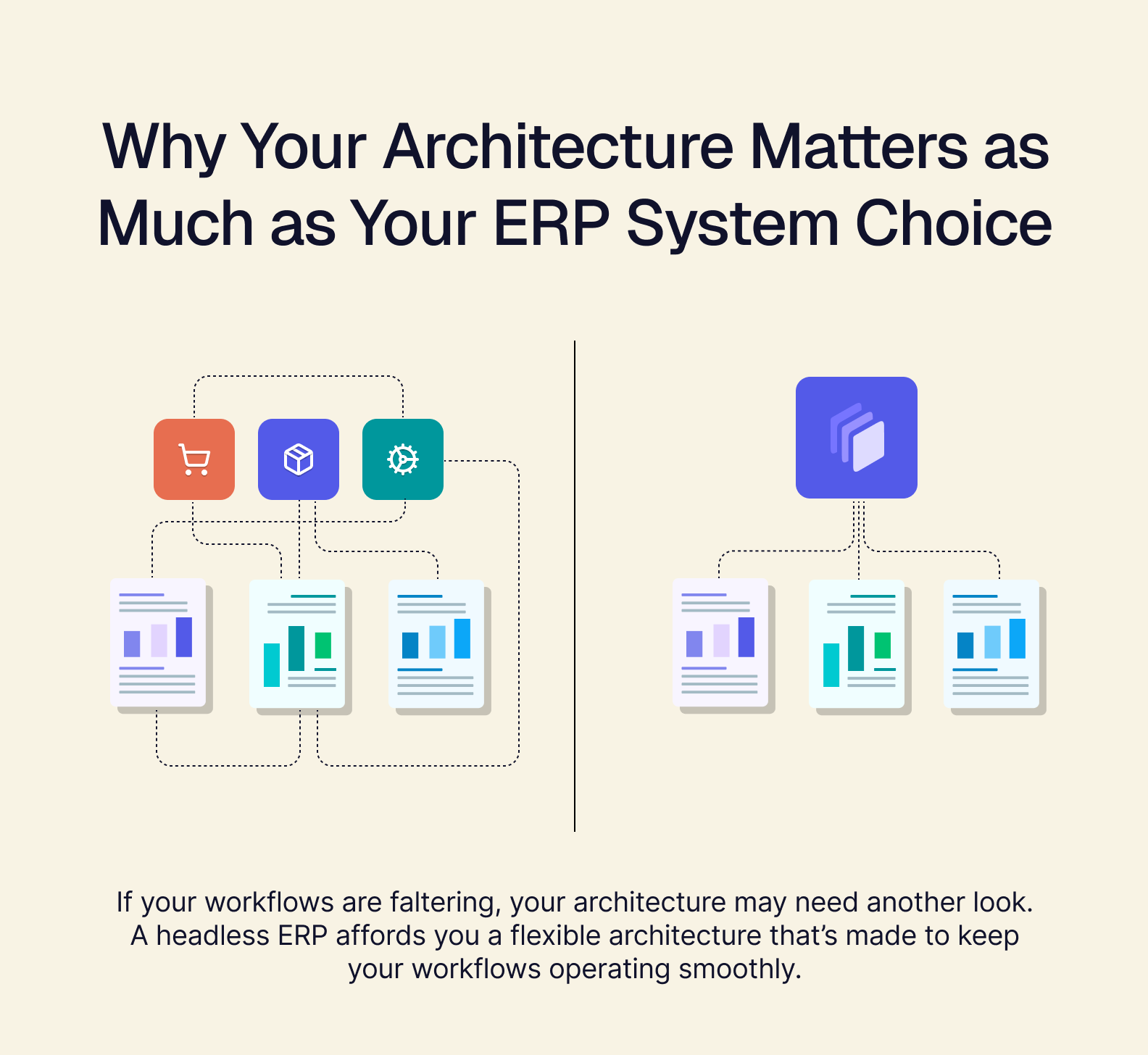
How well your business operates comes down to three important factors: smooth workflows, powerful tools, and clean data. Without all three of these factors firing on all cylinders, you might find that your business starts lagging behind in the marketplace. Perhaps you’re struggling with your workflows faltering, or the tools you rely on not working — worse, your data is messy and full of errors.
If so, your architecture may need another look.
As the support for your entire business, your backend architecture is what stops your workflows, tools, and data from becoming hang-ups in your daily operations. And as you read earlier, this is directly related to your ERP system.
Before integrating your ERP, your architecture might be the spreadsheets your operation uses to manage the shop floor, or the workflows designed to help your teams move between tools. However, once you integrate an ERP, it becomes the backbone of your business.
This means you cannot simply choose an ERP based on how powerful the tools could be in the future — you must also consider how it supports your daily operations. If you want to 10x your business, scale up the number of stores you provide product to, or even want to make your business more agile in a market full of stiff competition, a rigid ERP suite with a predetermined user interface and mandatory tools is probably going to slow you down.
Instead, a headless ERP affords you a flexible architecture that can be incrementally changed as you grow, with a customizable user interface that’s made for your workflows — not the workflows a vendor thinks you should have.
Creating a 10x Future with a Headless ERP
This is where Tailor can help.
Our flagship headless ERP — Omakase — is uniquely flexible and is designed to maximally support your business by unifying your backend and bringing all your core tools, along with your high-priority data, into a single UI. It can help get more power out of your tools, speed up your workflows, and become a single source of truth for your most important data.
By integrating Omakase into your business, you’re getting a customized experience designed to work for your business. You get all the benefits of an ERP suite, without having to shoulder the burden of lengthy integration time and costly licensing fees. With Tailor, you can have custom modules tested and live in just weeks. Rather than 10xing your overhead for the year, you could 10x your sales instead.
Choosing the Right Tool for the Job
Now that you know the difference between the different types of ERP systems, the benefits and drawbacks of each, and which is best for the size of your business — it should be clear which tool you need to ensure you can dominate your markets.
If you’re a large enterprise or a highly specialized manufacturer, an ERP suite is right for you. But if you’re a small business, SMB, or a Mid-Market operation requiring a custom solution, then a headless ERP is exactly what you need.
Book a demo today to see how Tailor’s Omakase ERP can level up your business and help it scale.