How Cloud ERP Software Actually Works (Without Forcing You to Replace Everything)
Your business is growing — and fast. It's the phase of flourishing and growth that you've been working toward for years, and it feels so good.
Now, you're shopping around for cloud ERP software because your current system can't keep pace with your growth. But here's what a lot of people don't realize: Traditional cloud ERP isn't always the best solution for scaling.
Even when these solutions promise easy scaling, you often still have to rip-and-replace everything during the migration process. And at the end of a long implementation, you're likely to find yourself locked in to vendors you don't particularly like.
The best cloud ERP for growth is one that's composable. A composable cloud ERP gives you the freedom to continue growing, without having to start from scratch.
In this guide, we walk through all things composable cloud ERP software: what it looks like in the real world and how to know if it's right for you.
What You'll Learn
- What is cloud ERP software?
- How does cloud ERP work?
- Cloud ERP vs. on-premises ERP
- The cloud ERP implementation reality
- What a composable cloud ERP implementation actually looks like
- Security, compliance, and core capabilities that matter
- How to evaluate if cloud ERP software is right for your business
What Is Cloud ERP Software?
Cloud ERP is a subscription-based software model that's based in the cloud. With cloud software, your ERP is hosted and accessed over the Internet instead of on-premises. It's managed and maintained by a third-party vendor known as a software-as-a-service (SaaS) platform. This offsite model is highly flexible, accessible, and affordable.
You might be familiar with the terms "multi-tenant SaaS" (also known as "true cloud") and "single-tenant" (hosted or private cloud). Multi-tenant means a single software serves multiple customers. Single-tenant is for dedicated instances.
When most vendors use the term "cloud ERP," they're referring to multi-tenant SaaS on public cloud.
There are hosted or private cloud options for companies that have more individualized security needs. But these sacrifice typical cloud benefits like reduced costs and automatic updates.
How Does Cloud ERP Work?
Just like a traditional ERP, cloud ERP software contains all of your critical business functions — finance, inventory, HR. These technologies are connected via the Internet. Your team can use their desktop computers or mobile devices to securely log in to the network — anytime and anywhere, including from remote worksites — access the ERP's data, and do their work.
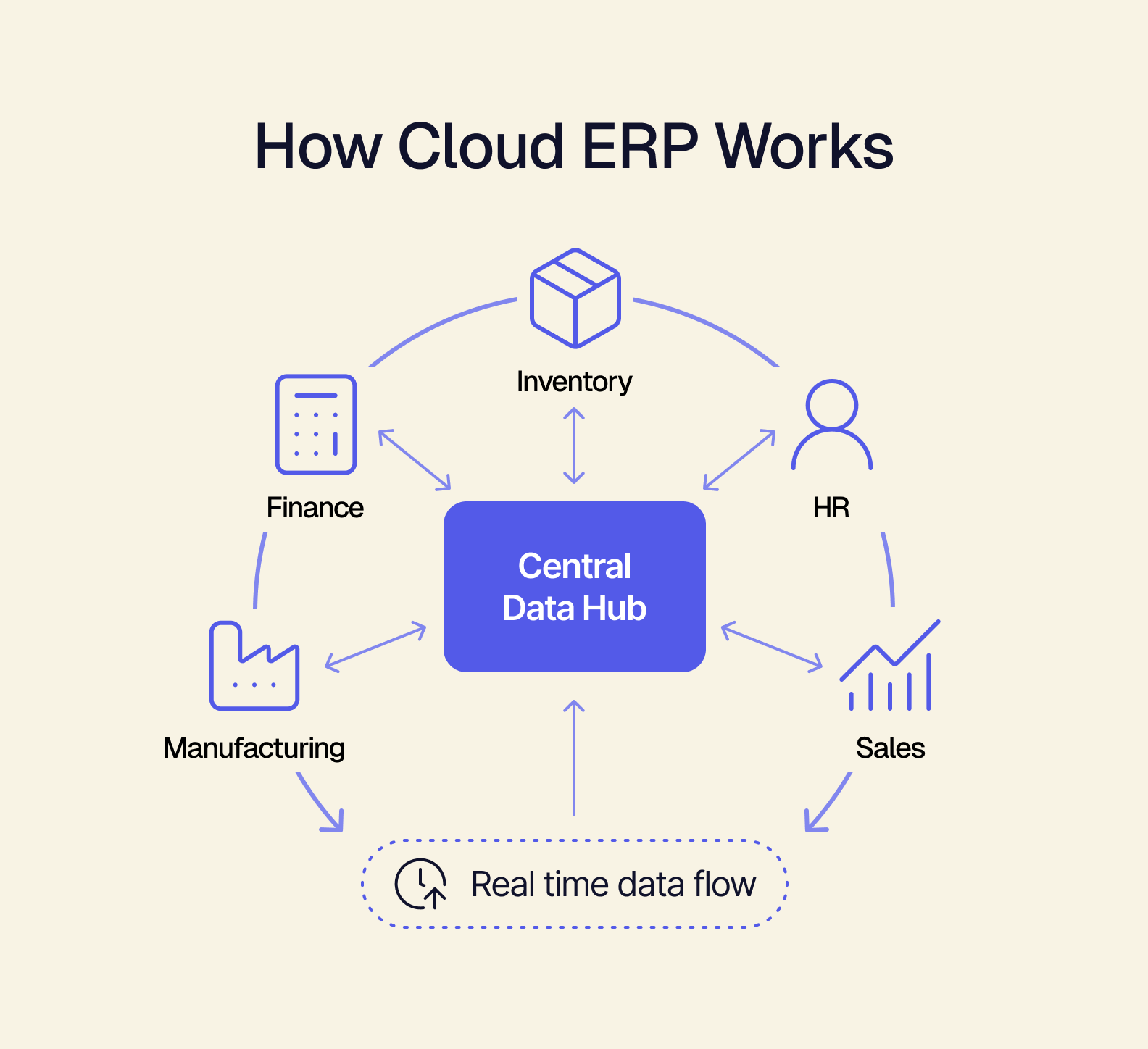
With cloud ERP, you can start with the most basic functionality and add more modules over time. There's no need to add more hardware or servers, so it's easy to scale. Cloud ERP vendors take care of maintenance, security, and upgrades to minimize downtime and reduce your internal IT burden.
Cloud ERP vs. On-Premises ERP
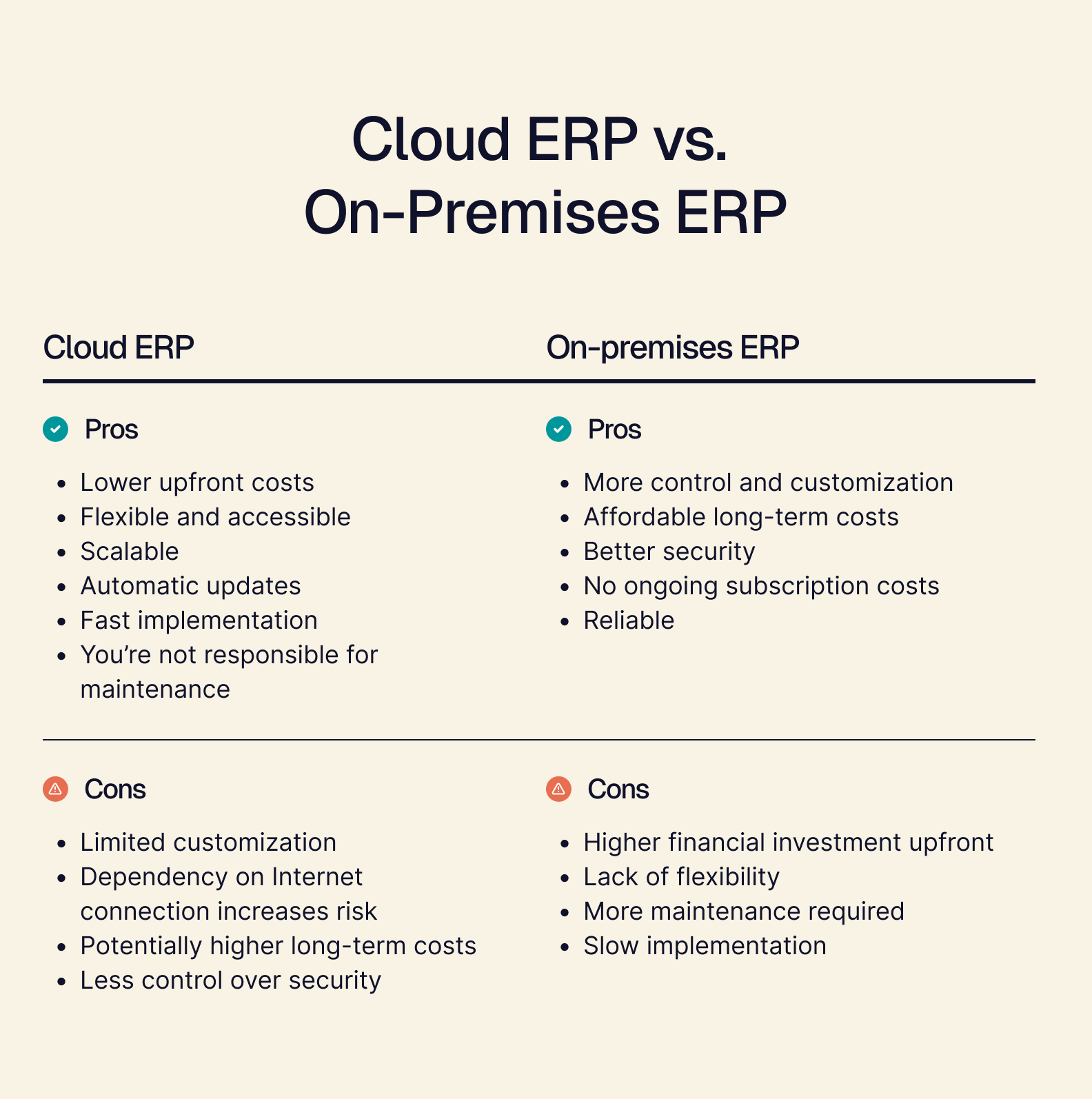
Whereas cloud ERP is accessed through the Internet, on-premises ERP is located wherever your business is, using your own servers, computers, and IT team. Many companies favor an on-premises ERP thanks to the level of control it naturally provides, which helps with customization and security. But for companies that are in a growth stage, a traditional ERP isn't going to provide the flexible foundation you need.
The Cloud ERP Implementation Reality
Cloud ERP software promises easy scaling. But most companies discover something very different once they greenlight implementation.
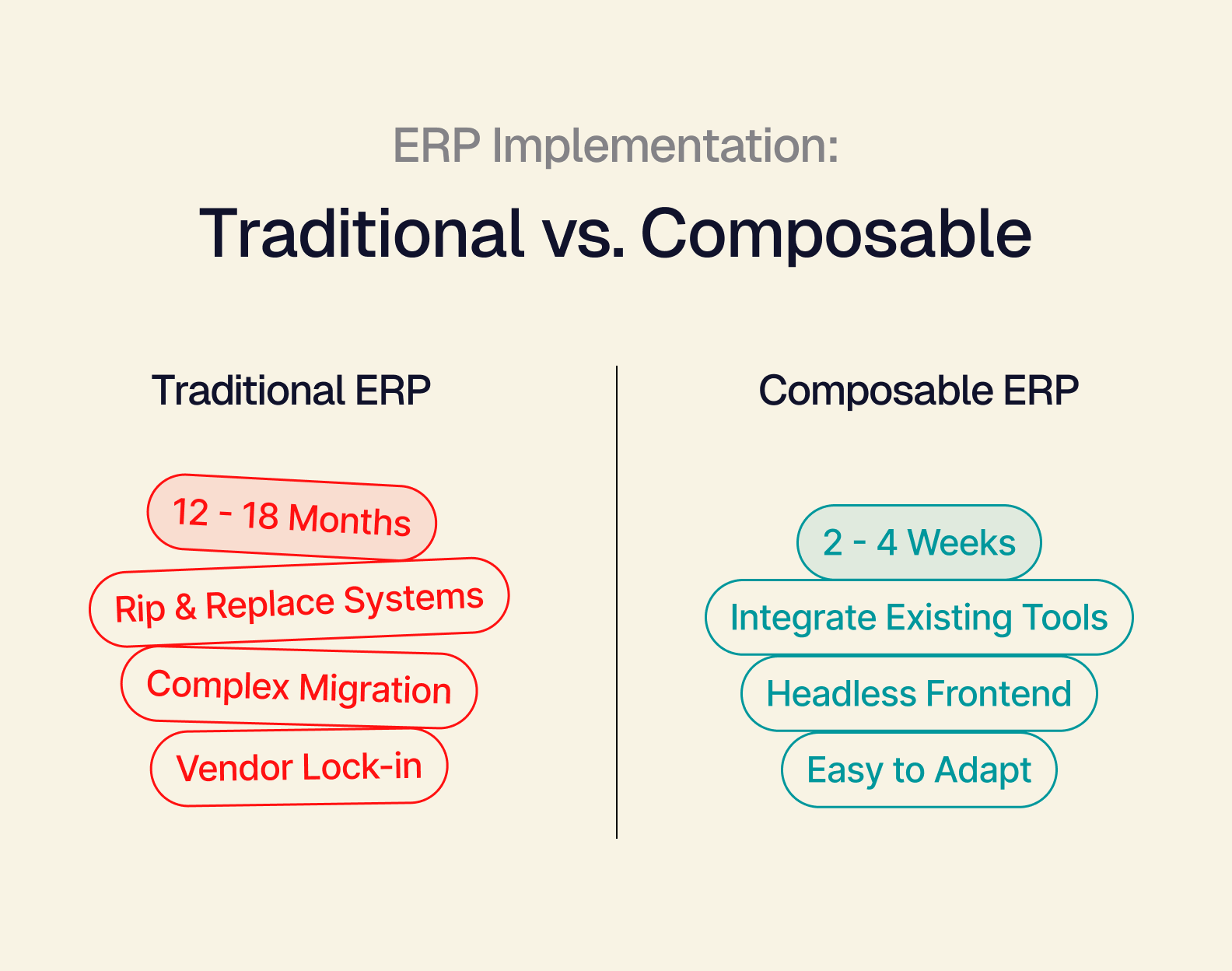
Traditional cloud ERP systems (like NetSuite, SAP, and Oracle) still require a total rip-and-replace of your current tech stack. Migrating off QuickBooks, ShipStation, Salesforce, or whatever tools you use means leaving years of data and custom workflows behind.
Traditional cloud ERP implementations can take 6-18 months depending on complexity, with enterprise-level deployments often reaching 12-18 months or more. During that time, team productivity suffers and company growth stalls. And once you're finally set up, you may find yourself locked in to vendors that you don't really like. (Ironic, since you originally chose cloud ERP for its flexibility.)
What happened to all of that rapid growth you were experiencing?
But it doesn't have to be this way.
What a Composable Cloud ERP Implementation Actually Looks Like
Composable is a business architecture philosophy that turns change into a capability, not a crisis. While traditional cloud ERP locks you into one vendor's roadmap, composable ERP gives your business the freedom to evolve.
Here's how a composable cloud ERP like Tailor's Omakase might work in practice:
-
Week 1-2: Connect your existing systems. Tailor Omakase doesn't require you to rip anything out. Instead, simply connect your existing tools through Omakase's integration layer. The composable ERP creates a unified data layer that collects data from each platform in real-time.
-
Week 3-4: Deploy prebuilt frontend. Omakase has a prebuilt frontend interface that's completely decoupled from the backend (your tools). Using this headless frontend dashboard, your team can see data in real-time at a glance. And because you don't have to rebuild your entire infrastructure, you can have the interface ready to go in weeks.
-
Months 2-3 and beyond: Adapt without disruption. Composable ERP lets you easily swap out tools as your needs evolve over time. Say you need a new accounting system six months later because you've reached $10M in revenue and QuickBooks can't handle the transaction volume. With traditional ERP, this would mean another complex migration project. But with Omakase's headless architecture, all you need to do is disconnect QuickBooks and connect a new tool in its place. The API integration is the only thing that changes — that decoupled frontend interface is still the same. And the entire implementation takes just 2-4 weeks instead of 6-12 months.
When you choose composable, you're trading an 18-month implementation that locks you into limited tools, for a process that takes mere weeks and leaves you with the ongoing ability to evolve.
Sounds like a pretty sweet deal.
Security, Compliance, and Core Capabilities That Matter
For many companies, their first question is whether a cloud ERP is secure. You have less control over security because the vendor is handling it, not you. But enterprise cloud vendors have security resources that your internal IT team can't match. And cloud ERP software is protected in a way that on-premise software isn't: Nobody can walk into your building, pick up a cloud system, and walk out with it.
Make sure any cloud ERP you're considering has the following compliance standards built in:
- SOC 2 Type II
- GDPR Compliance
- ISO 27001
Cloud ERP software should also have data encryption and access controls, including:
- Encryption at rest (data encrypted when stored in databases)
- Encryption in transit (data encrypted when moving between systems)
- Role-based access controls (RBAC — employees can only see data that's relevant to their role)
- Multi-factor authentication (MFA — additional security beyond passwords)
- Audit trails (a record of who accessed what data, when)
A high-performing cloud ERP like Tailor will also have a unified data layer that surfaces information in real-time. Look for good mobile functionality and AI capabilities — intelligent forecasting, dynamic pricing optimization, and automated data entry that works across your entire tech stack.
Finally, while cloud ERP systems are modular, you'll want to check for these standard core capabilities:
How to Evaluate If Cloud ERP Software Is Right for Your Business
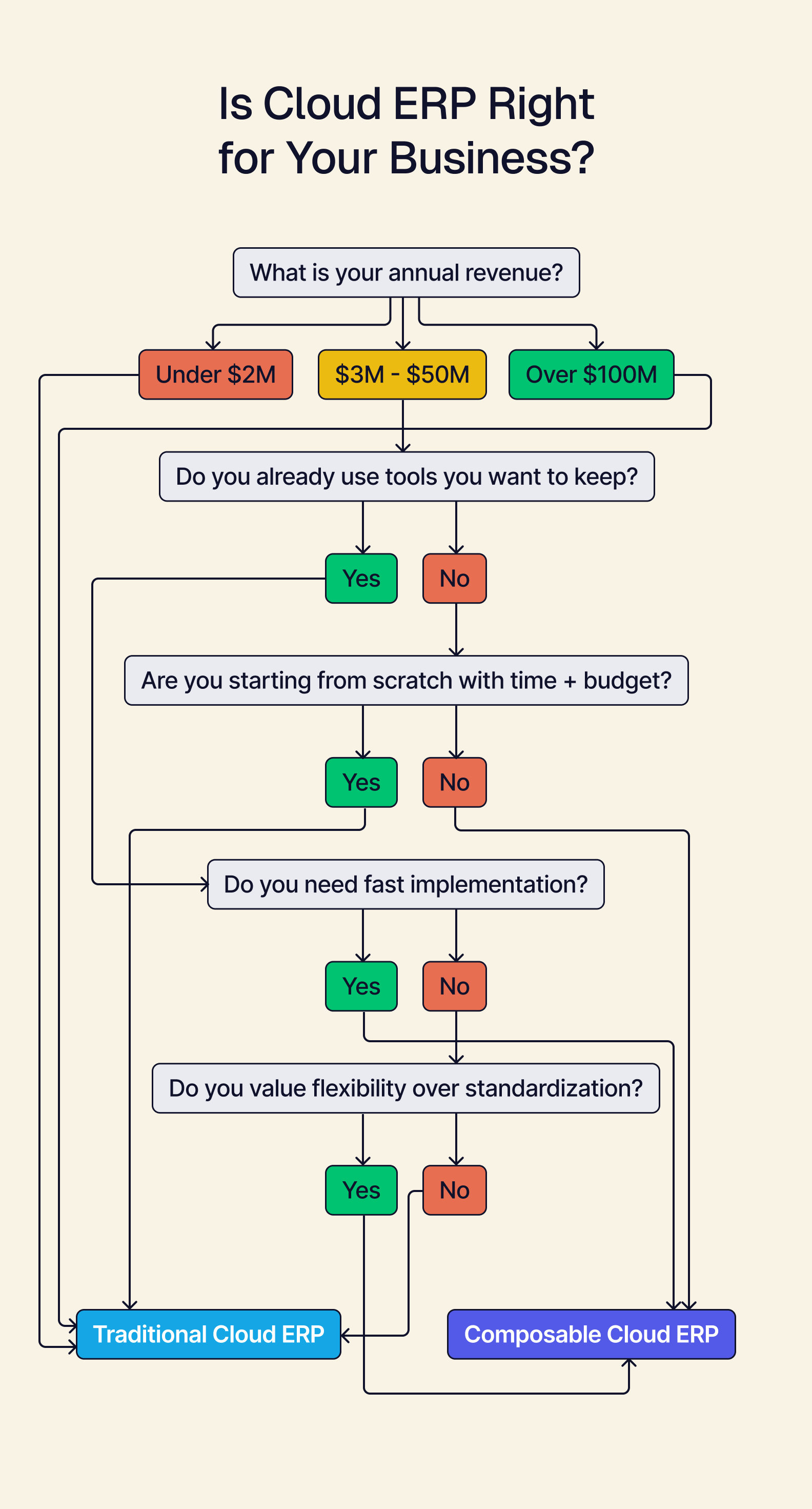
Choose composable cloud ERP if:
- Your team already has tools you like and want to keep
- You want a fast implementation (less than six months)
- You're expanding into new channels or markets
- You have limited IT resources
- You're between $3M-$50M in revenue
Choose traditional cloud ERP if:
- You're starting from scratch with no existing systems
- You have more time and budget for implementation
- You value standardization and need pre-validated compliance frameworks
- You're either very small (under $2M) or very large (over $100M)
If you have a steep growth trajectory and already use tools your team loves, composable cloud ERP lets you scale without starting over.
Takeaway: Infrastructure That Scales Without the Chaos
Grow your business by adapting, not replacing, when you choose composable.
With a composable cloud ERP, implementation happens in weeks — no rip-and-replace. A composable system gives you the architecture to unlock outcomes like scaling to 10x revenue without 10x headcount.
Interested in learning more? Explore what's included in Tailor Omakase and how it works as a cloud ERP.